|
Plus: The best new productivity tools
Plus: Prime Day deals and useful productivity tools |
By sheer coincidence, the timing of this week's newsletter lines up perfectly with Amazon Prime Day, the annual sale event that typically includes some major discounts on tech gear. |
I'll round up the best of those deals later in the newsletter. But first, let's discuss some things that don't require you to spend more money. |
In lieu of a regular newsletter column this week, I've published a couple of new guides on the members-only website. |
The first is a list of my most essential apps and tools, including all the ones I use to write this newsletter, browse the web, and organize my digital life. While I've mentioned many of these apps before, this guide puts them all in one place and allows me to evolve the list over time. Check it out if you need some inspiration on new apps to try. |
Also, I've turned last week's "big list of free stuff" issue into a free-standing guide. Some of you responded to that newsletter with some excellent suggestions, and I look forward to expanding the list with more free content sources over time. Add it to your bookmarks for whenever you're feeling bored and don't feel like paying for entertainment. |
iOS and Mac betas: For those who are feeling brave, Apple's first public betas for iOS 16 and MacOS Ventura are now available, so you can try them without a $100 per year developer account. Among the major features: Lock screen customization, shared iCloud photo libraries, and an "Undo Send" option for iMessage. You can enroll in the beta through this page. |
iOS and Mac betas can be pretty buggy, and they tend to be tougher on battery life than stable versions. Conventional wisdom says you shouldn't install them on your primary phone or computer, especially since you can't roll back to previous versions without restoring from a backup. |
That said, I've been assigned a Fast Company story on some of the new features, so I have no choice but to put my iPhone 13 Pro Max in harm's way. I'll let you know how it goes. |
The best new productivity apps: Keeping with annual tradition, I've put together my usual mid-year productivity app roundup over at Fast Company. The list is a major undertaking, as I generally steer clear of well-known apps like Slack and Zoom in favor of hidden gems, all of which are either new or have received substantial updates over the past year. |
If you've been reading Advisorator for a while, you may recognize some of the selections already. But here are a few I haven't mentioned here yet: |
-
SignFree lets you digitally sign documents with just your mouse, trackpad, or touchscreen. It's free with no sign-in required, and certainly beats having to print, sign, and scan.
-
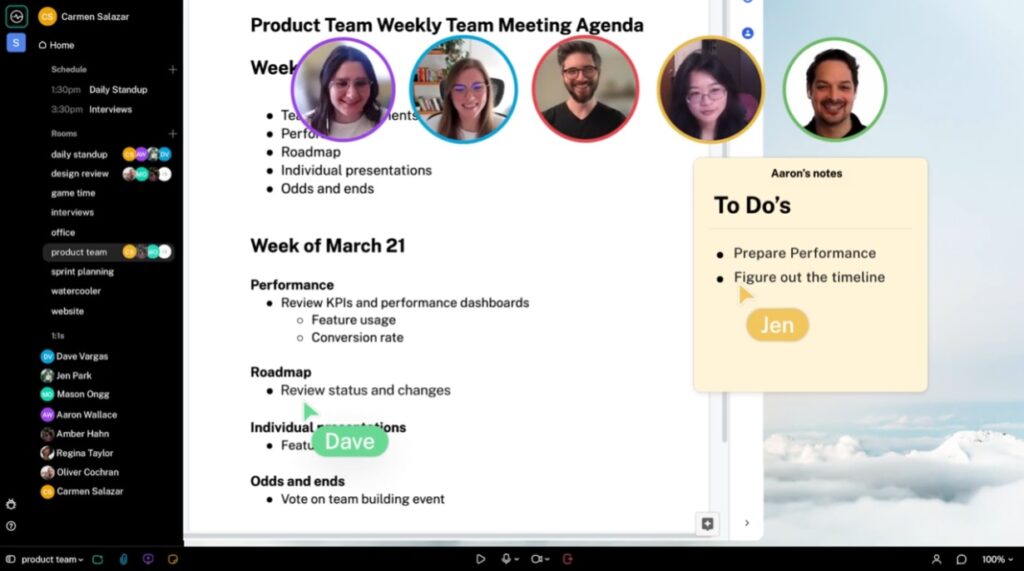
Switchboard (pictured above) is a Zoom alternative in which anyone on the call can load a web page, post a sticky note, or share a file, with everything appearing on a big, shared canvas.
-
Adobe Express lets you create slick-looking flyers, business cards, or social media posts with minimal effort. Just choose a template to start with, then use the drag-and drop interface to add, remove, or modify elements.
|
Another neat newsletter: On a related note, I've been reading Jeremy Caplan's free Wonder Tools newsletter for a while now, and I always learn something new from it. Jeremy focuses on highlighting useful productivity tools—I especially enjoyed his recent ambient noise app roundup—and he clearly puts a lot of thought into his recommendations. If you appreciate my occasional coverage of productivity apps, you should check out Wonder Tools as well. |
Another app discount finder: In response to last week's newsletter on finding free stuff, reader Tom L. suggested checking out AppSliced, a site that lists sales and giveaways for iOS apps. It also has an alerts feature that notifies you when an app you want goes on sale. (For Android users, AppSales has a similar feature in its mobile app.) Thanks for the suggestion, Tom! |
If I tried to list every tech deal that was available on Prime Day, I'd probably lose my mind and also would never end up sending the newsletter. So I'm going to take a somewhat curated approach here, listing only high-quality products at prices we don't see very often, if at all. |
Even then, I suggest checking price histories on CamelCamelCamel before hitting the Buy button, beware of hyper-inflated list prices, and try to avoid buying things without a clear idea of how you'll use them. There will always be more deals in the future. |
- Get a Kindle e-reader for $45, or the bigger, waterproof Paperwhite for $95.
- Fire tablets: 8-inch for $45 or with more RAM for $65, 10-inch for $75, or with more RAM for $105.
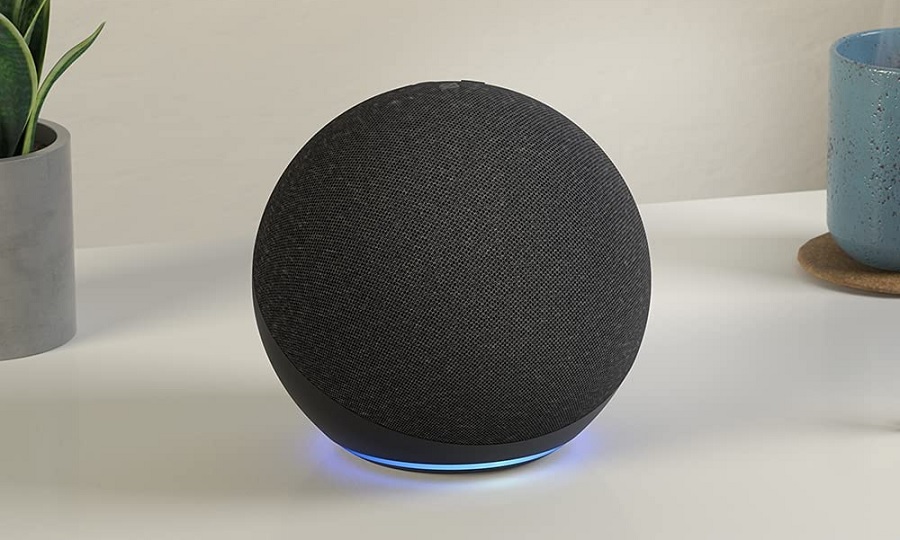
- Echo speakers: Dot for $20, Dot with clock for $33, regular Echo for $60.
- Echo Show smart displays: 5-inch for $35, 8-inch for $75, 10-inch (with swiveling screen) for $180, 15-inch for $180.
- Wi-Fi routers: Eero 6+ two-pack for $155 or three-pack for $194, tri-band Eero Pro 6 two-pack for $259, three-pack for $389. Add a Beacon range extender for $49.
- Ring home security: 5-piece alarm kit for $120, and add a doorbell cam for $49 more. The 8-piece kit is on sale for $150. More doorbell and camera deals here.
|
- Anker 10,000 mAh power bank with 20W fast charging for $20.
- Get Anker's 5,000 mAh snap-on iPhone battery pack for $44 with code FTSBUAA55X.
- Aukey 20,000 mAh wireless charging power bank (with 18W wired charging) for $30.
- Two-pack of RAVPower 20W fast chargers for $9.
- Monoprice has a USB-A (12W) and USB-C (39W) charger for $11.
- Jackery power stations: 293Wh for $210, 1002Wh for $769. (Make sure to clip the on-page coupon.)
|
- Acer Spin 514 Chromebook (14-inch screen, 64 GB storage, 4 GB RAM) for $199.
- Acer Swift 3 (14-inch, 11th-gen Intel Core i5, 512 GB storage, 8 GB RAM) for $399.
- HP Pavilion x360 (14-inch touchscreen, Intel Core i5, 512 GB storage, 8 GB RAM) for $530.
- HP Envy x360 (15-inch touchscreen, AMD Ryzen 7, 512 GB storage, 12 GB RAM) for $700.
- The ultra-light LG Gram 16-inch 2-in-1 (11th-gen Intel Core i5, 512 GB storage, 16 GB RAM) drops to $1,100.
- Dell's extra-fancy XPS 13 Plus (OLED screen, Intel Core i7, 512 GB storage, 16 GB RAM) for $1450.
- Get a 14 TB external desktop hard drive for $210.
|
Phew. That's about all the deals I can stand to look at right now. But if you're looking for anything else or need help vetting a deal you've found, just send me an email or drop into the Advisorator chat room on Slack. I'm happy to help! |
This has been Advisorator, written by Jared Newman and made possible by readers like you. Manage your subscription by clicking here, or reply to this email with "unsubscribe" in the subject to cancel your membership. |
Advisorator LLC, PO Box 42711, Cincinnati, OH, 45242 |
|

 Jared Newman | July 12, 2022 |