|
| |
 |
| September 1, 2020 |
| A healthier way to read |
|
Plus: Ubiquitous video calls, new Chrome tricks, and cheap smart speaker bundles
|
| |
 |
|
Hey folks, it's nice to be back again after a week away from the tech coverage grind.
Taking some time off work has a way of putting things in perspective, and in my case, it was the amount of time I've been frittering away on Twitter. Although I've learned a lot and made some friends through it, I can also too easily slip into the unhealthy trap of endlessly refreshing my feed for new calamities, shocks, and outrages. Apple's Screen Time reports say I'm averaging over an hour a day on social media through my iPhone alone, and I know for certain it's at the expense of getting news and analysis from elsewhere.
So now I'm trying something different. Instead of spending idle time on social media, I'm creating my own system for staying current, one that involves a whole lot of newsletters and a novel way to sift through them all. The hope is that I'll spend more time reading stories of substance and less time doomscrolling.
In short, my new reading setup involves using a service called Kill the Newsletter to divert newsletters away from my inbox and into an RSS feed reader called Inoreader. Although I'd like to think some newsletters truly are inbox-worthy (ahem), there are a lot of others that don't quite reach that bar. Now, I can subscribe them all while still keeping my inbox clean and my email address private. My reading progress is also synchronized across all my devices, and I can even browse through my newsletters by category.
Here's how to set up something similar for yourself:
The first step is to create an account with Inoreader, which is where you'll do all your reading. If you're unfamiliar with RSS readers, they essentially let you gather up feeds of information from around the web and read them all in one place. There's no shortage of RSS readers to choose from, but I like Inoreader because it's free to use, simple to set up, and available across iOS, Android, and the web.
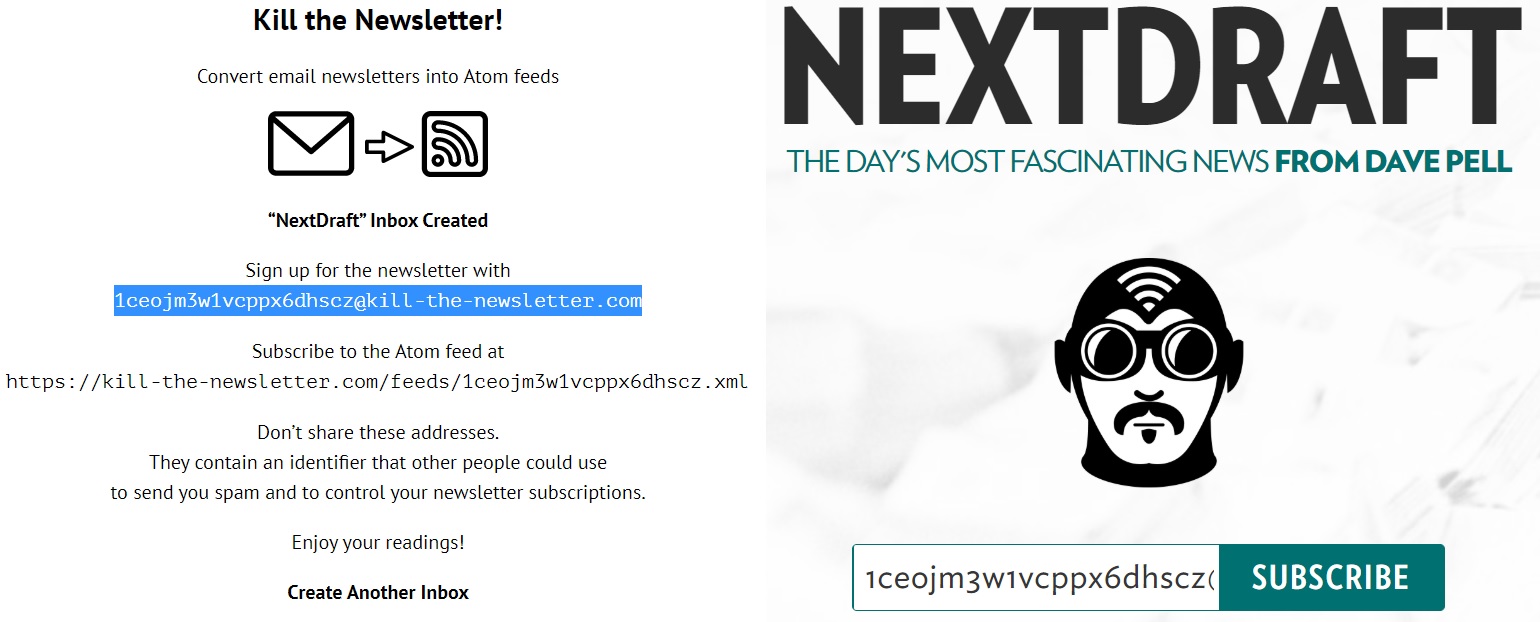
Next, find a newsletter you'd like to read, but instead of signing up with your real email address, head over to Kill the Newsletter. Type in the publication's name and hit "Create Inbox," then sign up using the randomized email address shown on the next page.
|
 |
|
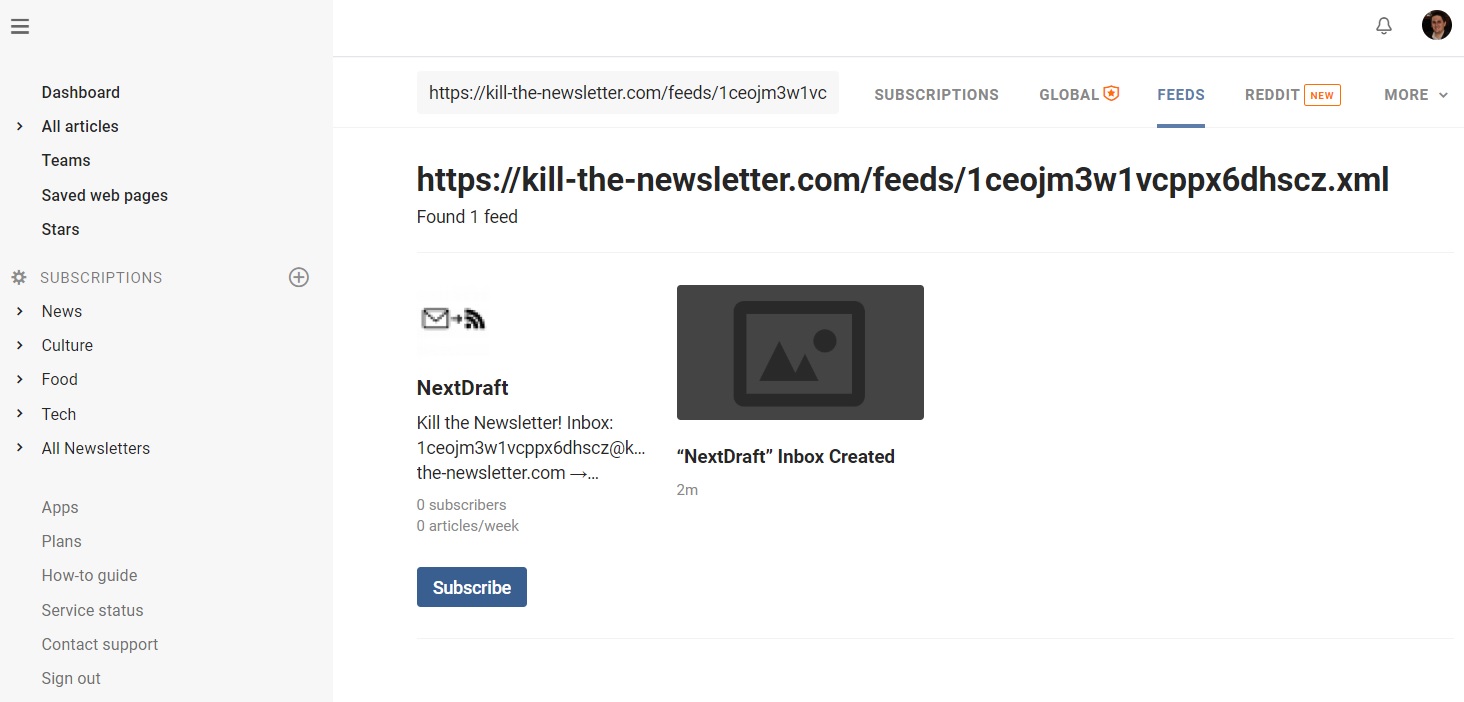
Don't close the Kill the Newsletter page just yet. Instead, copy the URL that appears under "Subscribe to the Atom feed at," and head back to the Inoreader website. Hit the little + button next to Subscriptions in the sidebar menu, then select the top icon, which says "Add Feed" when you hover over it. Paste the URL into the search box at at the top, then hit "Subscribe." (If you're using Inoreader's mobile app, just press the web page icon in the top-right corner of the screen after hitting the + button.)
|
 |
|
Inoreader's website also lets you sort subscriptions into folders, effectively letting you split up newsletters by topic. To do this, hit the + next to Subscriptions again, then click the folder icon. Name the folder, add some newsletters to it, then hit save. Once you've created some folders, you can drag newsletter subscriptions into them, or right-click any individual newsletter to select which folders it appears in.
Finally, consider customizing Inoreader to your liking. From the bottom of the sidebar, you can choose between light, dark, and the default "aqua" theme. Clicking the eye icon near the top-right corner of the screen lets you choose how each newsletter is formatted. (On the web, I suggest "Expanded view," as it'll let you read most newsletters in full without any extra clicking.) If you don't want newsletters to disappear from the feed after you read them, click "All articles" in the top menu bar on the web, or tap on the eye and select "all articles" on mobile devices.
Now, just wait for the newsletters to roll in.
Of course, this isn't the only way to build your own newsletter reading setup. Inoreader also has its own newsletter aggregation feature, which you could use instead of Kill the Newsletter, though it requires a subscription fee to use. Same goes with the newsletter features from other RSS readers such as Feedly and Feedbin. Alternatively, you can use newsletter reading apps like Stoop, ReadLet, or Inspiratio on your phone or tablet, or you could just subscribe to newsletters directly and use Gmail filters or Outlook rules to sort them into folders.
I chose my particular setup because it's free, private, and customizable. In addition to newsletters, I've added a few low-volume RSS feeds for some favorite websites, and I'm using the Save to Inoreader bookmarklet to collect articles from around the web for later reading.
Will this keep me away from an hour per day of Twitter? It's too early to tell, but I'm excited to find out.
|
|
| Need to know |
|
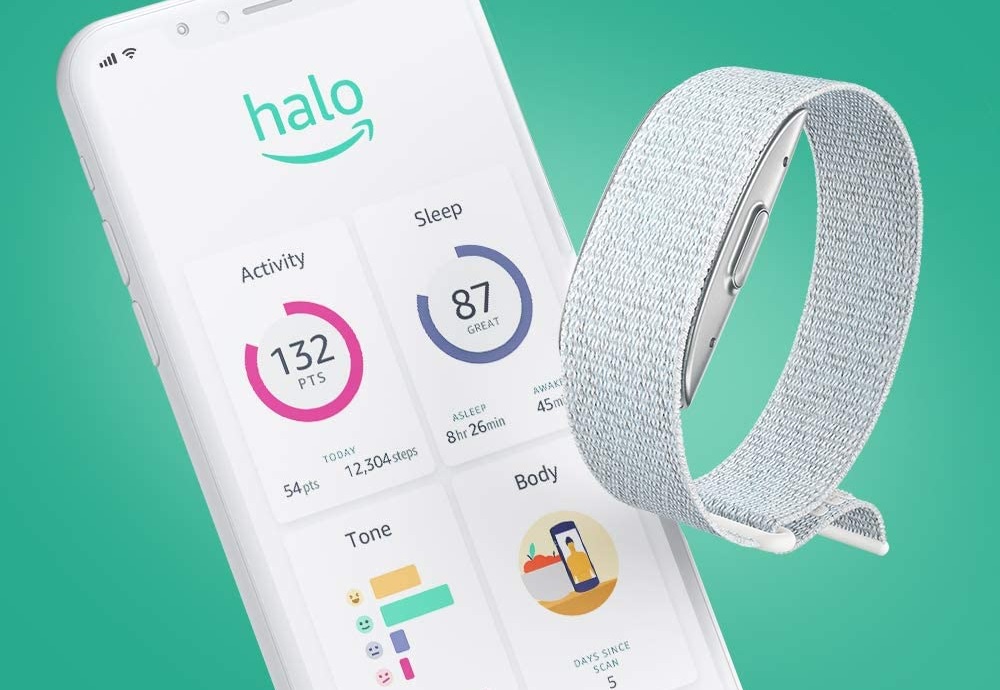
Amazon's unnerving fitness band: Out of nowhere, Amazon has entered the fitness tracking game with a $100 wristband called Halo. Unlike an Apple Watch or Fitbit, Amazon's band has no built-in display, but it's loaded with sensors for tracking steps, sleep times, and heartrate, all of which are viewable through a mobile app. For an extra $4 per month, Amazon will also provide deeper insights on your sleep patterns, body fat, and emotional state.
|
 |
|
The subscription element is both the most interesting and unsettling aspect of Halo. To measure your emotions, the band will constantly record your voice through on-board microphones, and the app will give feedback on whether you've sounded sufficiently positive or energetic. For body fat tracking, Amazon will ask you to take a photo of yourself, and will then project how you might look after losing some weight. Handing over that kind of personal information obviously requires a whole lot of faith that Amazon won't misuse it.
In fairness, Amazon seems aware of the potential pitfalls. The company says its audio tone analysis will run locally on users' phones, not in the cloud, and that it will automatically delete body scan images after processing them. It's also promised not to use health data for ads or marketing. Amazon is, however, already partnering with a life insurance company, which plans to give away Halo in exchange for policyholders' personal health data. The risk here is not so much that Amazon will do nefarious things with private health data, but that users will turn over those insights willingly with only the slightest incentives to do so.
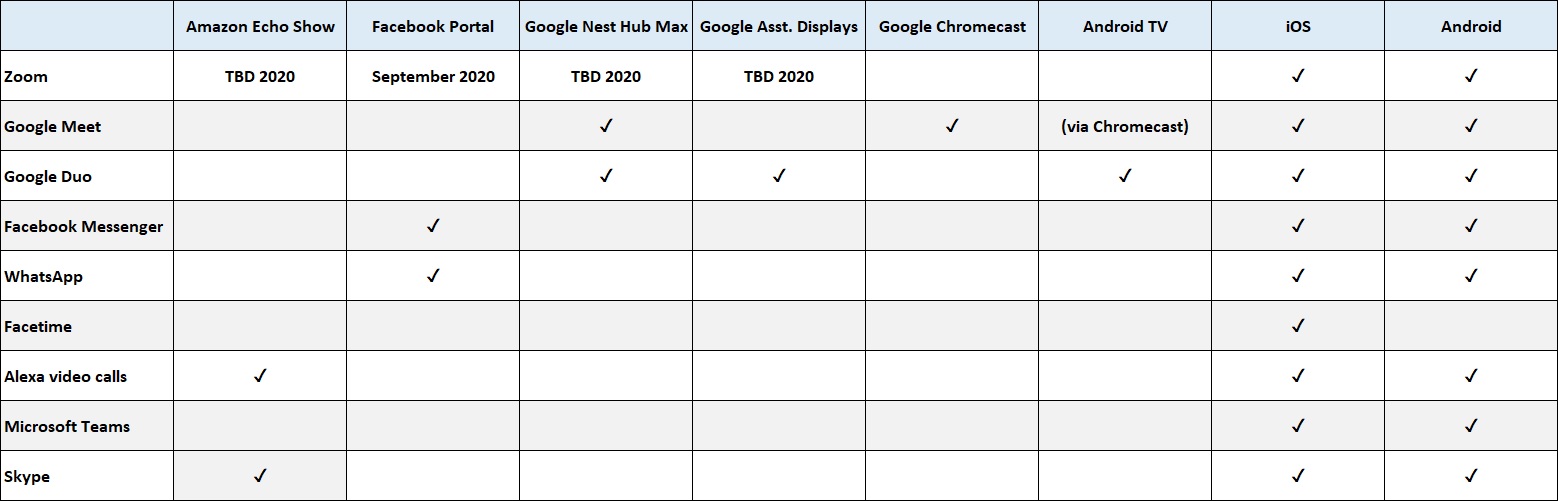
Ubiquitous video calls: I'm very much on board with the idea of making video calls from whatever device happens to be nearby, so I'm glad that Zoom calling is headed to smart displays from Facebook, Amazon, and Google. Facebook's Portal devices are getting Zoom support this month, while Amazon's Echo Show, Google's Nest Hub Max, and other Google Assistant-powered smart displays will follow later this year.
Meanwhile, Google has just added Chromecast support to Google Meet, so you can view video calls on a TV without HDMI cables or clunky mirroring methods. Just look for the "Cast this meeting" option when starting a call from the Google Meet website—you'll have to use Chrome to see it—or hit the vertical "..." menu button and select "Cast this meeting" during a call. Google also says it's rolling out support for Duo calls on Android TV devices, which means you'll be able to plug a USB webcam into a streaming box like the Nvidia Shield TV Pro for big-screen video calls.
The only downside to these developments? Remembering which video chat services work where has become headache-inducing. Ideally, you should be able to conjure a video call from any provider using whatever device you want, but it might be a while until we get there. In the meantime, here's a little chart I made to keep track of it all.
|
|
| Tip of the moment |
 |
|
New Chrome features galore: Google has packed a bunch of new features into the latest version of its Chrome browser, with a big focus on tab management. Strangely, though, it doesn't seem to be making them available by default right away.
Here are some new Chrome tricks to try, and how to enable them:
Since April, you've been able to sort tabs into color-coded groups by right-clicking and selecting "Add tab to group." Now, you can click on the little colored dots to collapse or expand these tab groups, saving space in your tab bar. (If these features aren't working for you, head to chrome://flags/#tab-groups and select "Enabled," and do the same for chrome://flags/#tab-groups-collapse)
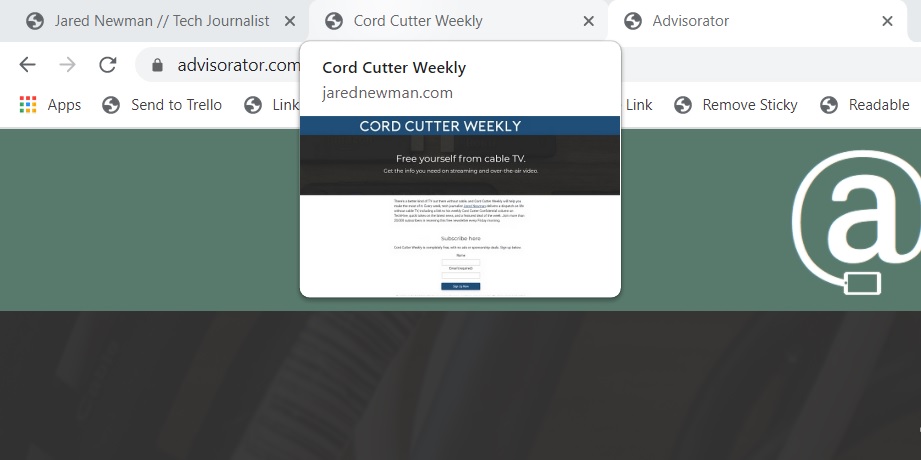
While hovering your cursor over a tab, you'll now see a pop-up that shows the page title and domain name. You can also enable a little visual preview when you hover over a tab by heading to chrome://flags/#tab-hover-card-images.
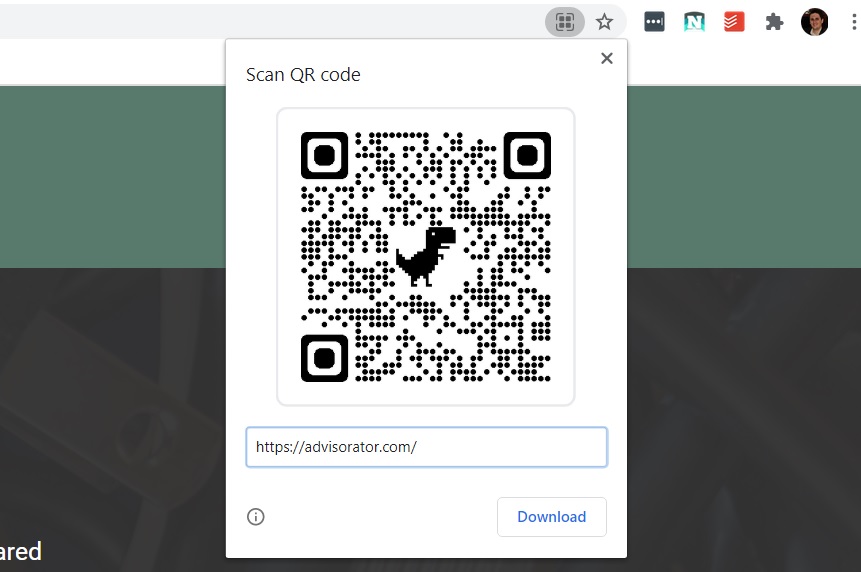
To quickly send a web page to your phone, generate a QR code by clicking the square-shaped code icon in your address bar, then scan the code with your phone's camera app. (If you don't see the QR code option, enable it through chrome://flags/#sharing-qr-code-generator.)
|
 |
|
When you encounter a PDF form on the web, you can now fill it out online and save the edited version to your computer. Just click the little down arrow in the top-right of the PDF, then select "Edited." (If this option doesn't appear, head to chrome://flags/#pdf-form-save and hit "Enable.")
Save battery life by turning on a new feature called "tab throttling," which takes back resources from tabs you're not currently using. This feature will eventually roll out to all users, but you can enable it now at chrome://flags/#intensive-wake-up-throttling.
|
|
| Now try this |
|
Apple's new radio channels: One of the best Apple Music features is its selection of internet radio stations with actual human DJs. Now, Apple’s offering a couple more of those stations for free, with no Apple Music subscription required: Music Hits plays both new and old chart-toppers, while Music Country is self-explanatory. Apple has also rebranded its former Beats One station to Music One, which remains focused on spotlighting new tunes. You can check out the new stations under the Radio tab in the Apple Music app or on the Apple Music website.
Another background remover: I will never tire of recommending new AI-powered image editing tools to check out, so here's a newly-updated one called Trace. Much like Remove.bg, which I recommended back in late 2018, Trace strips the background from any photo you upload, but it also has some neat editing tools to apply after the fact. You can add multiple people to a single image, add new background images behind them, and resize or reposition them around the frame. You can process up to five images per day.
|
|
| Around the web |
|
|
|
| Spend wisely |
 |
|
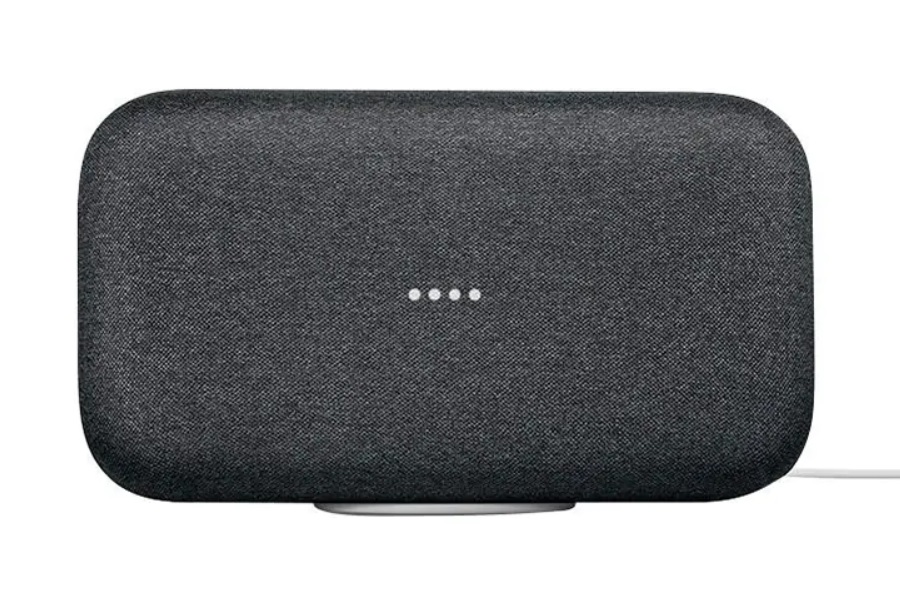
With rumors of a new Google Nest speaker on the way, Google seems to be clearing out inventory of its high-end Home Max voice-controlled speaker. Buydig has it for $199, which is $100 off the regular price, plus it's throwing in a pair of Wi-Fi smart outlet plugs (which you can turn on or off with Google Assistant) and a 32 GB SanDisk MicroSD card.
And speaking of speaker bundles, Amazon's high-end Echo Studio speaker is also on sale. The $170 bundle at Best Buy includes a free Echo Show 5 smart display and a Philips Hue Bluetooth light bulb.
Also worth noting:
- The Lenovo Yoga C940 14 laptop is on sale for $900 with a 256 GB of storage and 8 GB of RAM. I have a higher-spec version of this laptop and love it.
- Lenovo's Yoga C940 15 is a much different laptop—larger screen, beefier CPU, a decent gaming graphics card—and is on sale for $1269 and up.
- Staples is taking $20 off eligible purchases over $100 when you use the coupon code 85671 at checkout. This 24-inch HP monitor is a good pick for $80 with the coupon. (You'll have to add a cheap filler item, like this ruler, to get over the $100 threshold.)
|
|
| Thanks for your support! |
|
I appreciate you all sticking with me for Advisorator's first week off since switching to a weekly format (rather than every two weeks) back in January. I should be a bit more responsive to emails now, so send your questions and comments my way by replying to this newsletter. Or, drop into the Advisorator chat room on Slack for some back-and-forth discussion.
Until next week,
Jared
|
|
|
|
|
|