 |
| |
 |
| November 3, 2020 |
| A digital sharing checklist |
|
Plus: Apple's new bundles, tab-switching tools, and a smoother weather website
|
| |
 |
|
If there's one thing that huge tech companies like Apple, Google, and Amazon care about, it's family.
Well, not really. But in fairness, they're all somewhat generous about letting people share the benefits of their services with others. By taking the time to set up family groups, you can make sure everyone in your home—or perhaps, outside the home—has access to the same apps, games, and subscription services at no extra cost, even without having everyone use the same login and password.
With Apple having launched a new set of subscription bundles last week (more on those later in the newsletter), now seems like a good time to review all your sharing options:
Apple Family Sharing
Apple lets up to six people (that is, you and five others) access the same paid apps, iTunes purchases, subscriptions to certain Apple services (including Apple Music family plans, Apple TV+, Apple Arcade, and Apple News+), and iCloud storage plans of at least 200 GB. If you have an Apple Card, you can also share it as a payment for App Store purchases.
To set this up on an iPhone or iPad, head to Settings > [Your Name] > Family Sharing. From here you can create a family group and invite anyone who has an Apple ID, using their email address. Invitees can join the group under Settings > [Their Name] > Invitations on an iOS device. (If you create an account for a child through this menu, you'll be able to restrict their ability to buy or download apps without permission.)
Rules and restrictions: Sharing an Apple Music subscription requires a $15 per month family plan, which is $5 more than a standard subscription, and some things you buy through the App Store aren't sharable, including in-app purchases or in-app subscriptions. If you share iCloud storage, whatever space other people use will count toward your total limit (though you won't be able to see their files). Finally, keep in mind that anyone in your group can use your payment method in the App Store.
Google Families
Google lets up to six people share Google Drive storage, Google Play Store purchases, YouTube TV subscriptions, and family plans for YouTube Music or YouTube's ad-free Premium service. Setting up a family group is also helpful for certain free services, like having shared notes and lists in Google Keep or getting personalized responses on Google Home or Nest smart speakers.
You can invite anyone with a Google account to your group through the Google Families site, and they can accept the invitation through Gmail, though Google suggests using the separate Family Link app to set up accounts for children under 13.
Rules and restrictions: As with iCloud, paid Google Drive storage gets pooled across all family members, and subscriptions to YouTube's services—TV, Premium, and Music—can only be shared if the household manager is paying for it. You can't have multiple managers per household either, which will may lead to some awkward conversations about who's in charge.
Amazon Household
Amazon's family sharing features fly a bit under the radar, but they're a nice way to share Prime benefits, Kindle and Audible books, and digital video purchases without sharing a password. It also lets each person get their own order status emails instead of having them all sent to a single address.
To set it up, head to Amazon's Household site and hit the add button for an adult, teen, or child. You can then visit this page to turn on sharing for digital content and payment methods. (If you have an Amazon Prime credit card or store card, make sure to do the latter so that all your purchases still get 5% back.)
Rules and restrictions: Amazon has a limit of two adults per household, and only the main account holder can download Prime Video titles for offline viewing. Also, you'll continue to get purchase notification emails every time another family member buys something. (If you use an email service with filter support, like Gmail or Outlook, I suggest filtering out emails with "Household Purchase Notification" as the subject to avoid seeing them.)
Microsoft 365 Family
Microsoft's family-oriented subscription (formerly called Office 365 Home) is arguably the most generous, but it's also the most specialized. The $100 per year service gives each person in the group 1 TB of their own individual cloud storage space, along with access to the full Office suite on up to five devices.
Rules and restrictions: Sharing is limited to six total family members, and cheaper Office 365 Personal plans don't allow sharing at all.
|
|
| Need to know |
|
Apple's new bundles: As I mentioned earlier, Apple has launched two of the Apple One bundles that it announced a couple months ago. The Individual ($15 per month) plan includes Apple Music and 50 GB of iCloud storage for one person, along with Apple TV+ and Apple Arcade. Notably, those TV+ and Arcade subscriptions still work with Family Sharing, even on the individual plan.
But if you want to share Apple Music and iCloud storage, you'll need the Family ($20 per month) plan, which includes Apple Music and 200 GB of iCloud storage for up to six people, along with Apple TV+, Apple and Apple Arcade. A third Premier plan is coming later this year for $30 per month, which adds Apple News+ and Fitness+ for families and includes 2 TB of iCloud Storage, for a savings of $25 per month.
As I've said before, Apple priced these bundles pretty cleverly, with Apple Music and iCloud as the lynchpins. If you're already paying for those services—and lots of people are—the cost of bundling a bunch of other services starts to look trivial.
Google's VPN: Speaking of subscription plans named "One," Google's now throwing in a complementary VPN with the top tier of its Google One service, which includes 2 TB of Google Drive storage for $10 per month. It's available now through the Google One app on Android devices.
At first, this set off alarm bells for me. Part of the appeal with VPNs is privacy, since they can prevent internet providers from snooping on your web activity and mask your location from the apps and websites you visit. Naturally, I wondered if Google was offering VPN service as a way to keep a hold of that data for itself. The company insists, however, that it will not use its VPN to track or log users in any way, and has invited developers to scrutinize its source code as proof.
Even so, Google's VPN service has its limits. While you might use it to protect your data or stay safe on public Wi-Fi networks, it's not the kind of VPN that lets you pick a remote location for the purpose of fooling location-based streaming services. For that, you'll have to look elsewhere.
AirPods erroneous: Apple is offering to replace defective AirPods Pro earbuds after acknowledging that a "small percentage" of them have audio problems. Affected users may hear crackling or static while talking, exercising, or using the earbuds in loud environments, and they may notice that noise cancellation doesn't always work properly. Regular AirPods—that is, those without detachable tips—aren't affected.
Not to get overly conspiratorial, but I wonder if this explains we've seen so many deep discounts on AirPods Pro lately, with prices frequently falling to around $200 on Amazon and elsewhere. That'd be one way of clearing out potentially problematic inventory. Anyway, Apple says it will replace defective buds up to two years from the date of purchase, so keep an ear out for issues.
|
|
| Tip of the moment |
 |
|
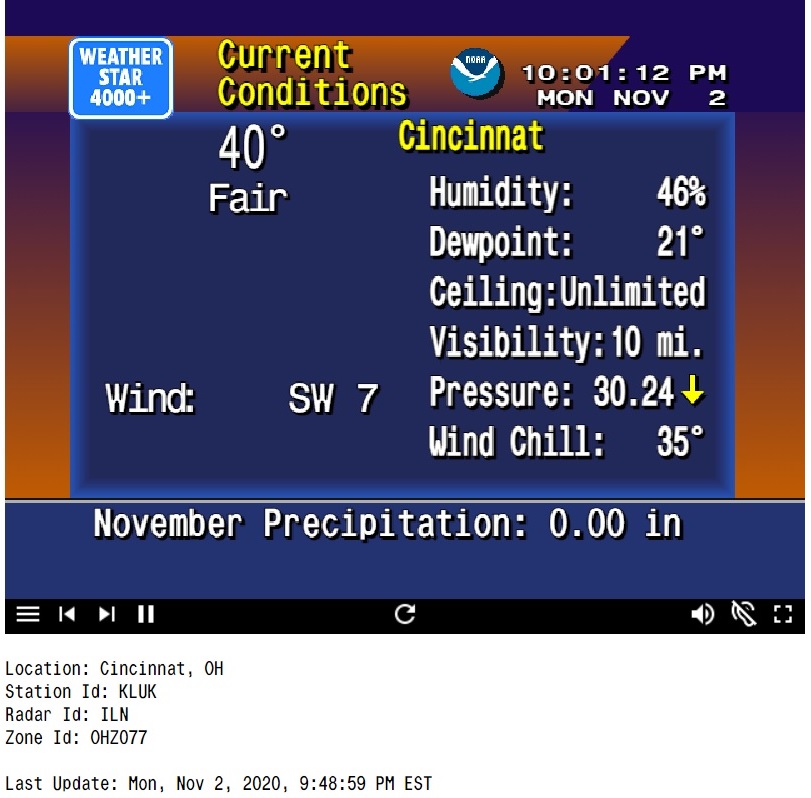
A smoother weather website: I think a lot of us could use something to put our minds at ease while we await the results of The Thing. So that's why I'm recommending this website, which displays your current local weather forecast in the style of The Weather Channel from the 1990s, complete with the smoothest of jazz. You cannot spend a few minutes on this site without imagining a calmer time, and you'll emerge feeling both refreshed and considerably more informed about the weather.
If you really want to geek out on this, you can instead download a simulated version of the WeatherStar 4000+ system that powered those classic forecasts. It takes considerably more tinkering, and you'll have to supply your own music, but it's more customizable and the graphics look sharper. Maybe it's just the time-waster you need.
|
|
| Now try this |
|
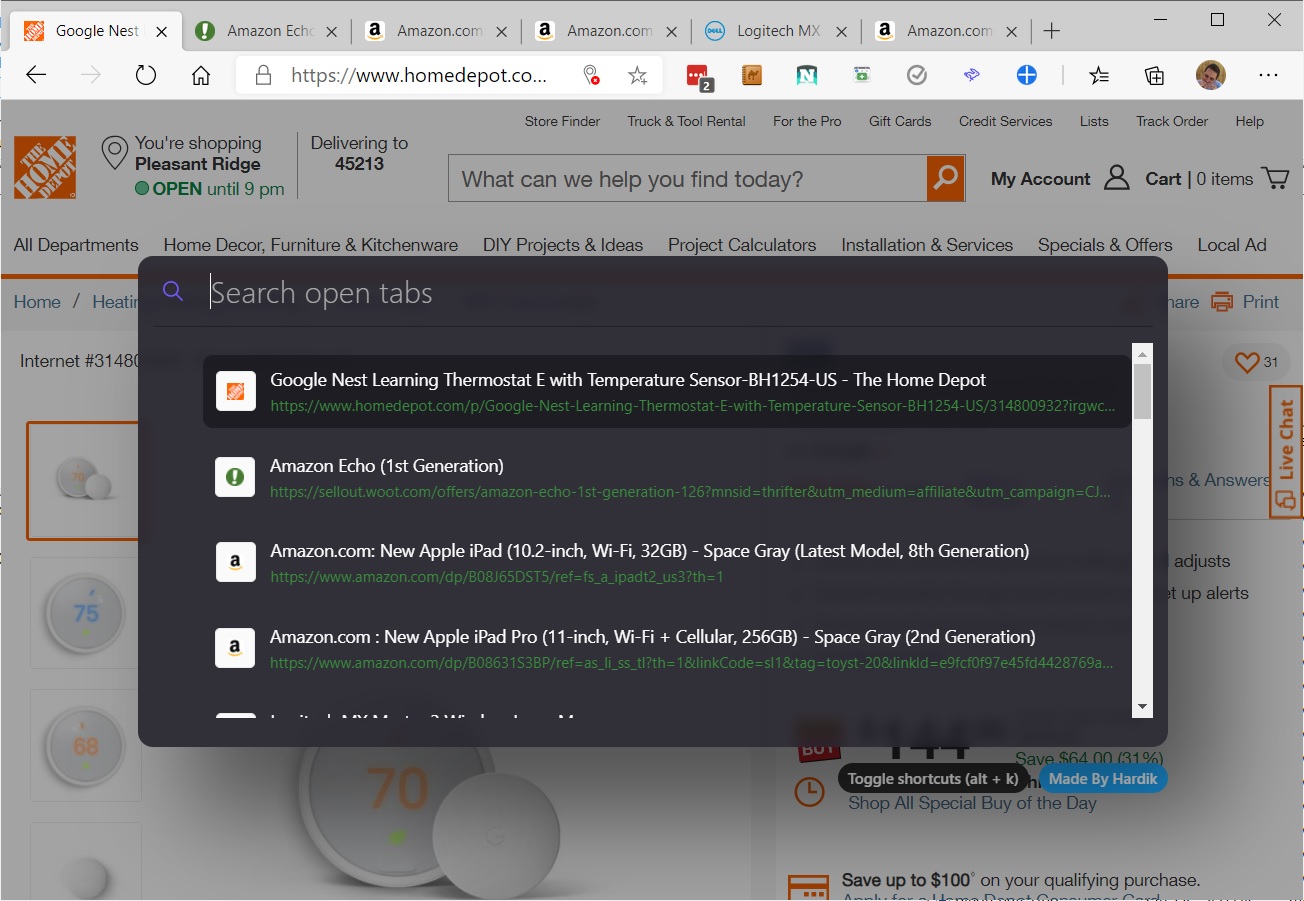
A search tool for tabs: For all those times that you have way too many browser tabs open, a free extension called Hare (for Chrome/Edge or Firefox) might help. After installing the extension, press Ctrl-Shift-Space or Cmd-Shift-Space (on Windows or Mac, respectively) to bring up a search window. From here you can type the name of the tab you're trying to find and use the arrow keys and Enter to pick it from the results list. There's also a handy "previous tab" feature, which lets you toggle between two recent tabs by hitting Ctrl-Shift-U or Cmd-Shift-U.
|
 |
|
Hare isn't the only browser extension of this kind, but I like how unbloated it is compared to other tab search tools, which often try to stuff in other unnecessary features. Hare also promises not to store any of your information, and it's often great at guessing what you meant even if your search term has typos or misspellings. It's an extension that does one thing well.
My only nitpick: The "previous tab" feature I mentioned earlier doesn't work in Microsoft's Edge browser, because Microsoft already uses the same shortcut for its "Read Aloud" text-to-speech feature.
Windows' new tab switcher: While we're on the topic of tab switching, the latest version of Windows 10 lets you use the Alt-Tab keyboard shortcut to switch between both apps and browser tabs in Microsoft Edge.
Just hit Alt-Tab like you normally would to switch apps, and your five most recent tabs will appear in switcher menu. If you head to Windows Settings > System > Multitasking and look for the "Alt-Tab" section, you can also have all your tabs or your three most recent ones appear instead, or you can turn off the tab integration entirely.
Keep in mind that you must be running the Windows 10 October 2020 Update for this to work, and Microsoft is still withholding the update from some devices while it irons out compatibility issues. To see if the update's available for you, head to Settings > Update & Security > Windows Update.
|
|
| Around the web |
|
|
|
| Spend wisely |
 |
|
Over on Twitter, Rich DeMuro brings word of a $10 coupon Amazon's offering some customers toward their second purchase through the Amazon mobile app. In other words, if you buy something once, you might be able to get $10 off whatever you buy after that. To see if you're eligible, just head to this link and sign into your Amazon account.
Other notable deals this morning:
|
|
| Thanks for your support! |
|
Hey folks, I've been working on some exciting stuff for Advisorator that I can't wait to share with you all soon. In the meantime, try to take it easy today and not spend too much time working yourself into a lather on social media if possible. If you want to talk tech with me, drop into the Advisorator chat room on Slack or send me an email.
Until next time,
Jared
|
|
|
|
|
|