 |
| |
 |
| Issue #8: How Google tracks you (even when you think it's not) |
| Plus: Galaxy Note9 details, hiding from Facebook, and a better keyboard for cheap |
| |
 |
|
File this one under tech giants behaving badly: Last week, the Associated Press detailed how Google tracks the whereabouts of users even when they've disabled the "Location History" setting on mobile devices. While Google's support page had claimed that "the places you go are no longer stored" when Location History is off, the company in fact continues storing snapshots of your location when you open Google Maps, check for weather updates on Android devices, or even search the web in some cases. Turning off tracking in those instances requires you to "pause" a separate setting called "Web & App Activity."
A few days after the AP ran its story, Google changed the language on its support page to clarify that it can still follow users around with Location History off. “This setting does not affect other location services on your device," the company now says, and "some location data may be saved as part of your activity on other services, like Search and Maps.”
Google isn't actually changing any of its policies, though, so you'll still need to disable two different settings to stop location tracking entirely. The easiest way to do this is to visit myaccount.google.com/activitycontrols, then uncheck both "Web & App Activity" and "Location History." (While you're at it, visit myaccount.google.com/myactivity for an eye-opening look at how much data Google is gathering from your online life.)
Still, disabling these features has downsides, and this is where things get especially nefarious: When you turn off Web & App Activity, Google cuts you off from features that have nothing to do with location tracking. You can't, for instance, save your home and work addresses for quick access in Google Maps, nor can you gain easy access to things you've searched for in the past. My Google Home speaker wouldn't even let me control the smart light bulbs in my bedroom with Web & App Activity disabled. Even if you just want Google to stop following you around, the only way to accomplish this is to cut off entire swaths of the Google experience. There's no granularity here, perhaps by design.
It's worth noting that with or without Google, you're still being followed around in some way. Wireless carriers will continue to track your location regardless of Google's settings, and they'll happily turn that data over to law enforcement when subpoenaed; we only sure way to keep your whereabouts secret is to leave the phone at home.
We could also debate whether Google's tracking is really that harmful in the grand scheme of things. But I tend to agree with the notion that privacy is a human right, which means tech companies should err on the side of providing more control--even if the only benefit of doing so is the intangible feeling of not being followed. Google should reflect on this and change more than just its language.
|
|
| Tip of the moment |
 |
|
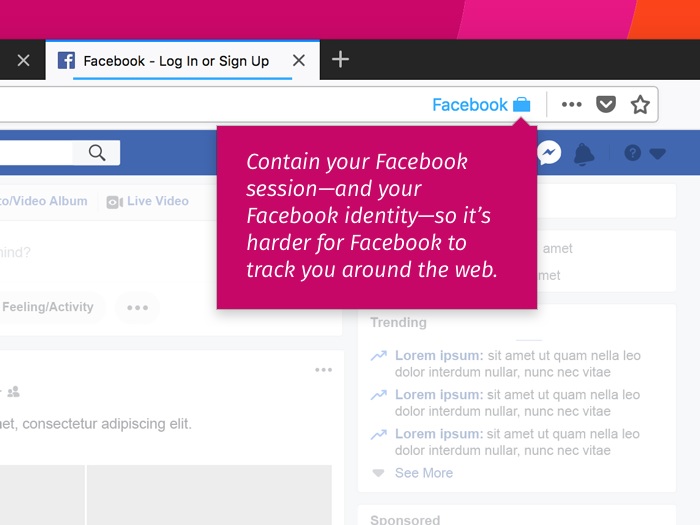
Keeping with this issue's anti-tracking theme, I've become a fan of the Facebook Container add-on for Firefox. Once installed, it walls off Facebook.com from the rest of your browsing activity, preventing the social networking behemoth from gathering data on all the other websites you visit. Although opening Facebook in a private window would accomplish the same thing, Firefox's container keeps you from having to log in again every time. It's also a bit simpler and less publisher-hostile than installing an ad blocker.
Facebook Container is a simplified version of Firefox's Multi-Account Containers add-on, which provides similar functionality for any website. For example, you could set up separate containers to access different Gmail accounts, or shop on Amazon without having the products you've looked at show up in banner ads elsewhere. To set this up, install the add-on, then click the icon that looks like a set of boxes in the top-right corner. You can then use the ready-made containers or create your own, and anything you log into will remain isolated to that container.
I'm not aware of any other browsers that offer this feature, though Privacy Badger comes close as an anti-tracking tool. Still, Firefox is much better than it used to be thanks to its recently-overhauled interface and browsing engine. Check it out if you haven't lately.
|
|
| Need to know |
|
Samsung's new Note: The vast majority of Android phone launches are easy enough to ignore, but Samsung's Galaxy Note line is an exception. What started off as a niche product--back when most of us were baffled by jumbo phones--the Note now represents Samsung's best (and most expensive) handset.
That said, the new Note9 isn't drastically different from last year's Note8. The main internal changes are a slightly larger screen (now 6.3 inches diagonally), a much larger battery (which beat every other flagship phone in PCMag's Wi-Fi video streaming test), dual speakers, a faster processor, and the same LTE modem as Samsung's Galaxy S9+ (which offers the fastest LTE data speeds of any phone on the market). Design-wise, it's still a monolithic slab of glass with gently-curved vertical edges, and its lack of a notch is now a defining feature, as other Android phone makers look to copy the iPhone X aesthetic. (Oh, it also still has a headphone jack.)
This is Samsung we're talking about, so the Note9 still has some throwaway gimmicks and undesirable features. The S Pen stylus now has Bluetooth, so you can click its button to take remote selfies or flip through presentations--I wonder how many folks will actually do either--and a button on the side of the Note is permanently assigned to Samsung's Bixby assistant, which remains less useful than other voice assistants.
Still, it's not all bad on the software front. Samsung's camera now has a layer of intelligence that can select the best scene mode based on what's in the frame, and can detect when a shot comes our blurry or has someone blinking. Samsung's software also has a handy shortcut for launching two apps side-by-side, which is a great way to make use of that extra-large display.
Now for the bad news: The Note9 costs $1000, thereby following Apple's iPhone X into the stratosphere of smartphone pricing. These days, it's possible to spend a lot less for an Android phone that's almost as good, including last year's Note8 for $550, last year's Pixel 2 XL (the phone I'm currently using) for $749, the Galaxy S9 for $569, or the OnePlus 6 for $529. If you can wait a few months--until after Apple's next iPhones arrive--I wouldn't be surprised to see the Note9's prices come downward as well.
Beware of email extortion scams: Ghacks' Martin Brinkmann has a good story up on the "Your Password" email extortion scams that seem to be on the rise lately. The setup involves threatening to reveal the targets' porn habits to friends and family members if they don't wire a large amount of bitcoin or other cryptocurrency to the scammer.
To make the threat seem real, the scammer also includes a password that might resemble one that the target has used before. These passwords come from previous security breaches on popular sites like LinkedIn and Yahoo, and bank on the fact that many people use the same password across multiple sites. While you can ignore this particular threat, it's a good idea to avoid recycling your passwords anyway. Install a password manager to make this easier, or use two-factor authentication where possible. (I've covered these topics in a previous newsletter.)
Cortana, meet Alexa: Microsoft and Amazon have finally linked up their voice assistants after originally promising to do so by the end of last year. If you have a Windows 10 PC, you can open Cortana from the task bar (or say "Hey Cortana," if you've enabled always listening mode, then say "Talk to Alexa." From here, you can ask about shipments, control smart home devices, or interact with third-party Alexa skills. It's a bit clunkier than putting an Amazon Echo in your office, but could be useful in a pinch. (Conversely, you can also use any Alexa device to talk with Cortana, though I'm still unclear on why you'd want to do this given how far behind Microsoft's voice assistant has fallen.)
|
|
|
| |
|
| Spend wisely |
 |
|
A good mechanical keyboard is among the best office upgrades you can make, sparing you from having to type on mushy keys all day. Right now, Amazon is selling Cooler Master's "tenkeyless" keyboard (that is, one that lacks a number pad) for $60, which is a $20 discount. You can also save another $10 with a mail-in rebate. It uses Cherry MX Blue keys, which are personally music to my ears but might bother anyone who's nearby.
|
|
| Thanks for reading! |
|
I'm still looking for one or two more reader testimonials to publish on the Advisorator website, so if you've been happy with the service, please consider reaching out with a sentence or two. (Check out a couple examples here if you need inspiration.)
As a reminder, I'm always happy to answer your tech questions via email. If you'd like a more immediate response, I'll be hosting a chat room this Friday, August 24, at 12 p.m. Eastern. Click here to join, and click here if you'd like a reminder.
|
Catch you in a couple weeks,
Jared
|
|
|
|
|
|
|
|
|
|