 |
| |
 |
| May 26, 2020 |
| Taking the private search challenge |
|
Plus: Free music for hippies, supercharged Windows search, and Spotify's podcast power play
|
| |
 |
|
Around the start of this year, I embarked on an experiment that I'll refer to as The DuckDuckGo Challenge.
Quite simply, it involves using DuckDuckGo instead of Google as your web browser's default search engine for as long as you can stand it. After briefly mentioning DuckDuckGo in last week's newsletter, I thought now would be a fine time to discuss my latest attempt.
DuckDuckGo has been around for over a decade—here's an early story on it—and its main hook is private search. Unlike Google, DuckDuckGo doesn't keep a record of your search history, and makes no attempts to build a profile of your interests for advertisers to target. As the company says in its privacy policy, "we don't know who you are and there is no way to tie your searches together."
Why doesn't everyone use DuckDuckGo instead of Google? For one thing, the power of inertia is not to be underestimated, but more importantly, Google's search results are still the best. The question with DuckDuckGo has never been whether it can beat Google at its own game, but whether it can come close enough to justify switching so you can reap the privacy benefits.
Hence The DuckDuckGo Challenge.
It had been a few years since I'd last attempted it, and my recollection was that the experience felt too crude compare to Google. This time, however, I was more pleasantly surprised. DuckDuckGo's results come in almost as fast as Google's, and certain searches provide instant answers, so you don't have to click through extra links. It has image search just like Google, and its mapping data comes from Apple, another source that doesn't track you.
I don't want to undersell the privacy upsides, either. It's an intangible thing, but sometimes I just don't feel comfortable feeding searches into some targeted advertising algorithm. Over the years I'd developed a habit of popping open a private browser window for certain queries, such as medical concerns or child-rearing questions. Being able to search for anything without that cognitive burden can feel like a weight off your shoulders.
With enough use, however, DuckDuckGo's flaws reveal themselves. Google remains far superior when you're searching for news topics, thanks to its "Top Stories" carousel in search results, and its instant answers are much more thorough. (Try searching for coronavirus information in both search engines to see what I mean, or just check out this comparison image.) DuckDuckGo also doesn't display dates for articles in its search results, so it's harder to tell if the link you're about to click on contains current information.
The bigger issue with DuckDuckGo is harder to quantify: Sometimes the links it surfaces just aren't as useful as Google's. On countless occasions, I'd be researching some topic and would find that none of DuckDuckGo's links were answering my specific questions. Eventually I developed a new habit: Turning to Google from the getgo when I suspected that DuckDuckGo search might struggle.
In the end, I lasted about three months with The DuckDuckGo Challenge this time around, but I probably won't wait as long between attempts as I did last time. We're more attuned to tech privacy than ever now, which might explain why DuckDuckGo's growth is starting to look exponential.
If you're up for a little experimenting, I'd love to hear how it goes for you. To switch search engines:
- In Chrome, enter chrome://settings/search in your address bar.
- In Firefox, enter about:preferences#search in the address bar.
- In the new Microsoft Edge, enter edge://settings/search/searchEngines in the address bar
- In Safari, head to Safari > Preferences > Search
All of these browsers should have an option to select DuckDuckGo as the default instead of Google.
To make The DuckDuckGo Challenge a bit easier, remember that you can always type g! anywhere the search bar—even after you've already entered your query—to get results from Google instead of DuckDuckGo. Should you find yourself doing this more often than not, that's a good indicator that the Challenge has run its course.
If you're not as committed to the idea, you can also try The Reverse DuckDuckGo Challenge to make private searches more easily accessible.
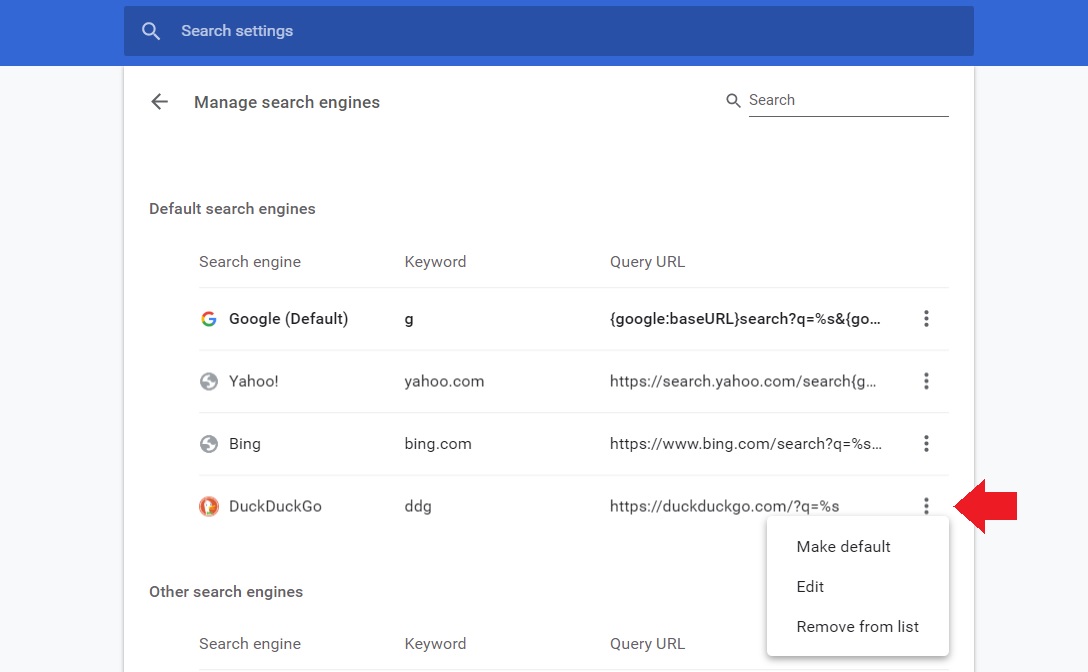
In Chrome or Edge, hit "Manage Search Engines" in the menus I mentioned above, then hit the "..." button next to any search engine. Find the line for DuckDuckGo, then hit "Edit," and enter ddg under the "Keyword" heading.
|
 |
|
You'll now be able to use DuckDuckGo instead of Google by typing "ddg" before any search in your address bar. (Setting this up is even easier in Firefox: Just type the "ddg" keyword for DuckDuckGo under "One-Click Search Engines" in the search menu I mentioned above.)
Got any questions about DuckDuckGo or search engines in general? Just reply to this email to get in touch.
|
|
| Need to know |
|
Spotify's podcast power play: Spotify has signed an exclusive podcast licensing deal with Joe Rogan, reportedly for more than $100 million. The Joe Rogan Experience podcast will arrive on Spotify in September, and will become exclusive to the platform a few months later, meaning it'll no longer be available through Apple Podcasts, Overcast, or other podcast apps. The deal also covers video, so Rogan's massive YouTube presence will disappear as well.
Whether you care for Rogan or not, this is a big deal for podcasts, which for years have thrived on a system of openness. Most podcasts publish RSS feeds that allow any podcasting app to serve the audio, and apps competed for users based on the merits of their design and features.
Spotify's exclusivity deals--this one being its splashiest yet--represent the end of an innocent era for podcasting. Listeners will have to use Spotify for certain podcasts, and over time, creators might feel forced to work with Spotify if they want to be heard at all. Not all hope is lost--Nathan Baschez has a great essay on how open podcast apps can fight back--but the battle lines are drawn.
The iPhone's COVID-19 update: iOS 13.5 launched last week, adding the ability for Apple's FaceID system to detect when you're wearing a mask. Face recognition still won't work with a mask on, but it will bring up the passcode field instantly.
The update also facilitates the coronavirus "Exposure Notification" system that Apple and Google are developing jointly. With this system, your phone can keep an anonymized record of any other phones that come in close proximity to yours. If whoever owns one of those devices becomes infected, health officials can send an alert to the other devices. The system doesn't identify individual users, and it requires you to opt in by downloading an app from your public health authority. Those apps are not allowed to track your location.
The big question now is how many states will opt into this system themselves. 9to5Mac has been tracking the answers, and so far only four states have confirmed they'll participate, while 17 have said they won't. That could be bad news for the whole digital contact tracing endeavor, especially if individual states do an inferior job with protecting users' privacy. North Dakota, for instance, hired a company to create its own system, which was promptly found to be sending location data to Foursquare and an ad identifier to in violation of the app's own privacy policy.
AT&T's fake 5G: For over a near now, AT&T has been using the misleading term "5G Evolution" to refer to some minor upgrades on its 4G network. The carrier even went so far as to slap a "5G E" icon on smartphones without any actual 5G networks in sight.
Apparently this went too far even for the advertising industry, whose own self-regulatory bodies have successfully pressured AT&T to abandon the phrase "5G Evolution" in its marketing. It will continue to display the 5G E logo, however, because the ad industry isn't telling AT&T to stop doing so.
The entire business of 5G wireless is filled with marketing obfuscation, with different wireless frequencies offering different speed and coverage trade-offs, and each network twisting their marketing based on the particular frequencies they're prioritized—all before 5G phones are even the norm. And yet, AT&T found a way to be even sleazier. If you have an AT&T phone and it shows a 5G E logo, the only appropriate response is to roll your eyes.
|
|
| Tip of the moment |
 |
|
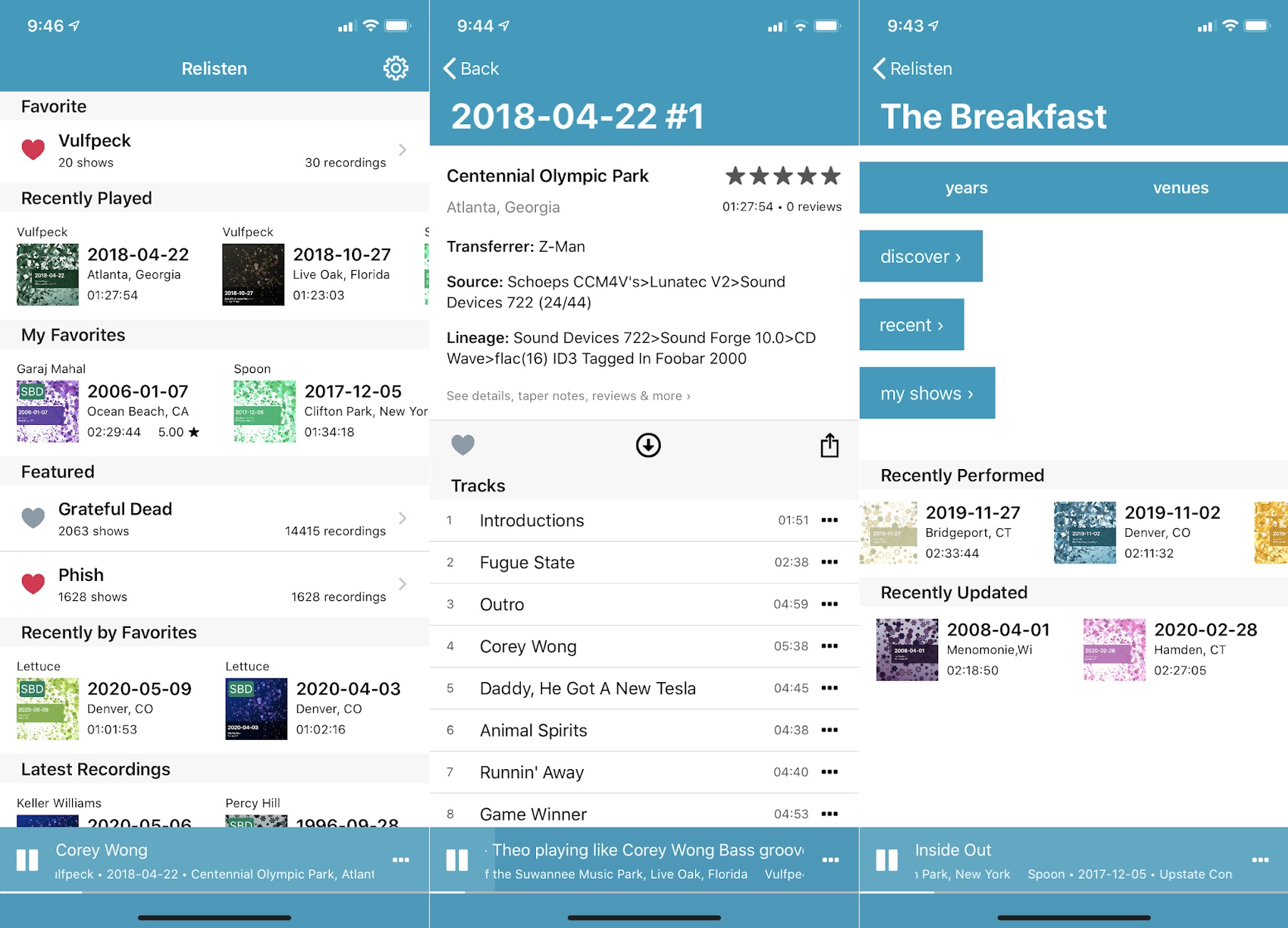
Free music for hippies: I owe a debt of gratitude to my brother in law (thanks Brian!) for tuning me into a free app called Relisten. It's essentially a mobile adaptation of Archive.org's extensive live music collection, so you can stream entire live shows from Phish, The Grateful Dead, Deep Banana Blackout, and many others.
To say it takes me back would be an understatement. I still have a fairly extensive concert taping collection from my college years on a hard drive, synced to both Google Play Music and Plex, but being able to play more shows from more bands on-demand is great.
In addition to the iPhone app, Relisten has a website and native Sonos speaker support. There's no Android version, but the free Taper's Section app comes pretty close.
|
|
| Now try this |
|
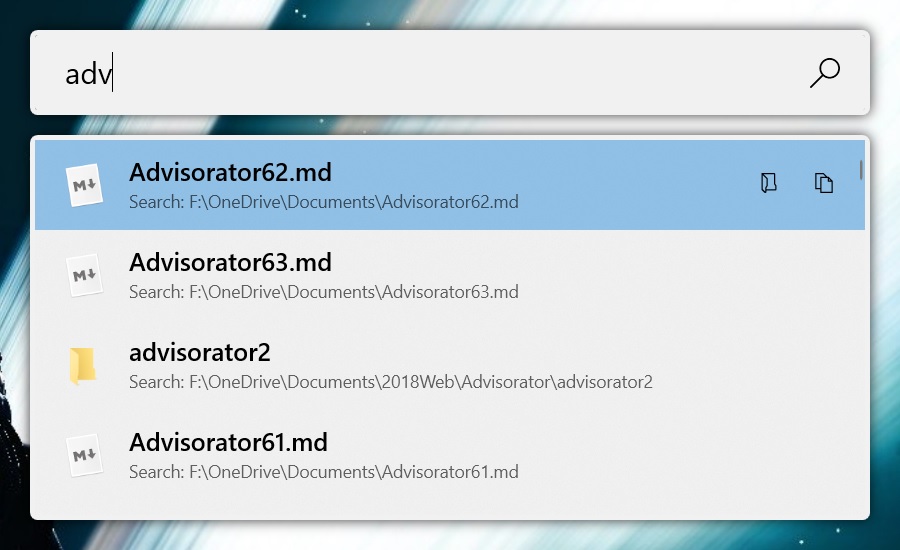
Supercharged Windows search: Last month, I wrote about the return of Microsoft PowerToys, a grab-bag of tools for working more efficiently in Windows. The latest version is the best yet, adding an even faster way to launch files, folders, or programs. Once you've installed PowerToys, open it up from the hidden icons menu on the taskbar, then enable "PowerToys Run." Pressing a key combination of your choosing (Alt-Space by default) will bring up a search bar at the center of the screen. It's a bit like hitting the search button on the taskbar, but the search results are instantaneous. If you're on a Mac, it's more or less a clone of the popular Alfred app.
|
 |
|
The new version of PowerToys also adds a "Keyboard Manager" tool for remapping keys and shortcuts. I immediately set my laptop's Caps Lock key to simulate pressing F11, so I can switch to full screen without having to hold down the keyboard's Fn key first.
Notion notes go free: Want to try a new notetaking app? Notion, an app for taking deeply detailed notes, is now free for personal use. The app previously had a limit on how many documents, maps, and other elements you could create before running into a paywall, but Notion has now lifted those limits. (There is still a $5 per month personal plan for unlimited file size uploads, version history, and unlimited guest access.)
Personally, I prefer more lightweight notetaking systems, but I understand Notion's appeal. Within any note, you can add to-do lists, tables, photo galleries, audio snippets, files, and more. You can also link between notes to form broader projects, and can tag other users to collaborate. It's a lot to take in at first, but I know some folks swear by it after taking the time to learn its intricacies. Maybe you'll be one of them.
One more iOS 13.5 tidbit: Not everything in Apple's latest iPhone update is directly coronavirus-related. In Facetime, you can now stop people's faces from floating in and out of the foreground. Head to Settings > Facetime and disable the "Speaking" toggle under "Automatic Prominence," and everyone's face will stay the same size no matter who's talking.
|
|
| Around the web |
|
|
|
| Spend wisely |
 |
|
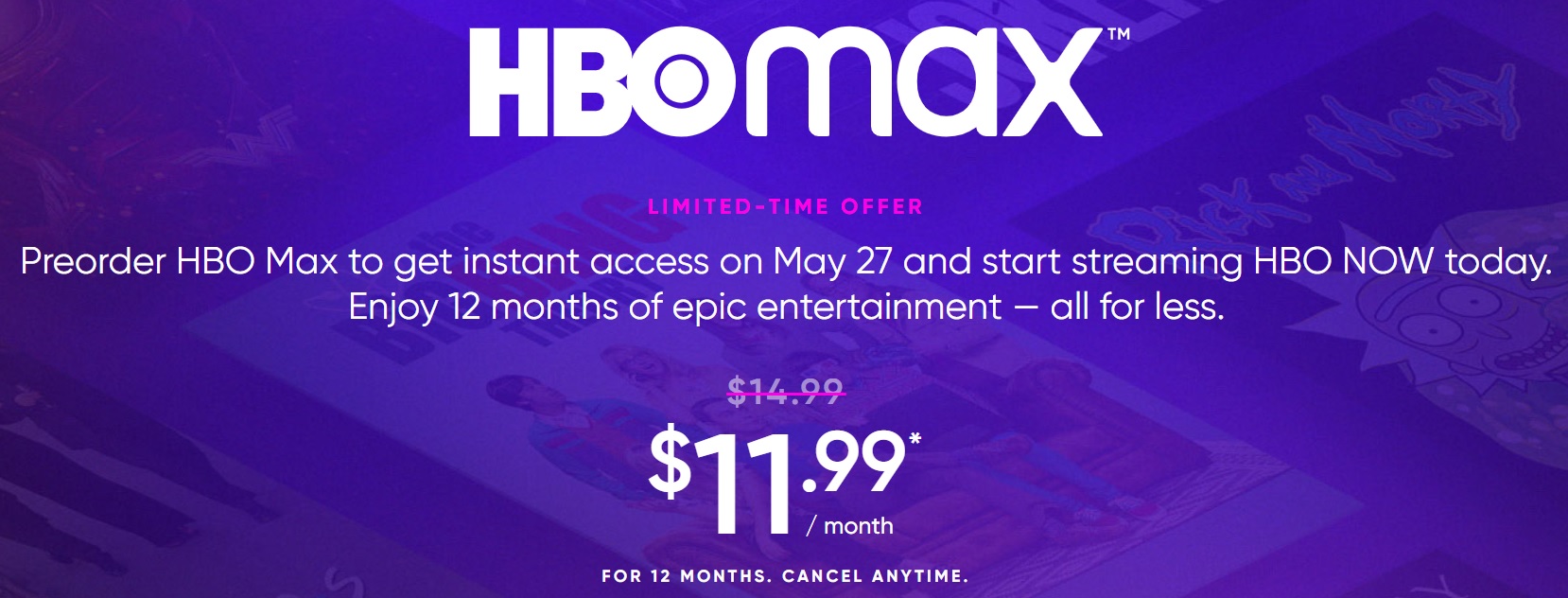
We're a little dry on deals right after Memorial Day, so I'll just remind you that today's your last chance to sign up for HBO Max for $12 per month, which is $3 per month off the regular price. That price is good for up to 12 months, but you can cancel anytime before that.
HBO Max is like a super-sized version of HBO, with many more movies and shows from the WarnerMedia catalog. It will effectively replace HBO Now, which is the current streaming version of HBO, and will be more of a direct Netflix competitor with a wider range of content overall.
|
|
| Thanks for your support! |
|
We've got a lot of new subscribers on board this week, so if this is your first issue, welcome! As I often say at the bottom of this newsletter, I'm always happy to hear from you with any tech questions you might have or feedback you'd like to provide. Just reply to this email to get in touch.
I'm also still experimenting with a Slack channel if you'd like to talk about tech in real time. You can sign up by clicking here. Slack will ask for a work email address to register, but any email will do.
Until next week,
Jared
|
|
|
|
|
|