 |
| |
 |
| March 17, 2020 |
| Make the most of video chat |
|
Plus: Easy YouTube downloads, Apple Store closures, and deals on wireless service
|
| |
 |
|
If your situation at home is anything like mine, there's a lot of lockdown going on right now. At least here in Ohio, group events are canceled, schools are closed, restaurants are take-out only, and a lot more folks are working from home.
All of which means you could be—or should be— spending more time than usual on video chat. Even if your work isn't demanding it, a little more face-to-face interaction could help ward off the feelings of isolation that come from being stuck in your house.
To that end, I'm throwing together a list of tips that can make video chat more tolerable for work and more enjoyable for personal use.
Personal chat
Talk through your TV: Conducting video calls on the biggest screen in your house isn't quite the same as having friends and family in the same room, but it still beats staring into a phone or tablet. If you have an iPhone or iPad, you can use screen mirroring with an Apple TV or AirPlay 2-compatible television to display your conversations on the big screen. Just open Control Center and select "Screen Mirroring," then choose your AirPlay 2 device from the list. If you don't have an Apple TV or compatible smart TV, Apple's Lightning to Digital AV Adapter or a cheaper third-party adapter will allow you to plug an HDMI cable into your iOS device instead.
Got an Android device instead? You can use mirroring with either a Chromecast or Android TV device. Using the Google Home app, just tap on the Chromecast device you want to use, then select "Cast my screen."
Either way, you'll be able to use whatever video chat app you like, with your phone or tablet providing the camera and microphone. I suggest propping up your device near the base of your TV so that you're looking in the vicinity of the person you're talking to. (With AirPlay, I've found that this produces some echo, so you may have to reposition your device or turn down your TV's audio.)
Group chat in Facetime: You don't need fancy videoconferencing software to set up a group video call. With Facetime on iOS, you can host a call with up to 32 people at the same time. Just hit the + button at the top of the Facetime app, then add the names of whoever you want to call. Alternatively, you can tap the contacts at the top of any iMessage group, then hit "Facetime" to call them all at once. Once you're in a call, you can also add more people by tapping the screen, swiping up on the menu bar, then tapping "Add Person."
Group chat in Google Duo: Don't leave out your Android-loving friends, though. Unless everyone you know is an iPhone user, consider setting up a group call in Google Duo instead. After downloading the app for iOS or Android (or using the website), swipe up on your contacts list, then select "Create group."
Facetime stickers, filters, and such: When you run out of topics to talk about, you can always turn to cheap conversational gimmickry. In Facetime, tap on the screen, then hit the star icon to bring up a menu of video chat effects. You can turn your face into an "Animoji" character, add filters, and more. When you're done, slide down on the menu bar to return to the conversation, or tap the star icon again to remove the effects.
Don't forget Hangouts: Although Google seems to have soured on Hangouts as a personal chat app, it's still a great way to host video chats for large groups. You can have up to 25 people on a video call at the same time, and it's available on iOS, Android, or the web. At least in my local group of dads, this is most likely replacing our monthly bar nights for the foreseeable future.
Work chat
Hide your messy house: Don't want your colleagues getting a glimpse of your home during video calls? If you're using Skype on Windows or Mac, you can blur the background behind you by hovering over the video icon, then selecting "Blur my background." Microsoft Teams has a similar feature in the "Choose your audio and video settings" menu before you start a meeting or under "More Options" when the meeting's in progress.
Zoom, meanwhile, provides a virtual background feature that can replace your messy house outright, though you may need a green screen if your computer's not powerful enough. In the Zoom web portal, navigate to My Meeting Settings > Meeting > Virtual background.
Brush up on etiquette: ZDNet's Steven Vaughan-Nichols put together a helpful list of video conference tips last week, many of which tackle etiquette in particular. The most important tip of all: Mute your mic when you're not talking.
All-purpose enhancements
To look your most beautiful on conference calls, the key is to get your video camera up to higher ground, thereby ensuring that the angle on your face isn't mostly neck and chin. If you're using a laptop, throw a few thick books underneath it before the call starts, or better yet, use the lap desk I told you about a couple issues ago.
A bit of extra lighting can also help keep unsightly shadows away from your face. Consider taking calls in front of a window where you can take advantage of natural light. Or, if you want to splurge on a more portable solution, grab a lighting kit for around $40 on Amazon. I've been using one like this for about a year now, mainly to photograph review products, but it comes in handy for the occasional conference call or video interview as well.
With Google Duo, you can also lean on Google's computer vision skills to brighten up a dark room. During any conversation, just tap on the screen, hit the vertical "..." button, then select Low-Light Mode.
|
|
| Tip of the moment |
 |
|
Whether you're in the midst of a pandemic or not, it's never a bad idea to stock up on YouTube videos that you can watch offline. With the right tools, you can download videos from YouTube even without a $12 per month YouTube Premium subscription.
Mac users should check out ViDL, a free app that can download videos from YouTube and many other sites. After installing the app, just click the + button in the top-left corner, then hit "Scan." After a moment, you'll be able to start the download. The app also includes a Safari extension and bookmarklets so you can download straight from your web browser.
For Windows, there's YouTube-DL-GUI. It doesn't have extension support like ViDL, but it's more customizable and seems to download at higher qualities by default. After installing the app, paste your YouTube links into the top list, then hit the download button in the bottom-right corner.
Once you've downloaded some videos, you can use the VLC app for iOS or Android to watch them on your phone. Use the iPhone app's Wi-Fi upload option or just plug an Android phone into your computer to drag-and-drop the files over.
(There are lots of websites that can download YouTube videos as well, but they're often loaded with sleazy adds and sketchy pop-ups, and are best avoided.)
|
|
| Need to know |
|
Upcoming MacBook Air upgrades: Despite the worldwide coronavirus fallout, Apple still plans to ship new MacBook Air and MacBook Pro models in the second quarter, at least according to well-connected analyst Ming-Chi Kuo. The main attraction in both laptops would be new keyboards with scissor-like switches, which provide more key travel and are less failure-prone than the slim butterfly mechanism in most MacBooks today. The 16-inch MacBook Pro that launched last November already uses the new design, so it's no surprise that other models would get the same upgrade.
Apple also reportedly plans to stretch the screen of its smallest MacBook Pro from 13 to 14 inches, following the 16-inch MacBook in cramming a larger screen into roughly the same design. High-end Windows PCs have been moving in this direction for years, so it's about time Apple's MacBooks caught up.
All of which means you should probably avoid being lured in by big MacBook Air and 13-inch Pro discounts in the coming weeks; we're likely to see a lot more of them as the new models get closer to shipping.
Apple Store closures: In other Apple news, the company has closed all of its retail stores outside of China until March 27, and I wouldn't be surprised if they stay closed for longer. Apple's also extending the return window for all products purchased after February 28 until 14 days after stores re-open, with the exception of on-contract or carrier-financed iPhones.
If you're having problems with an Apple device, you'll have to ship it off to Apple or find a third-party repair shop. (For in-warranty service, Best Buy is probably the next-best option unless it ends up closing as well.) Otherwise, try to treat your gadgets with a little extra TLC so you're not stuck using a shattered screen.
Can Yahoo hear me now? Verizon has repurposed the Yahoo brand for mobile phone service, launching Yahoo Mobile as a $40 per month plan with unlimited talk, text, and data on Verizon's wireless network. Unlike standard Verizon service, Yahoo Mobile speeds are capped at 5 Mbps, and Verizon also says it'll slow customers down when its network gets congested.
The service is similar to Verizon's other cheap wireless brand, Visible, but without Visible's group plans that can bring prices as low as $100 per month for a party of four. On the other hand, Yahoo Mobile service also includes "Pro" version of Yahoo Mail, which removes ads and provides 1 TB of storage, making it the preferred choice for folks who love corporate synergy.
The law of PC battery life strikes again: As I noted last week, AMD has been claiming that some future laptops powered by its Ryzen 4000 processors will get up to 18 hours of battery life, but didn't clarify how it arrived at that figure. Now, AMD says it's using the same benchmark (MobileMark 2014) that PC makers have relied on for years. While AMD acknowledges that this methodology is woefully outdated, no one wants to use newer benchmarks because the lower numbers would make them look bad.
Hence what I've long referred to as the unwritten law of Windows laptop battery life, which states that you should cut advertised battery life in half for a more realistic estimate. AMD even put together its own "blended battery test" to determine how the Ryzen-powered Yoga Slim 7 would fare in actual use, and the result was—you guessed it—nine hours. That's a great real-world number if it holds up, but's also more evidence of the law in action.
|
|
|
| |
|
| Spend wisely |
 |
|
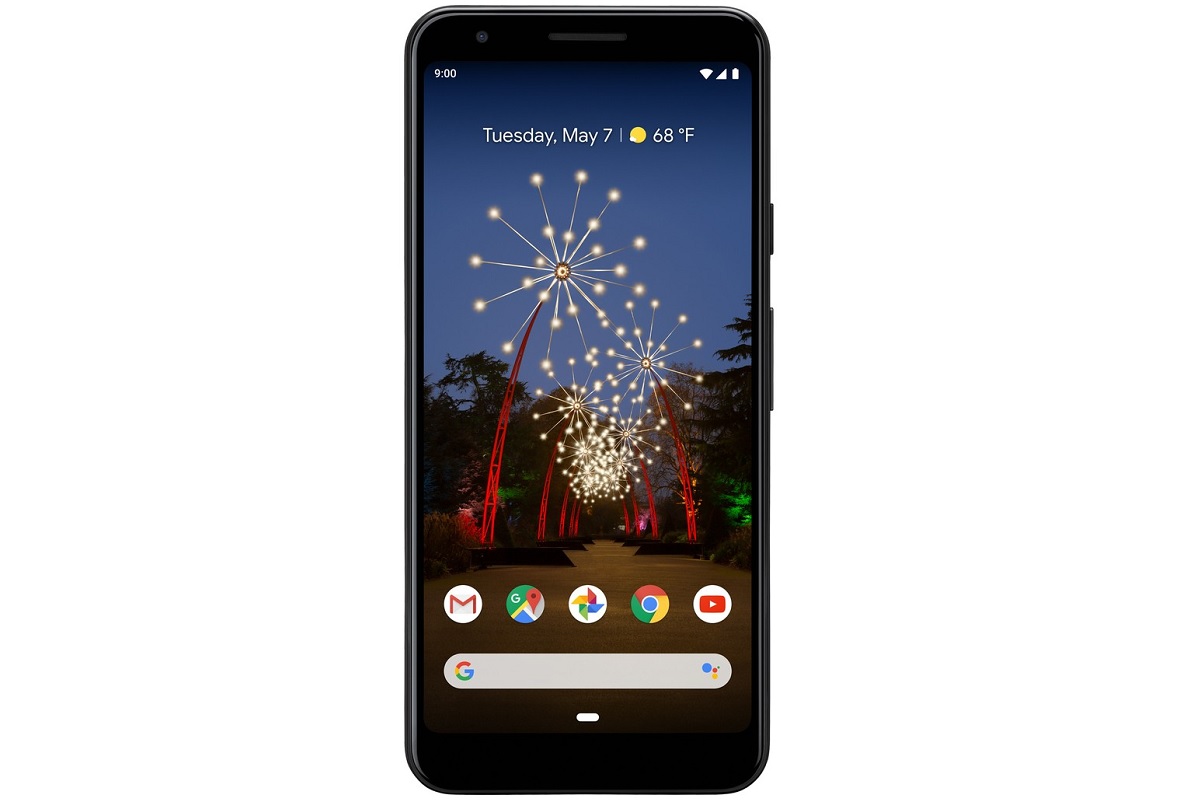
If you don't use your smartphone off Wi-Fi all that much, Ting's usage-based wireless service can save you a lot of money. Plans start at $6 per month per line and increase based on how much you talk, text, and use mobile data, with average usage—500 minutes, 1000 texts, and and 500 MB of data—coming out to just $30 per month. (Ting lets users choose between either Verizon's, T-Mobile's, or Sprint's networks.)
Through March 31, Ting is also sweetening the deal with $100 in bill credits (applied over 10 months) when you buy a Pixel 3A for $300. Although it came out last year, the Pixel 3A is still a fine phone for the money, with a camera that rivals even some high-end handsets. The only downside is that Ting isn't selling the purple one.
In other deal-related news, Roku's Streaming Stick+ is once again down to $39, which is $11 off the regular price.
|
|
| Thanks for your support! |
|
Having the kids at home means I'm a little more scatterbrained than usual, but hopefully the newsletter isn't making that too apparent. I'll keep doing my best to supply tech tips that can help with being stuck at home, but would also love to hear your feedback on what to cover next. You can always get in touch by replying to this email.
Until next week,
Jared
|
|
|
|
|
|
|