 |
| |
 |
| February 25, 2020 |
| In praise of the lap desk |
|
Plus: A multitasking power tool for Windows, updates on Office and Google Docs, and nice prices on mesh routers
|
| |
 |
|
Let me begin this week's newsletter with a confession: I wrote most of it from the couch.
This wasn't as uncomfortable as it could have been because of my newly-purchased lap desk. It's a laptop-sized tray with an inclined surface, and it raises the screen closer to eye level while keeping your legs cool. After a week of using the lap desk, and being spared from constantly craning my neck downward, I'm not sure how I went so long without it.
My laptop desk is $28 hunk of plastic from a company called HUANUO (hopefully not an acronym) with bean bag-like paddings underneath, adjustable height settings, and a snap-on mouse tray. It comfortably fits a 15-inch laptop with about an inch to spare on either side.
That's hardly the only option, though. Lap desks come in many shapes and sizes, and they generally run between $20 and $50. If you're interested in comfier couch computing, here are a few factors to consider:
Legs or padding: While my lap desk rests directly on my legs with pads underneath, others have retractable legs that sit on either side of your body. That approach might be less conducive to all the ways we reposition ourselves while lounging around, but if you ever wanted to put your laptop on a desk with an external mouse and keyboard, solid legs could be more practical.
Incline amounts: Take note of the natural incline of whatever lap desk you're looking at on sites like Amazon. Some have padding that's taller by your knees so the laptop sits up at an angle, while others are flat. Some even have surfaces with adjustable height levels.
A bit of incline is helpful for posture because it brings the screen up to a higher level, but it'll also make your mouse slide down while you're not holding it. You can find lap desk with flat portions for a mouse and an adjustable incline section for the laptop--mine is one example--but they're rare.
Wrist wrest or stopper: Unless your laptop is on the heavy side, it's probably going to slide down on any lap desk that has an incline. Some lap desks mitigate this by including a lip on the bottom, while others have padded wrist wrests instead. The latter sounds nicer in theory, but too much padding can also force your hands into a typing position that might not feel natural. I actually tried and returned a lap desk with wrist padding for this reason.
Surface material: If there's one big knock against my choice of lap desk, it's the use of creaky gray plastic throughout. Others offer wood grain surfaces and rounded edges, and some even have patterned fabric cushions underneath, helping them blend into your living room décor. I couldn't find any adjustable height lap desks with wood surfaces that didn't use retractable legs instead of padding, so I went for the more utilitarian approach.
Miscellaneous doodads: In addition to all the above factors, some lap desks stand out with other flourishes. You might see some with grooves for propping up a phone or tablet, and some with storage space for your office supplies.
Then there's the option for holding a mouse, either via a mouse pad or in my case an attachable tray. If we're being honest, I'll probably use this for one thing only: Playing Deep Rock Galactic from the comfort of my couch. You didn't expect me to use this thing exclusively for work, did you?
|
|
| Tip of the moment |
 |
|
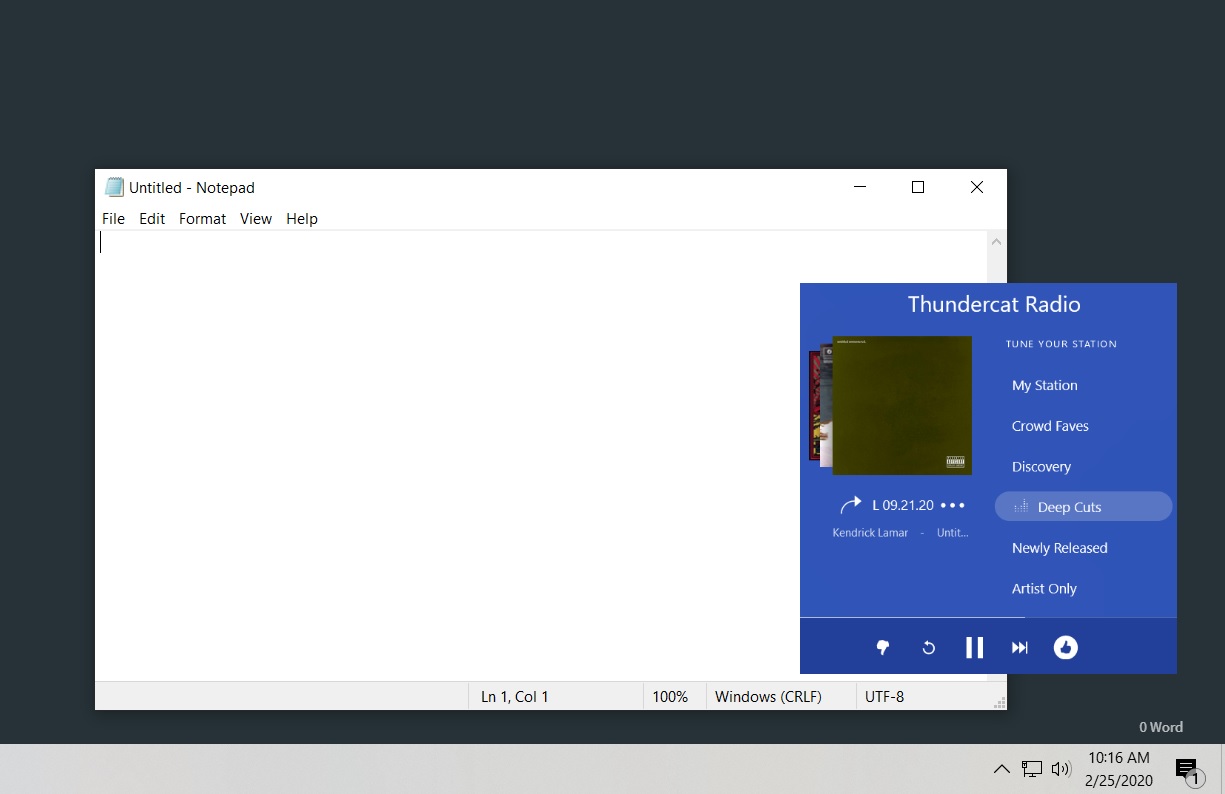
Last week, I was reading this story on GHacks about a Windows utility called OnTopper, which allows any window to always appear on top of any others. That in turn led me to an even more interesting app called OnTopReplica, which lets you crop any portion of any window and make it appear on top of everything else.
OnTopReplica can be useful for all kinds of things. If you're listening to music in Spotify or Pandora, you can crop just the playback controls so they're always visible while you're doing other things. You might also crop the Gamecast view on a site like ESPN to keep an eye on a game while you work, select just the video player portion of a site like Netflix, or monitor just the top few lines of your inbox. Personally I'm using it with Tweetdeck to monitor my Twitter news feed without being distracted by my other feeds.
There is a bit of a learning curve, though. Once you've installed and launched the app, (direct download link here), right-click on the empty frame and select any open window, which will then appear in a miniature view on top of all your other apps. You can then right-click on this view and choose "Select region" to crop out just a portion of the window. By default, this view is non-interactive, but you can change that by right-clicking on it and selection Advanced > Enable click forwarding..
My only gripe with OnTopReplica is that whatever window you're cloning can't be minimized to taskbar, otherwise the miniature view won't update properly. If you can live with that, it's a powerful way to multitask on a Windows PC.
|
|
| Need to know |
|
Office's all-in-one mobile app: Microsoft has consolidated Word, Excel, and PowerPoint into a single Office app on both iOS and Android. That means you can view and edit all your Office documents in one place instead of having to jump between separate apps.
More importantly, the unified app is less than half the size of the three individual apps combined. Office takes up about 379 MB, compared to 282 MB for Word, 282 for Excel, and 270 MB for PowerPoint, so if you use at least two of the three on your phone or tablet, you can save a lot of storage space. Otherwise, you can continue using the individual apps, but don't be surprised if they receive less frequent updates.
Google Docs' new auto-corrections: Speaking of productivity software, Google Docs is rolling out an auto-correct feature, similar to the one that already exists in Gmail. When Docs corrects your spelling, it'll underline the change in gray. You can then tap on the word to undo the change or keep typing until the underline disappears. Google's also bringing Gmail's "Smart Compose" feature into Google Docs, but only for paying G Suite customers. (This is the feature that offers to fill out sentences with word prediction as you type. Personally, I can't stand it.)
If you'd rather take full responsibility for your own spellings and phrasings, you can disable these features under Tools > Preferences. They're still in the process of rolling out, so you may not see the options for a couple more weeks or so.
Down with Apple's defaults: Maybe the worst thing about iOS is the inability to set third-party email, browser, music, and mapping apps as the default. Click an email link in Safari, for instance, you'll automatically end up in Apple's Mail app even if you prefer alternatives like Gmail or Spark. Click a link in your email, you'll be dumped into Safari even if you prefer Chrome or Firefox. This isn't just anti-competitive, it's also a bad user experience.
Bloomberg now reports that Apple is weighing a change to its longstanding default app approach. If the company decides to allow other apps to serve as defaults, we might see those changes in iOS 14 this fall. As Nilay Patel noted on Twitter, a little antitrust pressure from regulators goes a long way.
Intuit is buying Credit Karma: A few weeks ago, I linked to a story by my pal Rob Pegoraro's story about the sorry state of Mint, the personal finance service that Intuit acquired a decade ago. After squandering that opportunity, the maker of TurboTax and Quickbooks is moving onto a new one, announcing a $7.1 billion acquisition of Credit Karma.
Similar to Mint, Credit Karma provides free tax filing and other financial services in exchange for users' data, then it uses the data to pitch targeted loan and credit card offers. Credit Karma's software is much slicker, however, and it's being used by more than 100 million people, including half of all millennials. This is the kind of deal that doesn't instill confidence, though it's always possible that regulators will disapprove.
Mac scamware on the rise: Antivirus software vendor Malwarebytes is sounding the alarm about a rise in malware on Macs, mostly in the form of fake prompts to update Adobe Flash, often from sites that promise pirated video content.
I don't blame anyone who falls for these tricks, because for years we were told to always keep Flash up to date. (And unlike with Windows, Flash does not silently update in the background on Macs.) Nowadays, though, the vast majority of web content no longer requires Flash, and Adobe is planning to deprecate the software by the end of this year. The best move is to make sure it's uninstalled and ignore any website that tells you to update it. If you really do need Flash for some reason, you can update straight from Adobe's website.
|
|
|
| |
|
| Spend wisely |
 |
|
This could be a fine time to upgrade your home Wi-Fi setup, as Woot is selling refurbished Linksys Velop mesh systems at deep discounts. With a mesh system, you set up one or more additional access points away from the main router, creating a single network with expanded coverage. My editor at TechHive, networking guru Mike Brown, choose Velop as his runner-up pick for best mesh Wi-Fi system. (It doesn't have the backhaul speed of his top pick, Netgear's Orbi system, but that shouldn't matter unless your home internet speed is 1 Gbps or higher.)
Just make sure to select tri-band instead of dual-band from Woot's product listing. A two-pack for $170 should blanket a 2800-square foot-home in Wi-Fi, and you can get a three pack for $240 if you need even more coverage.
|
|
| Thanks for your support! |
|
One of the most challenging things about writing this newsletter is making sure it's useful for everyone regardless of how tech savvy they are. This has as much to do with the topics I bring up as it does with the way I describe certain concepts or features. While I try my best to make things comprehendible without being condescending, I'm aware that some things many not click for everyone.
So consider this your periodic reminder: If you're ever struggling to understand something I've written, do not hesitate to reach out, as I would be happy to break it down one-on-one for you. Conversely, if you ever want to get deeper into a particular topic, let me know about that as well.
To get in touch, just reply to this email, or drop into the biweekly Advisorator chat room. The next session will be this Friday at 2 p.m. Eastern. You can either hit this link at that time, or click here to get an email reminder beforehand.
Until next week,
Jared
|
|
|
|
|
|
|