 |
| |
 |
| March 2, 2021 |
| In praise of Notability |
|
Plus: LastPass' tracker troubles, new podcast tricks, and a farewell to Fry's
|
| |
 |
|
It's hard for me to believe, but somehow I've made it through 100 issues of Advisorator without ever mentioning Notability.
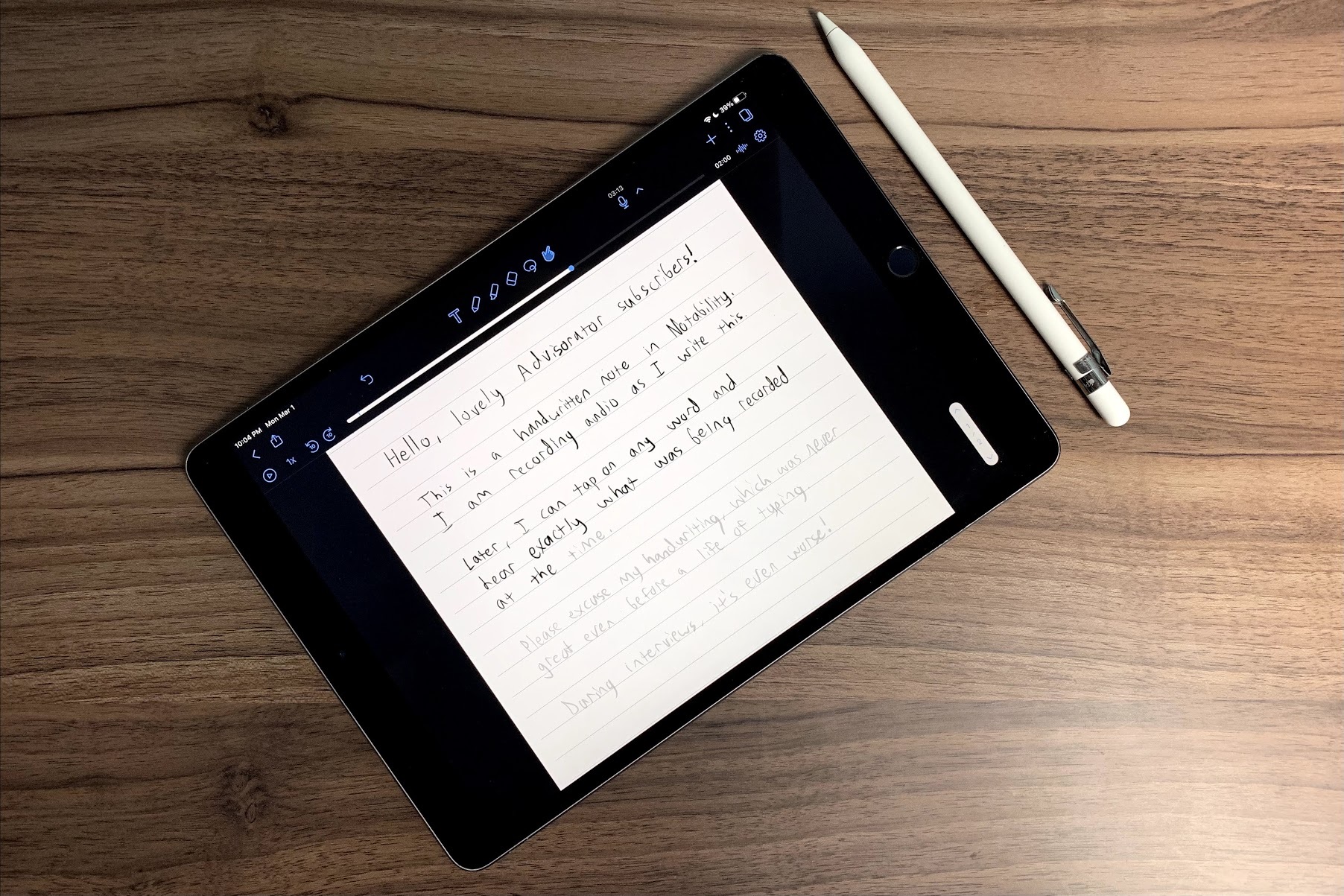
For years, Notability has been an essential note-taking app for my work as a journalist. Its most notable feature—one that I've never seen any other app execute as well—is the ability to take typed or handwritten notes while recording synchronized audio. That means you can go back and tap on any part of your notes and hear what was being recorded at that exact moment.
This obviously comes in handy for interviews. While talking to sources, I'll write down each discussion topic and highlight the most interesting comments along the way. Then, I'll go back and transcribe just those sections instead of the entire interview. I do all of this on an iPad Pro with an Apple Pencil, but Notability also supports text entry with an on-screen or external keyboard.
It's a huge timesaver, and one that could easily have applications outside of journalism. You might use it to take notes during meetings or lectures and revisit the audio highlights later. Or, if you're a creative type, you could try capturing extra thoughts by voice while drawing or making music.
Yet for whatever reason, no other apps have come close to nailing Notability's audio notes feature.
- A cross-platform app called AudioNote tries to offer something similar, but its Android app looks like it was developed a decade ago and its drawing detection has never felt great.
- The desktop version of OneNote lets you record audio that syncs line-by-line with your notes, but it's clunky to use and isn't available in OneNote on other platforms. Microsoft also almost killed this version of OneNote before, which doesn't instill confidence in its future.
- A device called Livescribe Echo lets you write on special paper while recording synchronized audio, which you can then view through its Mac or Windows apps. I relied on this convoluted setup for years before switching to Notability, and have never looked back.
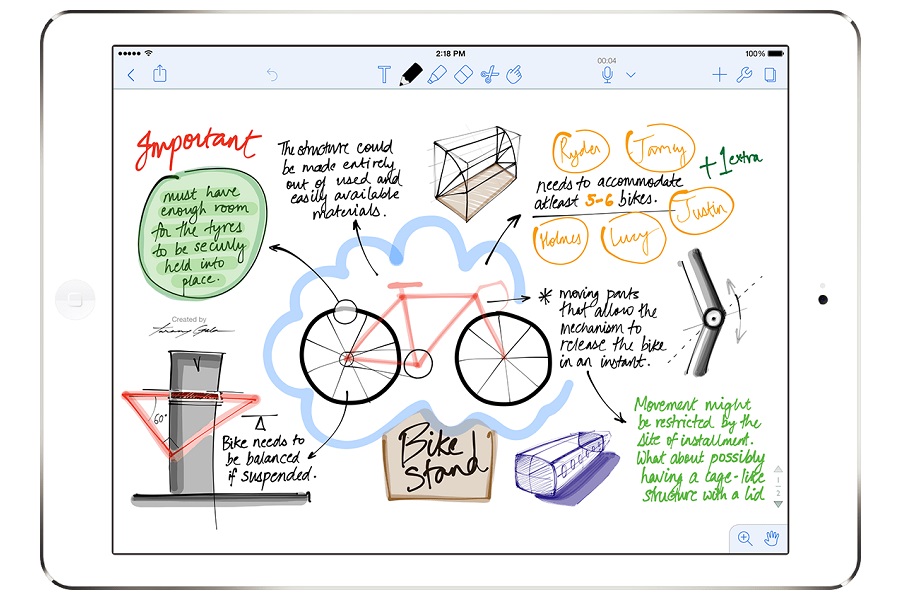
Notability also has other uses outside of audio recording. If someone sends you a PDF file or Word document that needs a signature, you can share the document with Notability, sign your name, and send it back. It offers a highlighter tool, so you can import PDF files and mark them up with notes and highlights. It's also just a pleasant place for drawing or sketching ideas, with multiple brush stroke sizes, colors, and shape recognition. (It's what I used to create my illustrated guide to over-the-air DVR for TechHive last fall.)
|
 |
|
Why am I writing about this now? Not for any particular reason, other than that I've grown increasingly appreciative of its business model in recent months. The app is a $9 one-time purchase for everything I mentioned above, and you can back up notes to cloud storage services such as iCloud or Dropbox at no extra charge. The main way Notability funds its ongoing development is through optional extra features such as themes, sticker packs, paper planner templates, and handwriting-to-text conversion. That's refreshing at a time when it seems like every app is switching to a subscription model.
My biggest knock against Notability is that it's only available on iOS and Mac, which means I can never completely ditch my iPad for an Android tablet or Chromebook. If Notability ever offered a true cross-platform version, I'd probably pay a subscription fee for it, but the closest developer Ginger Labs has ever come is saying it's "tracking interest" in the idea.
Given how much mileage I've gotten out of this single $9 purchase several years ago, I probably shouldn't complain too much.
|
|
| Need to know |
|
LastPass's tracker troubles: In case you needed another reason to switch away from LastPass after its recent subscription ultimatum, a security researcher has found seven trackers in the Android version of the app that transmit data to third parties. One tracker in particular, from a company called Segment, promises to help marketers build a profile of customers for ad-targeting purposes.
LastPass counters that its trackers aren't collecting "sensitive personally identifiable user data," a largely meaningless phrase given how even anonymized data can be tied to individuals. And while you can disable LastPass' trackers (under Account Settings > Show Advanced Settings > Privacy), their very presence is not a good look for a service that's already burning customer goodwill.
What about Bitwarden, which I recommended last week? The same researcher found a couple of trackers there as well, though the company says they're just for serving push notifications and reporting crashes, not marketing or ad-targeting. That seems kosher to me, though it's worth noting that 1Password manages to be tracker-free. I hear good things from several readers who are paying for it.
Goodbye, Fry's: Once a giant of electronics retail—at least on the west coast—Fry's is shutting down all of its stores for good. The company partly blames the coronavirus pandemic, but it was in rough shape even beforehand, having switched to a consignment model that left its sprawling stores mostly barren. My FastCo editor Harry McCracken wrote a touching eulogy, as did Sean Hollister at The Verge.
I consider myself fortunate to have experienced Fry's while living in Los Angeles a decade ago, when it seemed like even the most obscure PC part was available on demand. (My nearest Fry's had a rainforest theme, but the UFO-themed Burbank location was even more impressive.) I believe I'm even luckier to now live near a Micro Center, where that nerdy spirit is still alive without the excessive retail bloat that likely contributed to Fry's' collapse. I have no idea whether Micro Center itself is doing okay, though. Knock on wood.
Social media's new hotness: If you've been hearing about the rise of Clubhouse and Dispo and don't know what to make of them, a pair of recent New York Times stories are a good place to start. Of the two networks, Clubhouse seems like the more enduring concept: Users can meander between "rooms" where other users host audio conversations in real-time, ranging from silly to serious and occasionally marked by celebrity appearances. It's also raised concerns over content moderation (some large rooms last fall apparently became hotbeds of anti-Semitism) and user privacy (Inc.com scrutinized the privacy policy and found a bunch of red flags).
Dispo, meanwhile, takes inspiration from old-school disposable cameras, letting you share "rolls" of photos that don't develop until the day after they're taken. It's an endearing idea, albeit one with a higher risk of being a flash in the pan.
They both have one thing in common, though: You can't use either one without an invite, thereby creating a sense of demand in hopes of luring people from the likes of Facebook, Instagram, Snapchat, and Twitter. Don't be surprised if those huge networks start copying the new upstarts before long. (Twitter is already testing a Clubhouse clone, and Facebook is reportedly developing one.)
Spotify's hi-fi plans: Later this year, Spotify will join the likes of Tidal, Amazon Music, and Quboz in offering a subscription tier with better sound quality. It's unclear what this "Spotify HiFi" plan will cost or when it will launch, though true audiophiles will note that Spotify's only promising CD-quality audio.
By comparison, both Amazon's $15 per month Music Unlimited HD plan and Tidal's $20 per month HiFi plan offer 24-bit audio, and the latter supports Dolby Atmos and 360 Reality Audio formats as well. Perhaps Spotify plans to charge less for its service, or maybe it's just banking on its popularity as a reason to not go the extra mile. We'll see.
|
|
| Tip of the moment |
 |
|
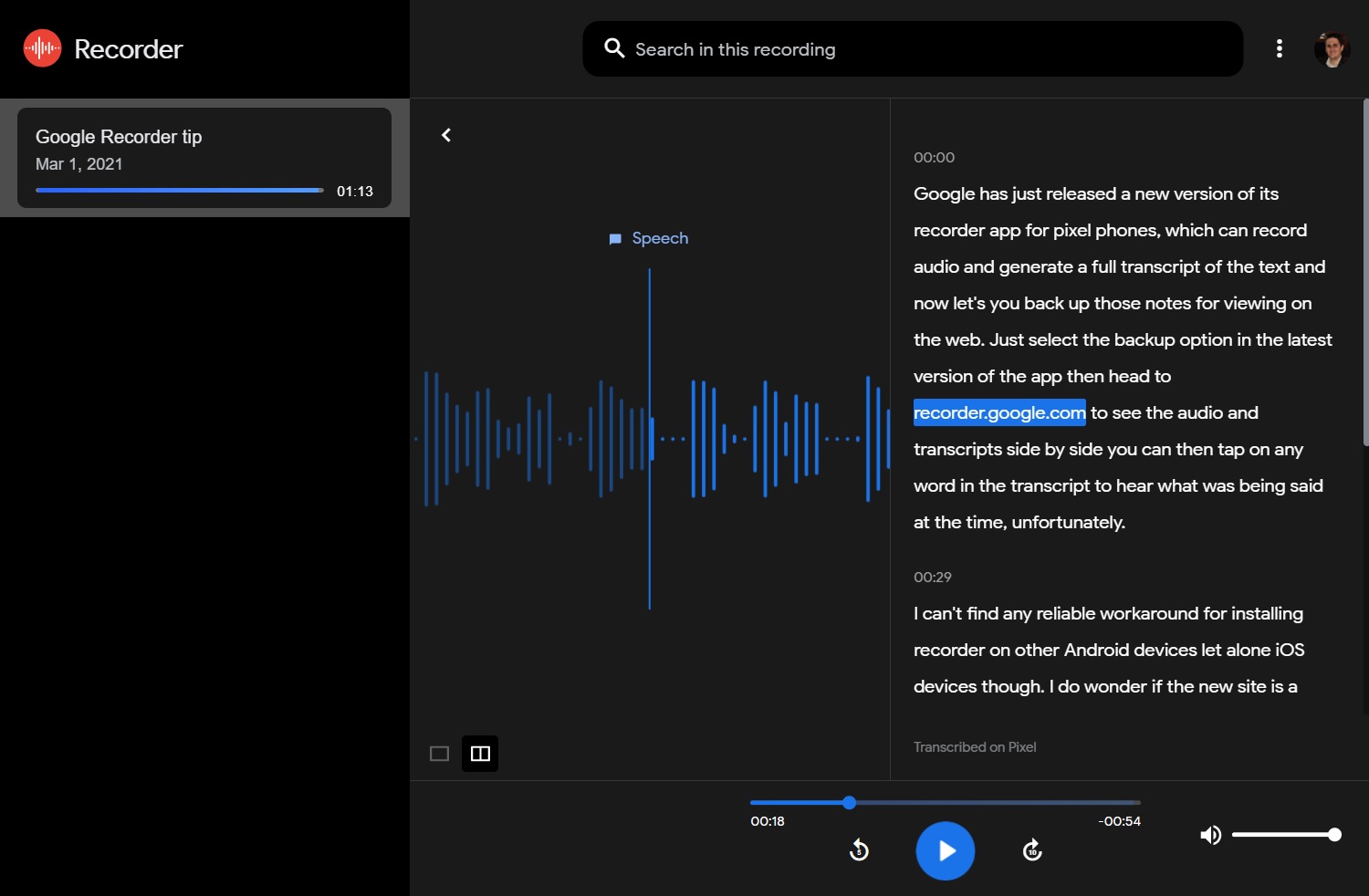
Better Pixel transcription: Okay, here's the other reason Notability is fresh in my mind this week. Google has just released a new version of its Recorder app for Pixel phones, which can record audio and generate a full transcript of the text. With this week's update, you can back up those notes and view them on the web. Just select the backup option in the latest version of the app, then head to recorder.google.com to see the audio and transcripts side-by-side. You can then tap on any word in the transcript to hear what was being said at the time.
Unfortunately, I can't find any reliable workaround for installing Recorder on other Android devices, though I do wonder if the new site is a precursor to wider availability. Uploaded recordings count against your Google Drive storage limit, so bringing the app to more devices would tie neatly into Google's growing subscription ambitions. At least for interviews, the idea of using this instead of Notability would be somewhat intriguing if it wasn't bound to Pixel phones.
In the meantime, Otter.ai is still a great cross-platform alternative, though you're limited to 40 minutes per recording and 600 minutes per month without a paid subscription.
|
|
| Now try this |
|
Overcast's easier podcast listening: If you use the Overcast app for podcasts, it now supports more powerful Siri Shortcuts for controlling playback by voice, and the folks at MacStories have already found a clever way to use them: Just install this Shortcut, then say "Hey Siri, what did they say?" during any podcast. This will make Overcast jump back 10 seconds and replay the audio at a slower speed. (It's inspired by a similar "What did they say?" feature for Siri on Apple TV boxes, which replays the last 10 seconds with closed captions on.)
Overcast also overhauled its Apple Watch app and offers a lot of features that Apple's own Podcasts app lacks, such dialog boost and silence removal, so give it a try if you haven't already.
Mac Mail anti-tracking: Continuing last week's discussion of emails that track when you open them, John Gruber brings word of an extension for Apple's MacOS Mail app called MailTrackerBlocker. As the name suggests, the extension monitors for known trackers (or, if you prefer, "spy pixels") and stops them from monitoring whether you've opened a message.
Not to belabor the point, but I'm still having success with Trocker, which performs a similar function but for the web versions of Gmail, Yahoo, and Outlook.com. While I've seen some folks suggest PixelBlock instead, that extension no longer receives regular updates and is less reliable in my experience.
|
|
| Around the web |
|
|
|
| Spend wisely |
 |
|
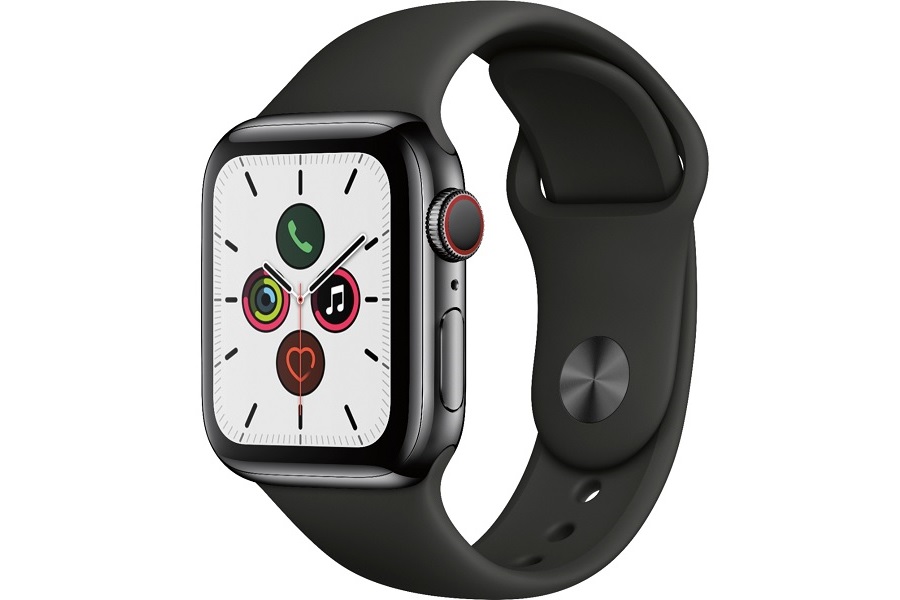
Best Buy is currently holding a sale on stainless steel, cellular versions of the Apple Watch Series 5. Most notably, you can get the 40mm version in space black for $379, which is $320 off the original price. Other stainless steel cellular deals include include 44mm in black with a milanese loop for $499, 40mm in gold for $399, or 40mm in silver for $399.
Aside from just looking shinier, the steel versions use sapphire crystal instead of glass over the display, so they're much more scratch-resistant. The Series 5 still has an always on-display like the latest Series 6, though the screen doesn't get quite as bright outdoors and it doesn't support blood oxygen readings (which I've found to be of little use anyway).
Other decent deals this morning:
- Grab a pair of USB-C to USB-A cables (one is six feet long, the other's 10 feet) for $4 with code RRXMPVRR at checkout.
- Aukey's car charger with USB-A and USB-C ports is on sale for $7.70 when you clip the on-page coupon and use the code SDAR8R6W at checkout.
- Going camping? Woot is selling RavPower's 70200 mAh portable power station for $150, which is $70 off the street price and $30 lower than Amazon's record low.
- Google's Pixel 4a 5G phone hits its lowest price yet at $449 from Best Buy and other retailers. B&H will also throw in a free clear case.
- The Arlo Pro 2 two-camera system is half-off, at $200.
- The Roku Streaming Stick+ is once again on sale for $39, down from the usual $50.
- Get a space gray iPad with 32 GB of storage for $300 or a silver one with 128 GB for $395, savings of $29 and $34, respectively.
|
|
| Thanks for your support! |
|
As always, let me know if you have any tech questions I can answer, comments on anything you've read here, or feedback on this newsletter. I'm always happy to hear from you. Just reply to this email or swing by the Advisorator chat room on Slack to get in touch. And remember, you can read every past issue of the newsletter online at the members-only website.
Until next week,
Jared
|
|
|
|
|
|