 |
| |
 |
| November 24, 2020 |
| Money-saving shopping tools |
|
Plus: Microsoft's unlimited video meetings, new tricks for Chrome, and Black Friday highlights
|
| |
 |
|
Let this be known as the week that I finally gave in and started using Honey.
If you're unaware, Honey is a free browser extension (now owned by PayPal) that tries to save you money while shopping. When you're about to buy something, it automatically finds coupons and tries applying them to your order, and it lets you know if better deals are available elsewhere. You can also set up a product wishlist that alerts you when prices drop, and your purchases at most major retailers can earn you credit towards additional gift cards.
Although I've known about Honey for years, I'm instinctively wary of shopping-related browser extensions that might offer a window into your browsing habits. But with Black Friday approaching, I decided to give it another look.
Honey's privacy policy went a long way to putting me at ease. The company says its extension doesn't collect any information when you're not on a retail site, and it doesn't sell any of your personal shopping data to anyone. (In fact, Honey doesn't even offer a "do not sell my data" mechanism, which would be required under California's privacy laws if it was engaged in such behavior.) As this Wired article from last year explains, Honey makes money by collecting sales commissions on the things you buy, not from advertising or marketing.
Once you've installed Honey for Chrome or Firefox, you'll see a little orange logo near the top-right of your browser on sites like Amazon or Best Buy. Hovering over it will show you the product's 30-day price history, and if you click "See price history," it'll bring up a larger chart where you can view up to four months of data. If you want to get alerts for better prices, you can select "Add to Droplist" in the pop-up menu. (By default, the extension also automatically syncs any items you add to your Amazon wishlist.)
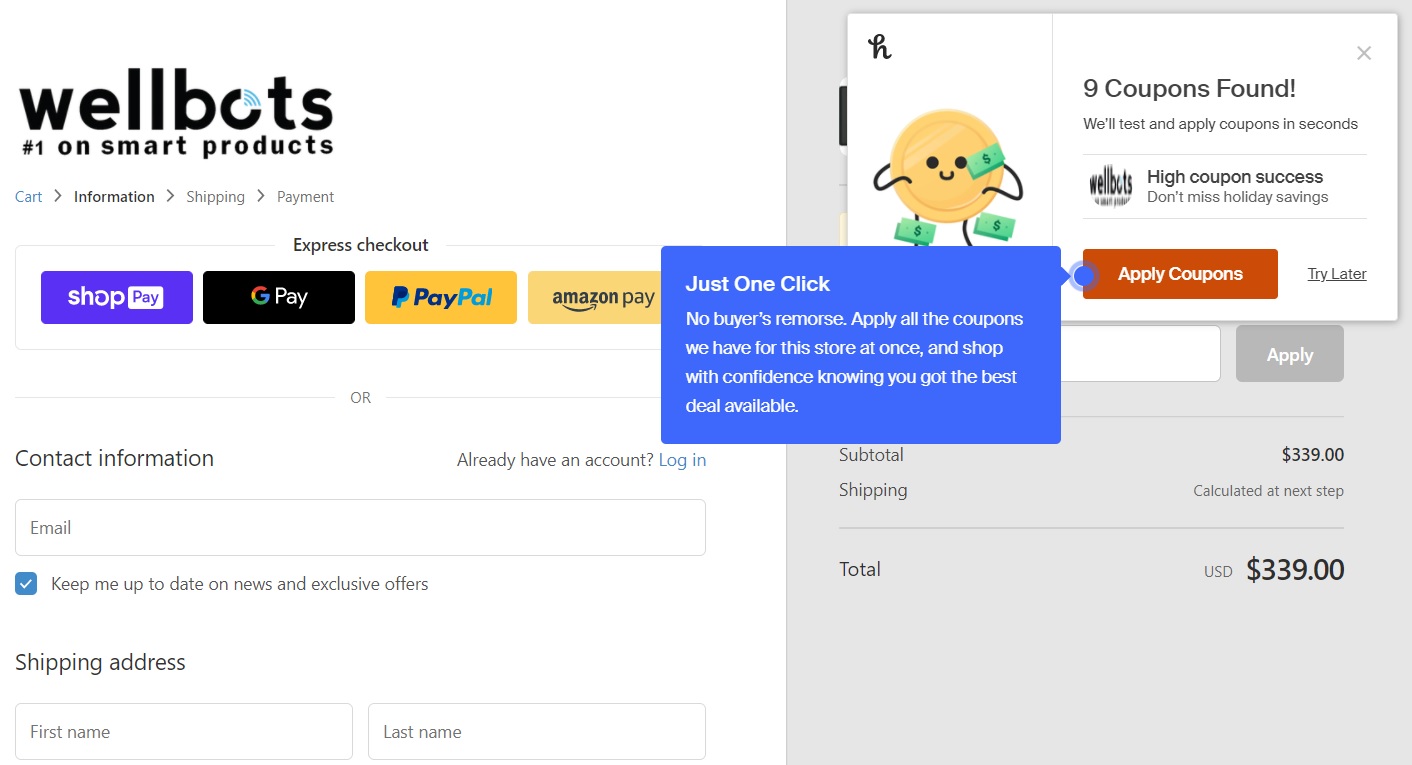
Honey is at its best, however, when you're checking out. The extension trawls the web for coupon codes and shows a pop-up if it finds any potential matches. You can then click a button to have Honey try applying the codes on your behalf. I've tried this on a handful of sites, and it works as advertised.
|
 |
|
I haven't used Honey enough to start benefiting from its rewards program, which gives you points toward gift cards if you shop while the extension is active, but I do plan to keep using Honey for the foreseeable future. If anything, I wish I'd checked it out sooner.
Of course, Honey isn't the only shopping tool that can help you out during the holiday season. Here are some others:
Microsoft Edge's shopping tools
Last week, Microsoft added its own coupon-finding feature to its Edge web browser, and unlike Honey, it works just as well on your phone as it does on your desktop. (Although Honey has a mobile app that lets you shop through certain retail stores, it doesn't work through your regular web browser.)
Just install Edge for iOS or Android, and you'll see a blue coupon icon in the address bar when discounts are available. Tap the icon to view coupon codes, or just let Edge try to apply them automatically at checkout.
Google Shopping's price tracker
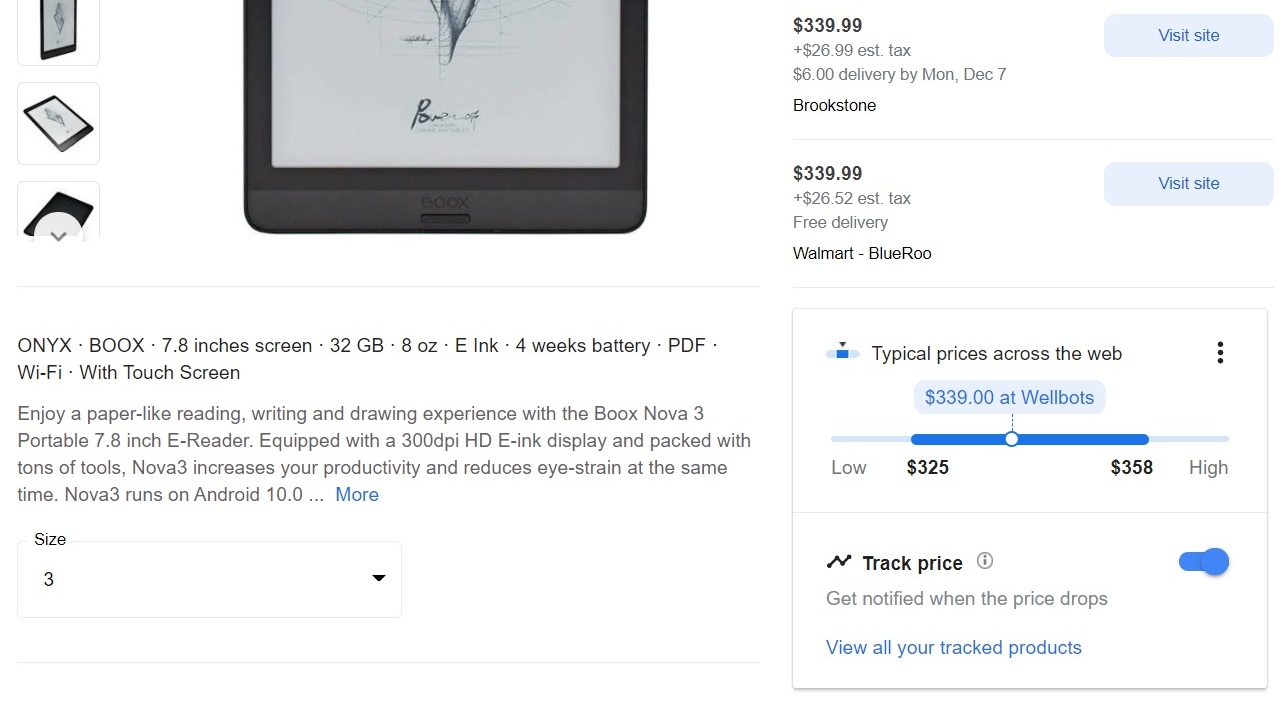
For more price history insights, give Google's Shopping website a try. Search for any product, then click "view product details." This will take you to a product page, where you'll see a box showing a range of typical prices. You can also click the "Track price" toggle to set up alerts when prices drop.
|
 |
|
Google Shopping does have one major blind spot, in that it doesn't index prices from Amazon, but it's still useful as a rough guide to whether you're getting a deal.
Old favorites: CamelCamelCamel and Slickdeals Alerts
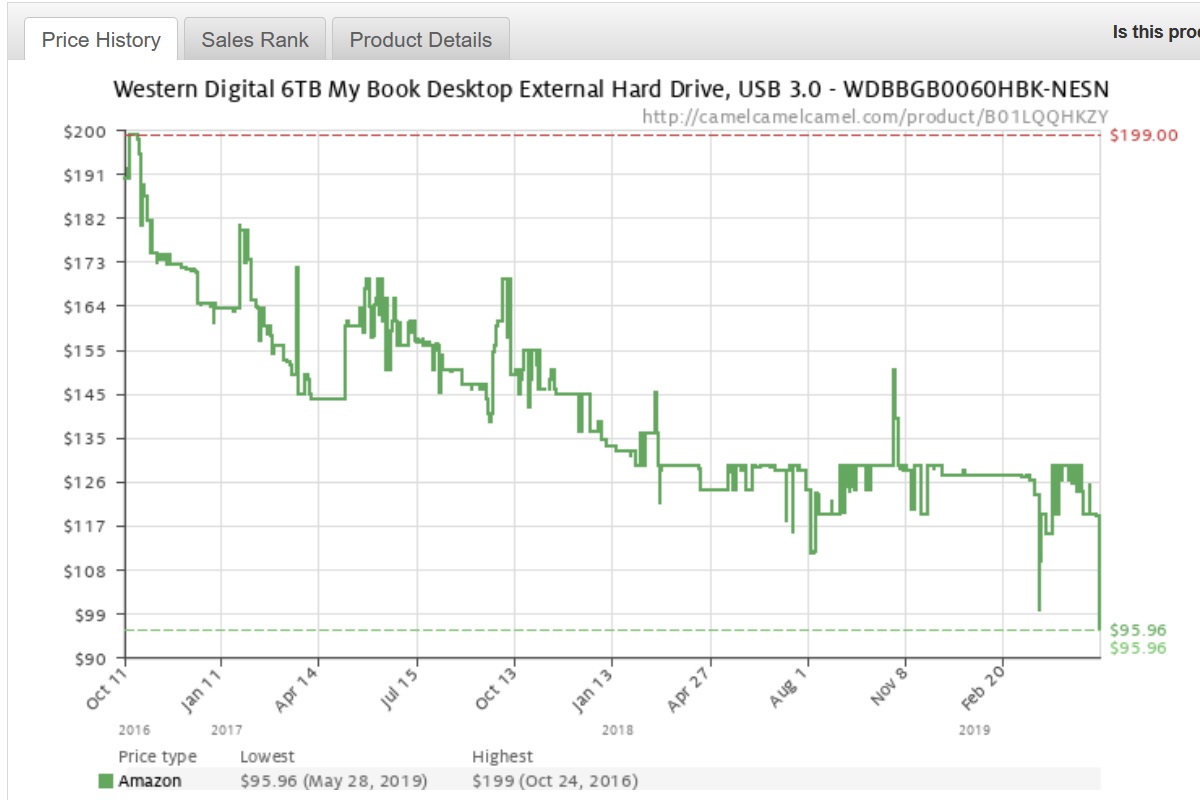
Although I've mentioned it many times before, I'll always take any chance to praise CamelCamelCamel. Just paste any Amazon product link into the search bar, and CamelCamelCamel will show you its price history. You can also set up email alerts for when a product's price drops below a certain threshold.
|
 |
|
To make CamelCamelCamel easier to use, install the Camelizer web browser extension, or use the TryCamel Android app, which lets you look up Amazon product pages through the Android share menu. On iOS, you can use the CmlCmlCml Shortcut to look up price histories through the Amazon app.
I also make extensive use of SlickDeals to keep track of certain products. The long-running community does an excellent job digging up discounts from around the web, and if you create an account with the site, you can set up custom alerts based on keywords. It's the best way to look beyond Amazon for price drops, and to search for broad categories instead of just specific products.
Jared's Twitter list
If you want to drink straight from the deal firehose, feel free to peruse my Deal Stream list on Twitter. Here you'll find the latest updates from Slickdeals, Wirecutter Deals, Thrifter, 9to5Toys, and Newegg's Hot Deals. It's got an admittedly-high chaff-to-wheat ratio, and not all the deals are tech-related, but it's a fun way scan through lots of sales all at once.
|
|
|
Did you know that you can now read every past issue of Advisorator on the web? Just log into the new members-only website at advisorator.com/members, then head to "Archives." If you haven't set up an account yet, click this link first to set up your password.
One more thing: Advisorator now offers gift subscriptions! If you know anyone who'd love this newsletter, you can set them up with a non-recurring subscription for six months ($30) or one year ($50). I'll also add a $5 credit to your account if you buy a subscription by the end of this year.
|
|
| Need to know |
|
Microsoft's unlimited video meetings: Microsoft Teams just become more conducive to personal use with a free web-based version that anyone can join. You'll still need a Microsoft account to start a video call, but other participants can join just by visiting the meeting link, with no account required. To get started, visit teams.live.com in your web browser, then click the video icon in the "Chat" tab. You'll then get a meeting link that you can share with anyone.
Microsoft says video calls lasting less than 24 hours are free for up to 300 participants "until further specified." This follows a similar move by Google, which recently waived time Google Meet's 60-minute time limits until March 2021. Zoom, meanwhile, still caps free meetings at 40 minutes, but is lifting that limitation on Thanksgiving day.
M1 MacBook misfires: Over at Forbes, Pat Moorhead has an interesting corrective to all the glowing M1 Mac reviews that dropped last week. While Apple's home-grown M1 chip does seem to outperform Intel processors by a wide margin on the new MacBook Air, 13-inch MacBook Pro, and Mac Mini desktop, Moorhead ran into compatibility issues in apps like Microsoft Edge, Outlook, Adobe Acrobat Reader, and Logitech Camera Control. (He also linked to a handy website that documents M1 support levels in popular apps.)
Bear in mind that Moorhead is an industry analyst who counts chipmakers like Intel, AMD, and Nvidia (but not Apple) among his clients, and I disagree agree with his conclusion that you should just buy an Intel-based Mac instead. Apple silicon is clearly the future of the Mac, and these compatibility issues probably won't last. Still, he's right that initial reviews painted an overly rosy picture, and there's no need to rush into upgrading what you already have. MacBooks are one of Apple's most frequently-discounted product lines anyway, so there's little harm to waiting if you can stand to do so.
|
|
| Tip of the moment |
 |
|
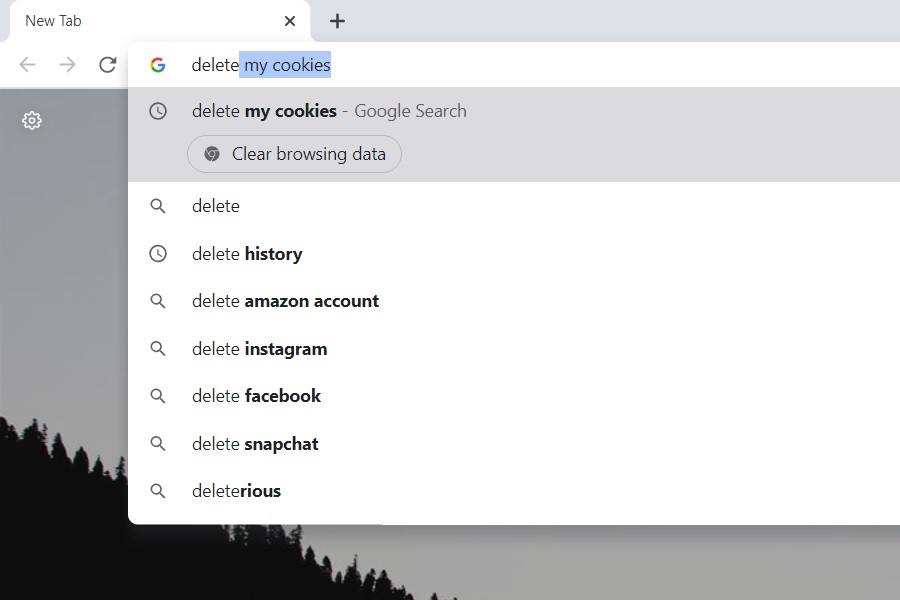
New tricks for Chrome: Google's added a couple of neat features to its Chrome browser in version 87, though you may have to activate them manually if they don't show up for you:
With "Chrome Actions," you can get things done by typing in the address bar instead of searching for the appropriate button or setting. Type "Delete history," for instance, and you'll see a "Clear browsing data" button that takes you straight to the settings menu for wiping your browsing activity. Other examples:
- Type "edit credit card" to manage your payment autofill options.
- Type "incognito" to open a private browser tab.
- Type "edit passwords" to manage login info saved by Chrome.
- Type "translate this" to translate the current page.
- Type "update browser" to trigger the latest browser update.
If you don't see these options, you can enable them by entering chrome://flags/#omnibox-pedal-suggestions in your address bar and selecting "Enabled" in the drop-down menu, then doing the same for chrome://flags/#omnibox-suggestion-button-row.
Chrome also has a much better built-in PDF reader now, with a sidebar for jumping between pages, a rotate button, and an option to switch between full page and page width views. If you're not seeing the new viewer, head to chrome://flags/#pdf-viewer-update and select "Enabled" in the drop-down menu.
The other big update in Chrome 87 shouldn't require you to do anything: Google's rolling out a couple of new features called "tab throttling" and "occlusion tracking" that are supposed to boost battery life and performance. Google says it's rolling these features out gradually, but you can enable tab throttling right now via chrome://flags/#intensive-wake-up-throttling.
|
|
| Now try this |
|
Relive Flash's glory days: At the end of this year, Adobe will conclude its three-year endeavor to wipe Flash from the web. It will no longer offer the plug-in for download or issue security updates, and all major browsers will stop supporting it if they haven't already.
While the death of Adobe Flash will make the web a safer, faster, and overall better place, it also means that countless web games and animations from the 1990s and early 2000s will stop working. So I'm delighted to see Archive.org stepping in with a push for preservation. Head to the Flash software library, and you can relive classics like Helicopter Game and Jonti Picking's Badger song through emulation, even without Flash installed in your browser.
Amazon's music trivia: If you've ever used Amazon Prime Video, you've probably come across the "X-Ray" feature that shows extra info on whatever movie or show you're watching. Now, Amazon's extending that feature to its Amazon Music app. Just swipe up whenever you see "X-Ray" on the now playing page, and you'll get details about when the song came out, along with credits and other informational tidbits. This works not just with Amazon's Music Unlimited subscription, but with Prime Music, which includes two million ad-free tracks for Prime subscribers.
|
|
| Around the web |
|
|
|
| Spend wisely |
 |
|
As with last week, you don't have to wait until Black Friday to get some of the better deals out there.
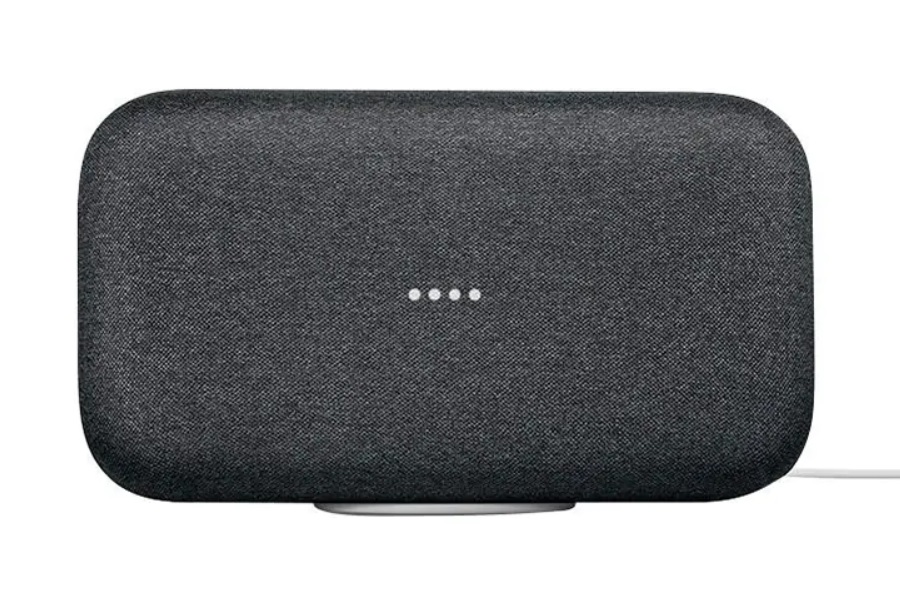
If you're into Google's smart home ecosystem, you can currently get a Google Nest Wi-Fi two-pack (plus a bonus pair of Wi-Fi smart plugs) for $219, down from the regular $278; a Google Home Max speaker for $150, which is half off the regular price; or a Google Nest Hub smart display for $50, down from around $90 regularly.
The best deal for these products is at BuyDig (linked above), where you can use coupons for extra savings. Use the code DIGTURKEY5 for $5 off orders over $150, DIGTURKEY10 for $10 off orders over $300, DIGTURKEY15 for $15 off orders over $500, DIGTURKEY25 for orders over $1000, DIGTURKEY50 for $50 off orders over $2000.
Meanwhile, Amazon's new spherical Echo speakers are also on sale for the first time. Get the fourth-gen Echo with a pair of Philips Hue smart bulbs for $70 (regularly $100 for the speaker alone) or the Echo Dot with clock plus a Sengled Bluetooth smart bulb for $39 (regularly $69 for just the speaker). The new spherical Echo Dot (without clock) is also on sale, but I'd skip it and grab the previous-gen model for $19. Amazon's also having its usual sales on other devices, including Kindle e-readers and Fire TV streamers.
Other notable deals:
- Get a 256 GB Samsung MicroSD card for $25, by far its lowest price yet.
- If you need a three-pack of Nest Wi-Fi mesh routers, it's down to $299 at Best Buy, versus a regular price of $468.
- Lenovo's Smart Clock with Google Assistant is down to $33.25 with coupon code EXTRAFIVE.
- The UE Wonderboom 2 is a decent waterproof Bluetooth speaker, and it's down to its lowest price yet at $50. (Amazon Prime cardholders also get 10% cash back instead of the usual 5%.)
- Amazon's taking $40 off the TP-Link Deco Wi-Fi 6 mesh system, bringing the price to $230.
- The red Apple Watch Series 6 (40mm) is down to $330 from Amazon or Walmart, versus $400 regularly.
- The 11-inch iPad Pro has dropped to $730 (reg. $800) from Best Buy, with additional savings for open-box models.
- Chamberlain's MyQ smart garage door opener is on sale for $25 (reg. $40), plus you can get a $30 Amazon credit if you enable in-garage package deliveries.
- Amazon's also offering a $10 store credit if you sign up for its Audible Plus audiobook service. That'll net you $5 if you cancel before the second month starts.
- The Sonos Beam soundbar has hit $300 (reg. $400) at most major retailers, including Best Buy. You can also take $100 off the compatible subwoofer, bringing its price to $600.
- The LG Gram 17, a super-light laptop with a 17-inch screen and great battery life, has hit $1,262 at Amazon, its lowest price yet. This has a better keyboard than the previous-gen model, which I reviewed for PCWorld last year.
- The LG Ultra PC is also on sale for $1200. It's basically the Gram 17 with an Nvidia GeForce GTX 1650 graphics card inside. I reviewed this one too and liked it a lot.
- Best Buy has the Surface Pro 7 tablet bundled with a Type Cover keyboard for $600, a $360 discount. This is for the Intel Core i3 model with 4 GB of RAM. The Core i5 version with 8 GB of RAM is on sale for $800.
- Also at Best Buy: HP's 14-inch 2-in-1 Chromebook with an Intel Core-i3 processor and 8 GB of RAM for $379.
|
|
| Thanks for your support! |
|
I hope everyone has a safe, restful, and enjoyable Thanksgiving. As always, I'll be keeping an eye out for more deals and sharing any exceptional ones via Deal Alert emails. (If you opted out of deal alerts and want to start receiving them again, please let me know.) I'll also post additional deals in the Advisorator chat room on Slack, so please swing by and say hello!
Until next week,
Jared
|
|
|
|
|
|