 |
| |
 |
| December 15, 2020 |
| Revisiting big screen video chat |
|
Plus: Apple's new fitness program, a mini-Chrome scandal, and a simple source for news
|
| |
 |
|
Back at the start of the pandemic, there were no great ways to conduct a video chat through your television.
While the big screen is a more natural place for video chat than your phone or a computer—you can virtually sit across the room from someone instead of being up close with their face—few companies were interested in facilitating such interactions pre-pandemic. As such, using your TV for video chat probably meant plugging your laptop into the television with an HDMI cable or relying on clunky screen mirroring methods.
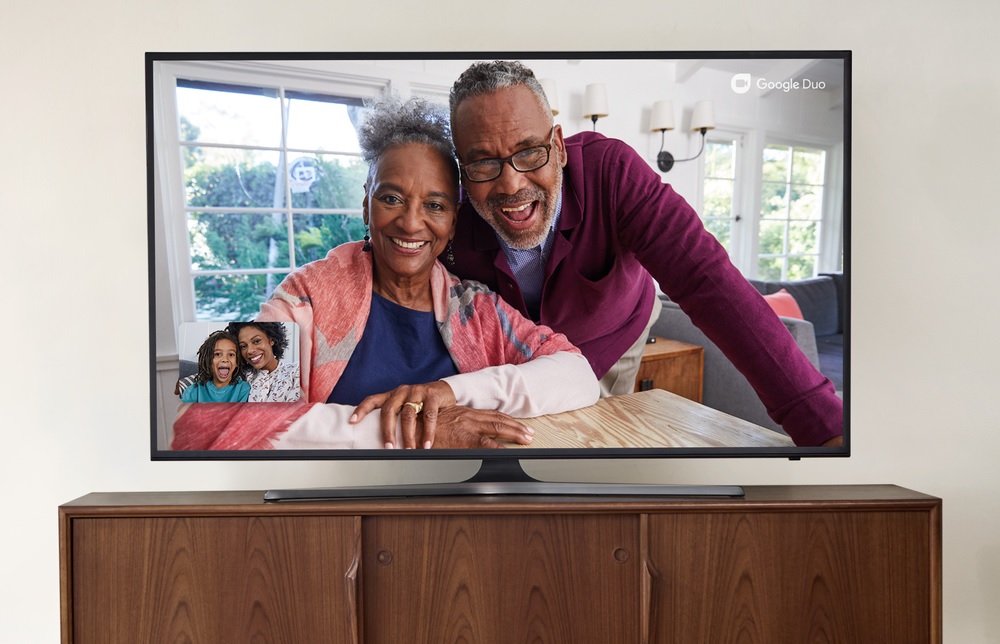
But with lots of folks hunkering down at home during the holidays this year, the state of TV video chat is starting to change at just the right time. Earlier this month, Amazon launched Alexa video chat support on its Fire TV Cube streaming box, and Google has also been rolling out a version of its Duo video chat service for Android TV devices, such as Sony smart TVs, Nvidia's Shield TV box, and the new Chromecast with Google TV. In both cases, you can plug a webcam into your smart TV or streaming player and view the call through your television.
Both efforts still feel rudimentary. You'll need unusual combinations of hardware to get them working, along with video chat software that may not be your friends' and family members' first choices. I also ran into a bunch of technical glitches with Google Duo on Android TV, and I wish Amazon's system was more robust feature-wise.
And yet, here I am contemplating a USB hub for my Nvidia Shield TV Pro—the two existing ports are already occupied for other things—along with another webcam so I don't have to shuttle one back and forth from my computer. When it works, the experience of video calling through the television is still as close you get to being in the same room.
Setting up Google Duo
|
 |
|
Google's support documentation for Duo calling on Android TV is best-described as bare-bones, but I got the best experience by plugging my Logitech C920 webcam directly into the USB port on my Nvidia Shield TV box, then installing Duo from the Google Play Store. If you have a Sony smart TV with a USB port, that would probably work as well.
Things get trickier if you have an Android TV-based streaming dongle such as the Chromecast with Google TV or TiVo Stream 4K. Neither of those devices has a full-sized USB port, and the Chromecast only has a USB-C port for power. I tried connecting a USB-C hub to add the necessary full-sized port, and while this technically worked, my webcam video seemed unusually blurry in both cases.
I ran into other issues with Google Duo as well. The Shield TV did not seem to like my older Logitech C270 webcam, which caused video glitches and error messages, and connecting any camera with Duo still running resulted in an error telling me to restart the device. (In fact, force-quitting Duo seemed to be sufficient.) The app also displays a bunch of visual effect options that don't actually work on televisions, and trying to activate them results in even more glitches. To call this a work in progress would be charitable.
Under ideal conditions, though, video chatting through Duo is quite pleasant. The C920's video looked crisp, I'm told, and its microphones did a fine job capturing audio. Duo itself supports group calling through the TV, and it has a neat auto-frame feature crops the image around any faces it detects. It's too bad the surrounding setup and support haven't received the same level of care.
Fire TV Cube calling
|
 |
|
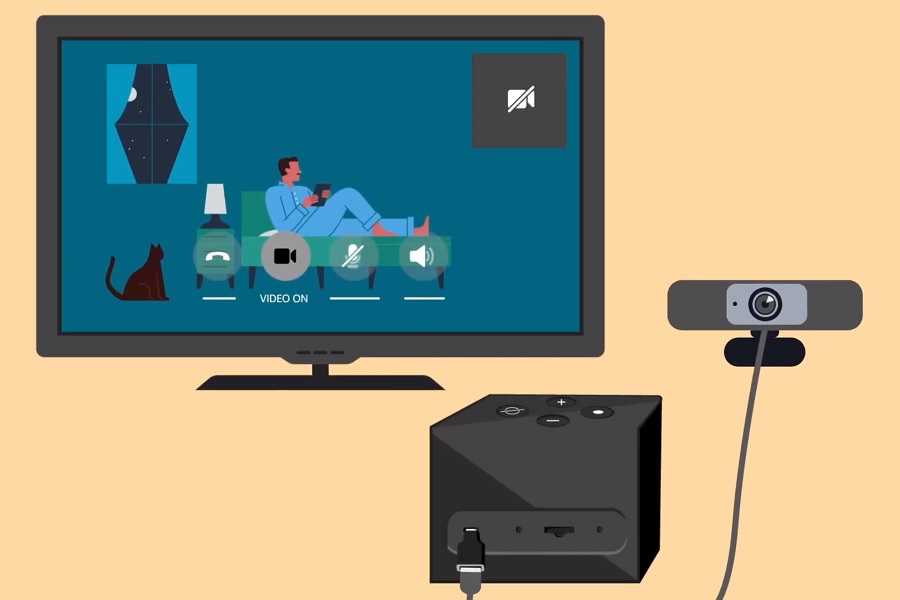
I didn't have nearly as many issues with Amazon's system, perhaps in part because it only works with the second-generation Fire TV Cube streaming box. (I tried setting it up with other Fire TV devices, to no avail.) Although the Cube also doesn't have a full-sized USB port, you can add one by plugging pretty much any OTG adapter (like this one) into the Micro USB port on the back, then plugging a webcam into the adapter. Both of my Logitech webcams worked flawlessly with this setup.
Amazon's big problem, though, is the Alexa video chat service itself, which doesn't support group calling and is unlikely to be adopted by anyone who doesn't already own an Echo Show smart display. While you can use Alexa's mobile app for video chat, good luck convincing non-Echo users to embrace that.
Also, it's not immediately obvious how to enable video chat in the first place. To get started, you have to open the Alexa app on your phone, head to the Devices tab, select your Fire TV Cube, and make sure Communications is enabled. Even then, Amazon doesn't offer any kind of centralized calling app on the Fire TV. You can either head to Settings > Alexa > Communications > Contacts for a list of people to call, or just use a voice command instead.
Other options
Ideally, these companies would offer simpler TV video chat solutions, akin to Facebook's Portal TV device. (That's an option I've been reluctant to embrace, mainly because I try to use Facebook products as little as possible.) My real dream is for Apple to build a streaming TV product around Facetime, but I know that developing new products usually takes years, most tech companies probably weren't even thinking about such concepts until last spring.
For now, plugging a laptop into your TV remains the most versatile and hassle-free option, but webcam support from Amazon's and Google's streaming devices gives us a taste of something better.
|
|
|
Know anyone else who might love Advisorator? Please consider setting them up with a gift subscription! They're available in increments of six months (for $30) or one year (for $50), and you'll get a $5 credit if you purchase one in 2020. Thanks!
|
|
| Need to know |
|
Apple's new fitness program: After announcing it back in September, Apple has launched its Fitness+ subscription service, which offers an array of in-home exercise videos for $10 per month or $80 per year. (You can also bundle it with an Apple Music family plan, Apple TV+, Apple Arcade, Apple News+, and 2 TB of iCloud storage for $30 per month.) CNBC got an early preview and has a nice hands-on look at the service.
The service has its own strict hardware demands, though, including an Apple Watch Series 3 or newer paired with iPhone 6S or newer, plus an optional iPad or Apple TV if you want a larger screen on which to view the videos. (It seems that other AirPlay devices, such as Roku players, are incompatible.) The upside is that by tying all those elements together, you'll get a readout of your heartrate, calorie burn, and exercise ring progress overlaid on the videos, which could be more engaging than looking up random exercises on YouTube.
In any case, Apple is giving out three-month trials to new Apple Watch buyers, and if you grabbed an Apple Watch from Best Buy recently, you may be entitled to six free months of the service, so keep an eye on your inbox for those offers before signing up outright.
A potentially-unwanted Windows icon: Have you noticed a funky new icon hanging around the Windows taskbar recently? Hover over it with your cursor, and you'll discover that it's a "Meet Now" button, whose purpose is to quickly launch Skype meetings on demand.
Perhaps some folks exist who are thrilled at this concept, but I am not. Fortunately, the icon is easily wiped away by right-clicking on it, then selecting "Hide." In fact, Skype itself is easily uninstalled from Windows 10 by hitting the Start button, typing "Skype," right-clicking the icon, and selecting "Uninstall." I used to keep it around for the occasional odd Skype invite, but those have dried up entirely for me in the age of Zoom. The "Meet Now" button, ironically, is a reminder that it's time for Skype to go.
Chrome's performance brouhaha: Over the weekend and into yesterday, the world of nerdier Apple users was alight with claims that Google's Chrome browser causes major slowdowns on Macs. The debate began when Loren Brichter, a well-regarded software designer, noticed excessive processor usage coming from a program called Keystone, which Google uses to auto-update the browser. Brichter set up a website ("chromeisbad.com") to document his findings, and he's since been collecting anecdotes from people who say that banishing Chrome and all instances of Keystone has drastically improved their Macs' performance.
Still, the case isn't as cut-and-dry as Brichter claims. Internet commenters on Hacker News and Reddit found the evidence against Chrome to be lacking, and 9to5Mac's Guilherme Rambo ran a bunch of tests that turned up no signs of excessive processor use coming from Chrome's update utility. (Rambo attributed the anecdotes of improved performance to confirmation bias and placebo effects.)
I'm all for experimentation, so if you're dissatisfied with your Mac performance, Brichter's Chrome removal instructions might be worth trying. But I'm also willing to accept the possibility that this is just a weird bug.
|
|
| Tip of the moment |
 |
|
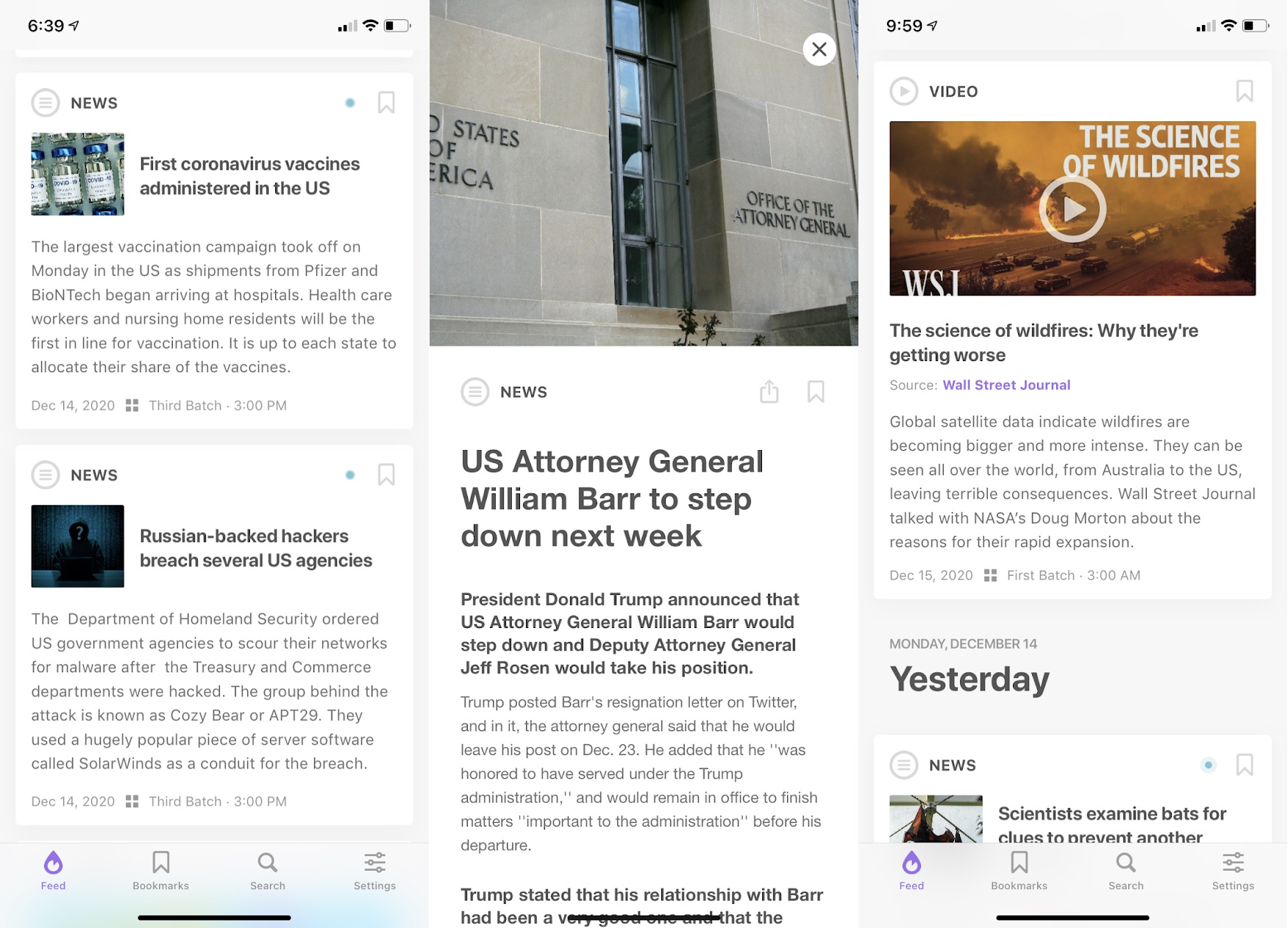
A simple source for news: While there are plenty of ways to get the news on an iPhone—from Apple's own News app to whatever's floating through your social media feeds—I like this little alternative called Newsdrop. The free app uses human editors to boil down the day's top stories into fact-focused blurbs of 200 words or less. You can tap on each story for more details, and tap the links at the bottom of each story for the original sources, but just scrolling through the top-level feed is enough to give you the gist.
Newsdrop isn't perfect. The app could use a higher number of news items in general, and you have to view 30-second video ads to unlock certain bundles of stories, which runs counter to the app's focus on quickness. That said, the price to remove all ads is a reasonable $8 per year, and the app as a whole is welcome break from the overly loud headlines and drawn-out articles you'll find elsewhere.
|
|
| Now try this |
|
One last spin for Music Memos: Back in 2016, Apple released an app for recording musical ideas called Music Memos. It included a built-in tuner to make sure you were playing or singing on-key, and it could automatically add little drumbeats and basslines to your recordings. This was an admittedly niche idea, which might explain why Apple's pulling Music Memos from the App Store on March 1. The app's latest—and final—update adds the ability to export recordings to Apple's Voice Memos app instead.
The app will remain usable after the discontinuation date if you download it now, and I think it's worth a try if you have any musical inclination. It's a neat idea that could have been iterated upon, and now I'm a bit said that it's going away. I hadn't even heard of Music Memos until reading about its impending demise—which could have been part of the problem.
An interesting list of apps: Speaking of apps to try, the folks at Macstories have released their annual picks for best apps of the year, and it's a good read that's different from most app roundups. Instead of rewarding the obvious hits, the site tends to focus on apps that embrace iOS and Mac design trends, and that make full use of platform-specific features like iOS Shortcuts and widgets. That's how you end up with apps like MusicHarbor and Craft among the top picks. I don't always use the tools that Macstories recommends, but I appreciate the point of view.
|
|
| Around the web |
|
|
|
| Spend wisely |
 |
|
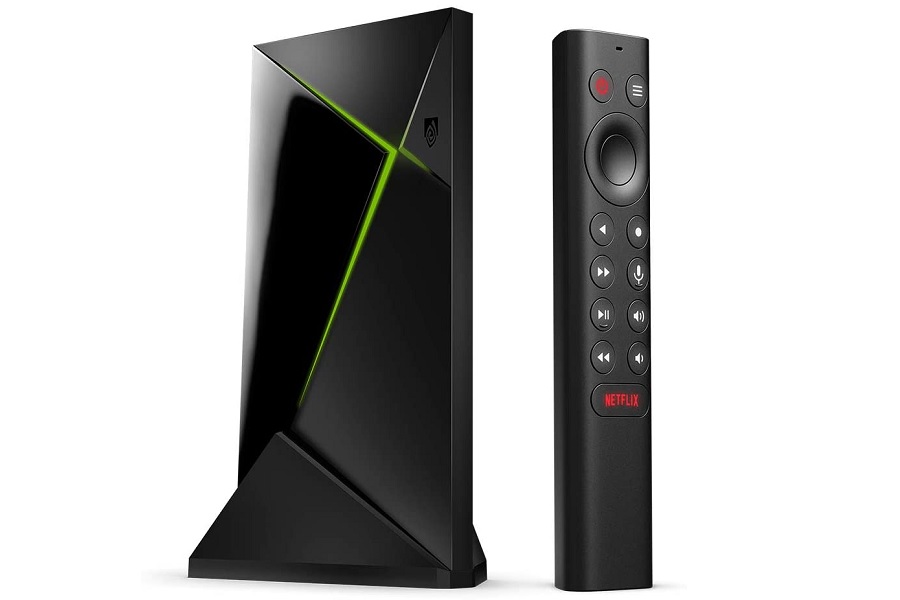
I sent a deal alert email about this yesterday, but you can still get the Nvidia Shield TV Pro streaming box for $179 from B&H, or for a buck more from other retailers including Amazon and Best Buy. It's a great device for running your own Plex or Channels DVR server, or for video chatting with a webcam per this week's feature topic. The non-Pro version, which lacks USB ports and server support but is still a speedy 4K HDR streaming player, is also on sale for $129.
Other notable deals:
- Get a second-generation Echo Dot speaker for $50.
- Save $20 on the iPad's Apple Pencil, or save $30 on the Pencil 2 for the latest iPad Air and newer iPad Pros.
- Target has Logitech's basic C270 webcam in stock for $27.49, down from $40 elsewhere, though you'll need $7.51 of extra merchandise for free shipping.
|
|
| Thanks for your support! |
|
Just an early heads up that next week's newsletter will be the final one of 2020, as I'll be trying my hardest not to work during the last week of the year.
As always, don't hesitate to email me with any tech questions you might have, or stop by the Advisorator chat room on Slack for further discussion. I think we're building something very cool there!
Until next week,
Jared
|
|
|
|
|
|