|
Plus: Neat focus tools and Apple's next event
Why a desktop computer's worth considering
|
Plus: Hyperlinking with ease, neat focus tools, and Apple's next event
|
|
About a week ago, I dipped into the Advisorator Gadget Budget and bought a Mac for the first time in my life.
|
|
It's not that I'm anti-Apple by any means—I switch freely between iOS and Android, and I'm currently wearing an Apple Watch—but my preference for working in Windows has started to feel like a blind spot in my tech coverage, at least to me. Even when I can borrow my wife's MacBook to try the occasional app or MacOS trick, it's not the same as living inside MacOS full-time.
|
|
Unlike the average Mac buyer, I didn't end up with a MacBook. Instead, I went with Apple's diminutive Mac Mini, which is now sitting on my desk beneath my main monitor. I'll surely have plenty to say about the experience in the weeks or months ahead as I switch back and forth from Windows.
|
|
But since I've gotten some questions before about the merits of desktop computers vs. laptops, now seems like a fine time to make a case for the former. While the laptop's portability benefits are obvious, here's why I still appreciate the desktop computer—whether it's running Windows or MacOS:
|
|
The Mac Mini starts at $700, which is $300 cheaper than a MacBook Air with nearly identical tech specs. Essentially, you're not paying for the display, trackpad, battery, and webcam, which means you can put that savings toward better desktop accessories or use what you've already got.
|
|
The math gets a little trickier on the Windows side, where pricing can be all over the place depending on brand. Still, you can generally find decent entry-level desktops for well under $500 (one example), whereas the quality of laptops in that price range can be iffy.
|
They're better for certain applications
|
|
The always-on nature of desktop computers also opens up some use cases that aren't practical with a laptop. One thing I'm looking forward to setting up on the Mac Mini is AirMessage, a free program that brings iMessage to non-Apple devices such as Android phones and Windows computers. Because AirMessage's Mac software is responsible for relaying messages to other devices, it needs to be running around the clock.
|
|
The same goes for any other program that involves serving data to other devices, including Plex media servers, Channels DVR servers, or HomeBridge smart home setups. With a laptop, you'd lose access to these services whenever you put it to sleep.
|
|
Intel and AMD ship different sets of processors for laptops and desktops, with the latter being more powerful. After all, they don't have to worry about keeping your lap cool or burning through too much battery life, and they can use bigger fans to dissipate heat.
|
|
Meanwhile, benchmark tests have shown that the M1-powered Mac Mini is a teeny bit faster than the M1 MacBook Pro, which in turn outperforms the M1 MacBook Air due to its internal fan and extra GPU core. That means there's no better computer than the Mac Mini for seeing what M1 can do, even if the differences aren't drastic.
|
Desktops are easier to expand ...
|
|
To keep costs down, I went opted for the entry-level Mac Mini configuration with 256 GB of storage, and while I don't intend to run out of space, adding more storage would simply be a matter of plugging in an external hard drive.
|
|
Adding more storage to a laptop creates a whole new set of complications. Only some Windows laptops let you throw in more internal storage, and Apple's recent MacBooks aren't expandable at all. While you can certainly plug an external drive into a laptop, you'll need to avoid loading it with any important files or programs unless you always plan to take the extra drive with you.
|
... And they're simpler to sit down and use
|
|
The ease of adding storage to a desktop ties into a broader point, which is that desktops can feel less cumbersome than laptops, especially when you're bringing in external monitors, webcams, speakers, mouses, and keyboards. You don't have to deal with finding your laptop and plugging in power cords and peripherals before you can get comfy at your desk.
|
|
That might sound sort of silly—it's not that hard to plug in a few cables, after all—but sometimes removing tiny bits of friction can make a big difference. Even using a fancy laptop docking station isn't the same as being able to sit down at your desk and immediately start computing.
|
|
Whether those upsides are worth sacrificing the portability of a laptop is something I can't answer for you. But they're worth keeping in mind next time you're dipping into your own Gadget Budget for a new computer.
|
|
Apple's next event: Later today, Apple is holding an online news event. New iPads Pro are almost certainly on the menu, as are Apple's long-rumored AirTags item trackers and an updated iPad Mini. We might also see an update to the basic iPad, new M1-powered iMacs, and some new accessories, such as iPhone cases and battery packs. Apple may also release—or at least say when it will release—iOS 14.5 and its headlining ability to stop apps from sharing your activity data with others. MacRumors has an easy-to-read rundown of what's likely and what's not.
|
|
As always, abstain from buying any new Apple gear at full price if replacements are imminent, and feel free to swing by the Advisorator chat room on Slack if you want to discuss the news as hit happens.
|
|
Amazon's improved earbuds: Amazon is releasing a new set of wireless earbuds next month, and the most interesting thing about them is that they're relatively cheap. The second-gen Echo Buds start at $120, or $140 with a wireless charging case, and Amazon's knocking an extra $20 off the price for a limited time. Amazon also says the new buds sound better, are more comfortable, and have better noise cancellation than their predecessors.
|
|
Of course, much cheaper wireless earbuds do exist, but $100 (or even $120) is a pretty aggressive price for noise-cancelling buds with hands-free voice control. Google's Pixel Buds cost $180 by comparison, and Apple's AirPods Pro fetch $249 when they're not on sale. I'm intrigued, if only because Alexa is the only voice assistant that can play music from my Plex server.
|
|
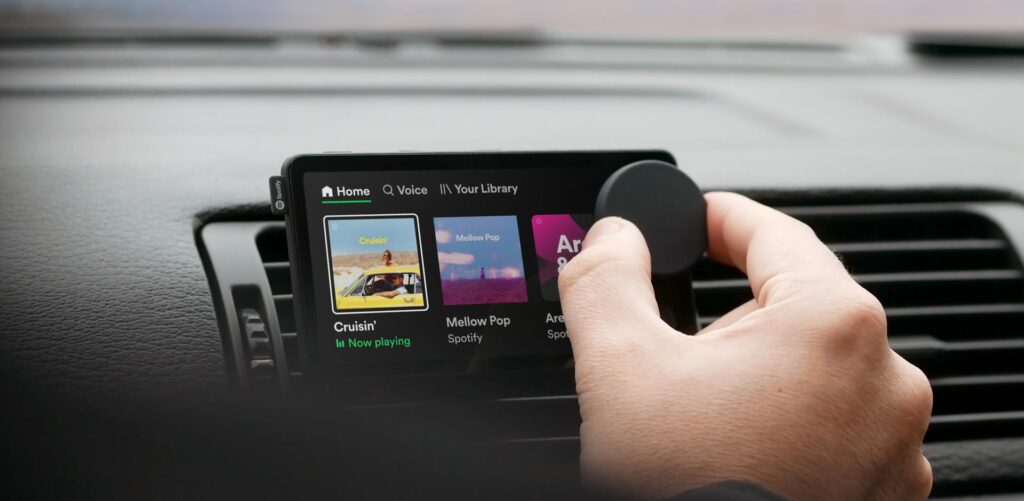
Spotify's car player: Spotify is taking a stab at consumer hardware with Car Thing, a small touchscreen device with a dial and voice control that clips onto an air vent and plays music through your car's speakers. It could be a neat way to simplify playing music or podcasts from the road, though you'll have to be 100% committed to Spotify to use it, and even Spotify seem unsure if it'll stick, referring to it as a "limited product launch." In any case, the company says Car Thing would normally cost $70, but you can reserve it for $7 by joining a waitlist and maintaining an active Spotify Premium subscription until it's your turn.
|
|
Caavo's universal remote update: In last week's story about universal remotes, I said to be wary of Caavo due to its recent silence and lack of product updates. Now, the company is speaking up, telling Protocol that it will launch a new version of its Control Center hardware next month.
|
|
Caavo's approach is unique in that it routes all video sources through its own set-top box, then uses its own menu overlay and remote to control them all. But even with updated hardware on the horizon, the startup seems to be losing interest in consumer tech. Caavo now says it's focusing more on senior living facilities, where it hopes to sell hardware for checking in on loved ones through their TVs.
|
|
It's not a bad idea for the tech, but it also seems like a desperation play for a startup whose bet on fixing entertainment headaches hasn't paid off. For that reason, I'd still think twice about making any big investments in whatever Caavo ends up selling.
|
|
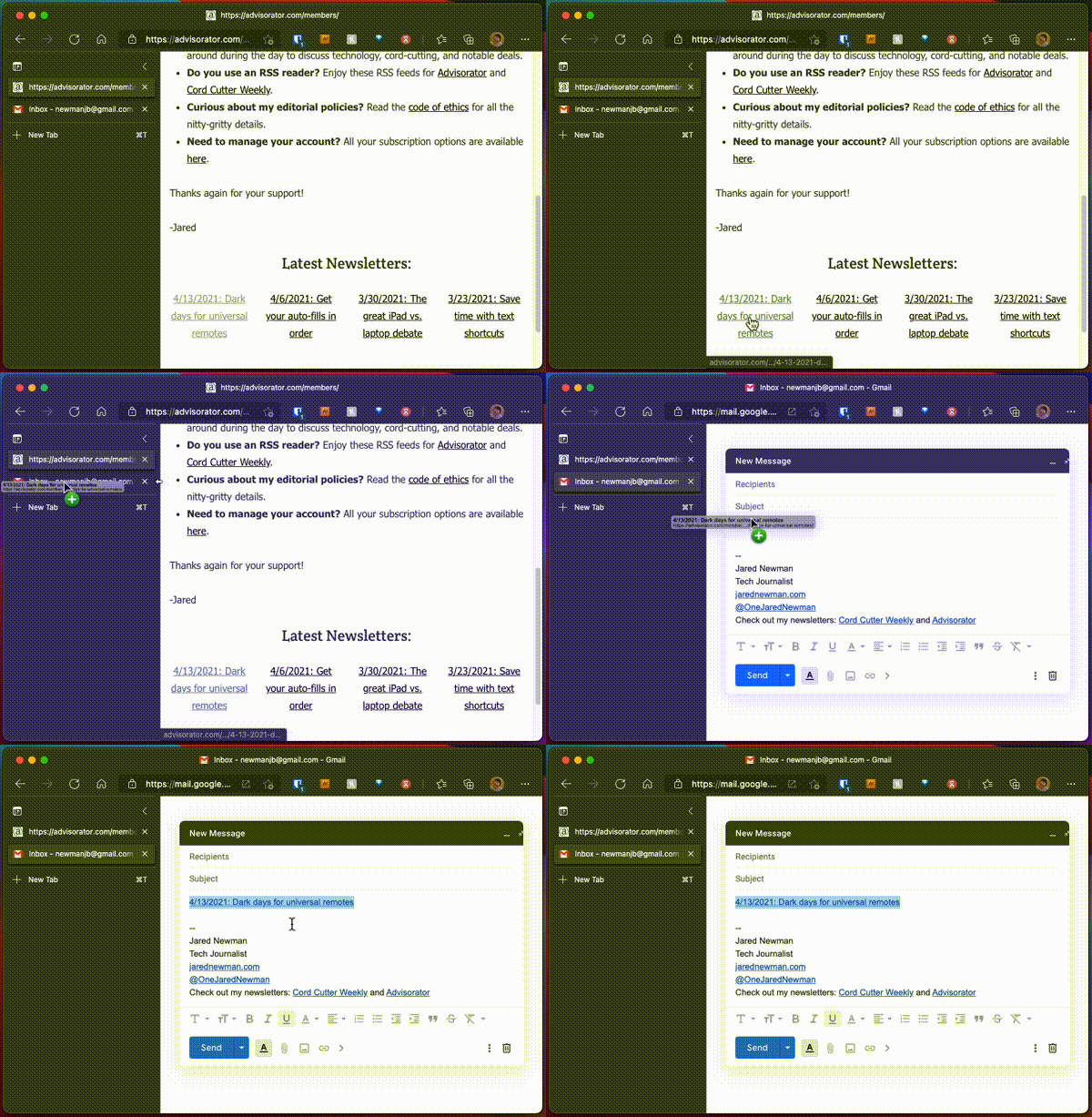
Hyperlinking with ease: While the concept of dragging and dropping is not new to me, somehow I never realized you could drag links between browser tabs until reading this story by Dwight Silverman over at Forbes.
|
|
This trick, which works in both Google Chrome and Microsoft Edge, comes in handy if you're writing an email or editing a document in one tab and want to bring in a link from another. Just start dragging the link from the source tab, and when you hold it over the destination, the browser will switch tabs so you can drop the link into place. (As Silverman notes, this feature had been broken in Microsoft Edge's new vertical tab mode until last week, which is why he brought it up.)
|
|
But that's not the only way to add hyperlinks to online documents. Lately I've also become a fan of using Ctrl+K (or Cmd+K on a Mac) as well. Just copy a link from anywhere, then use that shortcut while highlighting some text. It works in Gmail, Google Docs, and Notion, along with some offline apps like Microsoft Word. Whichever method you use, it beats hunting for the "add link" button instead.
|
|
Chill beats to check out: As an avowed collector of offbeat streaming music services, I was excited to discover a new one called lofi.cafe. The free internet radio site offers a list of stations with mellow grooves for relations, study, or work, but what really sets it apart is its background imagery. Each station comes with a full-screen cover animation, usually drawing on sci-fi, anime, or geek culture while using scan lines to enhance the lo-fi vibes. It's especially great to run on a second monitor as you're trying to stay focused.
|
|
A new kind of attention timer: Speaking of neat focus tools, Ian's Awesome Counter is a new Apple Watch app that uses simple prompts to keep you on task. Every 30 minutes, the app will ask if you've been staying focused, and you can answer with a simple yes or no. You can then set daily focus goals or adjust the time intervals for each reminder. (You'll find those options by swiping left from the app's main menu.)
|
|
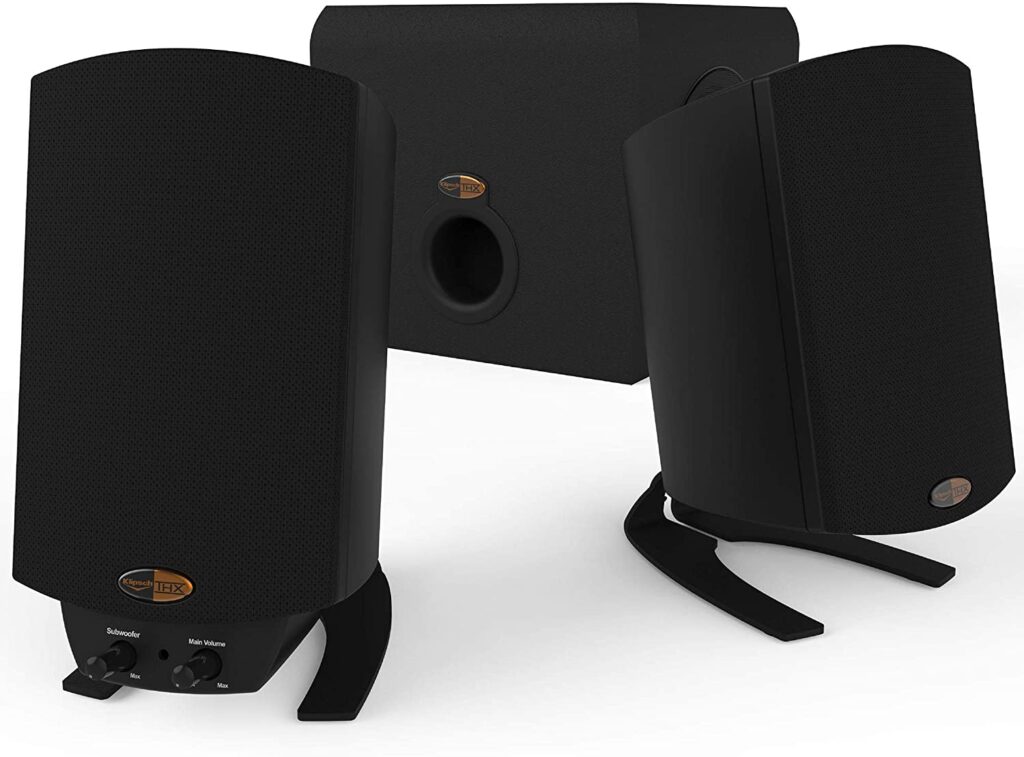
Since we're talking desktops, Klipsh's ProMedia 2.1 desktop speakers have returned to a nice price of $90 on Amazon. These are among the Wirecutter's picks for PC speakers, and fellow tech journalist Dwight Silverman (who I mentioned above) swears by them as well. Note that the final price appears at checkout, not on the product page.
|
|
Other deals worth noting:
|
|
A quick note for those of you who are using Hey or other email services that sniff out spy trackers: My newsletter provider now supports anonymous metrics, which lets me see how my newsletters are doing without compromising privacy. I'll be able to see what percentage of readers have opened the newsletter and clicked on each link, but will never know what each of you individually have opened or clicked on. I still think your newsletter reading habits are none of my business and this new metrics system reflects that, but it's possible that apps like Hey will report the presence of a spy tracker regardless. If you have any questions about this, please let me know!
|
|
This has been Advisorator, written by Jared Newman and made possible by readers like you. Manage your subscription by clicking here, or reply to this email with "unsubscribe" in the subject to cancel your membership.
|
|

 Jared Newman | April 20, 2021 |