Plus: New Apple gear and iOS's best new feature |
Cheap earbuds vs. AirPods Pro |
Plus: New Apple gear, Android's text message upgrade, and iOS's best new feature |
Apple's AirPods Pro have inspired no shortage of knock-offs since they first launched in 2019. |
A quick Amazon search reveals countless wireless earbuds that look a lot like Apple's for less than a tenth of Apple's $250 asking price. Many of them advertise similar features, such as active noise cancellation and "transparency" mode for letting in outside sound. |
A couple weeks ago, I finally became curious enough to see how these knock-offs compare, just as I did a couple years ago with Apple's original AirPods. For $18, I bought a pair of wireless earbuds from Ugreen that even look kind of like the real deal, with glossy white plastic and stems that hang below the ear. All that was missing versus the AirPods Pro, at least on paper, was wireless charging. |
(If you're getting my deal alert emails, you'll note that I also tried earbuds from another brand called Apulueo. While they included wireless charging, they were so bad in every other way that I quickly returned them. Ugreen seemed like a safer choice as I've at least seen it elsewhere.) |
The results with Ugreen's HiTune T3 earbuds were surprising. While I'm not going to argue that they're just as good—or even almost as good—as the AirPods Pro, the differences aren't as dramatic as you might think given the gulf in cost between them. |
Noise cancelling: Shockingly strong |
Long-pressing the right stem of Ugreen's earbuds switches between normal, noise-cancelling, and transparent modes. With active noise cancellation on, the earbuds' microphones capture outside sound and invert the sound waves to minimize what you hear. |
To my surprise, Ugreen's earbuds reduced more noise than the AirPods Pro. The fan on my desktop PC became inaudible—it's still faintly noticeable with the AirPods—and conversations in the next room became less of a distraction. |
But there is a trade-off: My ears are sensitive to the "eardrum suck" phenomenon in active noise cancellation, and I noticed it more on Ugreen's earbuds than on the AirPods. I suspect Apple opted for less aggressive noise cancelling to make its earbuds more comfortable for more people. |
As for transparency mode, Ugreen's verison is serviceable, but the AirPods Pro produced crisper voices and made my own voice sound less muffled. (Either way, there was no discernable difference in how much my wife hated talking to me with earbuds in my ears.) |
Sound quality: They bring the bass |
Let's be realistic here: The AirPods Pro sound better than Ugreen's cheap earbuds, with a sound that's cleaner, brighter, and more balanced overall. |
Even so, Ugreen's fat bass tones—a common trait on cheaper earbuds—were satisfying in their own way. Audiophiles may hate to hear this, but I suspect some people may even prefer the lopsided sound, especially while working out or going for a run. |
Design: Closer than expected |
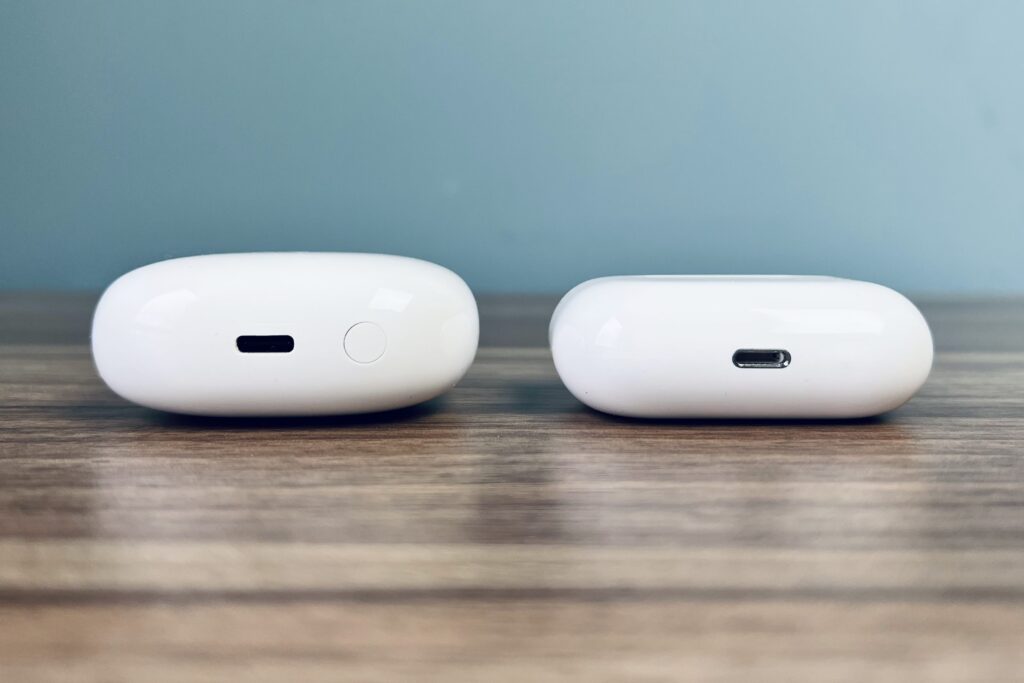
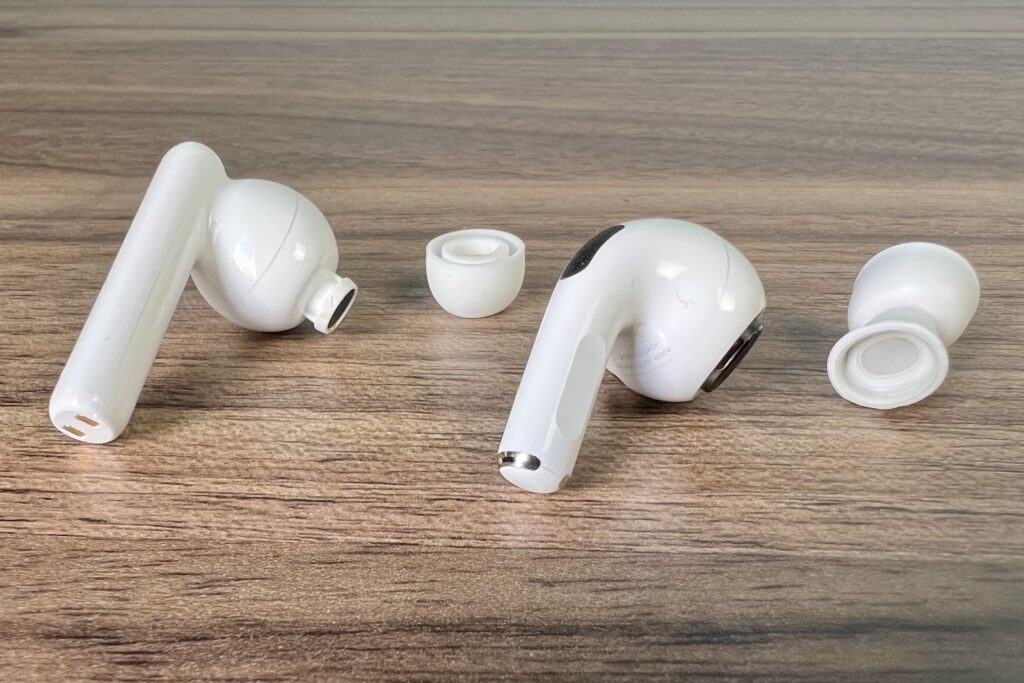
The AirPods Pro are clearly slicker than Ugreen's knock-offs. The Ugreen stems are thicker and hang down further, and they protrude more from the driver portion of the earbud. The charging case, meanwhile, is both lighter and thicker, which makes it feel chintzier. Also, the earbuds slip into the case with stems facing inwards, so you have to twist them around when putting them in your ears—a minor nuisance. |
But unlike my previous cheap earbuds, the case is still slim enough to comfortably stick in my pocket, and the glossy plastic finish was is no different than Apple's. The earbuds themselves could even fool some folks from afar. |
While earbud comfort can depend a lot on the size and shape of your ear, I was much more comfortable wearing the AirPods Pro for extended durations. Whereas Ugreen's earbuds have a plastic lip that its ear tips wrap around, Apple uses snap-on tips whose inner portion forms a cone shape inside your ear. That tapered design can make a big difference, especially for folks with smaller ear canals. |
Apple's ecosystem advantages |
No matter how much you spend on non-Apple earbuds, they'll always be missing a handful of features that depend on Apple's custom hardware and software support. These features don't matter as much to me as the ones above, but they're still worth noting: |
-
Easy pairing: While I don't find the standard Bluetooth pairing process to be overly burdensome, Apple's automatic pairing and simple switching between iOS devices is nice to have.
-
Longer range: With my iPhone in my office, the Ugreen buds' Bluetooth connection would consistently cut out in the kitchen about 50 feet away. That's not an issue with the AirPods Pro.
-
Lower latency: Whereas the H1 chip in Apple's AirPods Pro eliminates audio lag in gaming, Ugreen's audio noticeably lagged behind the action. (This wasn't an issue with videos or Facetime calls, at least.)
-
Spatial audio: AirPods Pro can make sound seem like it's coming from the direction of your device, which is neat if you're watching movies or listening to music. Non-Apple earbuds don't support this, though you can enable surround sound audio in certain music services.
|
Overall, I'm impressed with Ugreen's earbuds given the price—especially on the noise-cancelling front—and could see myself using them in scenarios where they might be easily lost or stolen. |
But while Apple's original AirPods had fewer clear advantages over bargain-bin alternatives, the AirPods Pro bring new advances in design, comfort, and sound quality, all of which add up in ways that don't appear on a spec sheet. (They're also frequently on sale for less than their $249 asking price, reaching as low as $160 on Black Friday.) To compete with the AirPods Pro in earnest, budget brands like Ugreen still have a lot more to copy. |
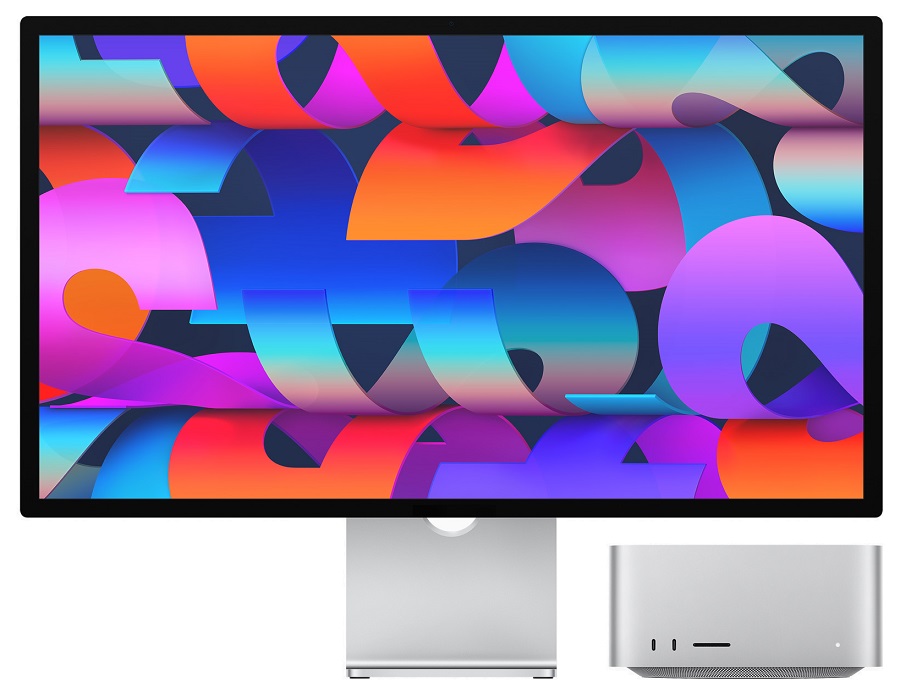
New Apple gear: The big announcements out of Apple's news event last week were the Mac Studio desktop computer and Studio Display monitor, both of which aim to straddle the line between consumer and professional use. |
The Mac Studio starts at $1,999 with an M1 Max processor—one with a bit less graphics power than Apple's priciest 16-inch MacBook Pro—plus 32 GB of RAM and a 512 GB solid state drive. Upgrading to the $3,999 model gets you an M1 Ultra processor, which is essentially two M1 Maxes grafted together, plus double the storage and RAM. Both may be overkill for anyone whose job doesn't involve media production, but they do make me wish Apple took MacOS gaming more seriously. |
The $1,599 Studio Display costs $1,599 (plus $400 for a height-adjustable stand) and includes a 27 inch, 5K resolution panel with 600 nits brightness, plus a built-in 12-megapixel webcam and six speakers. When combined with a Mac Mini or Mac Studio, this appears to be Apple's de facto replacement for the 27-inch iMac, which it has now discontinued. (Bloomberg's Mark Gurman still expects Apple to release a larger iMac Pro, but not anytime soon.) You can also use the display with Windows PCs, albeit without a couple of Mac-specific features. |
Other announcements from Apple last week: |
-
New iPhone SE: The only remaining iPhone with a home button has the same 4.7-inch screen as the 2020 version, but with a faster A15 processor, 5G networking, and up to two hours more battery life, addressing a major gripe with the previous model. It's also $30 pricier, at $429 unlocked.
-
New iPad Air: The mid-range iPad has the same flat-edged design and 10.9-inch display as before, so it can work with the Apple Pencil 2 and Magic Keyboard, but has a faster M1 processor, optional 5G, and a sharper 12-megapixel front camera that can automatically keep your face centered during video calls. It still starts at $599.
-
Green iPhone 13 and 13 Pro: Adding a new color six months after launch is starting to look like a trend for Apple. (Last year's addition was purple.) I like that Engadget photographed five green phones together.
-
Friday Night Baseball on Apple TV+: Two games every Friday, free for a limited time. I wrote more about this in Cord Cutter Weekly.
|
Android's text message upgrade: Google's is rolling out two new features to its Messages app on Android that should make texting with iPhone users more pleasant: |
- The app will format iMessage reactions as emojis, so you won't get any more annoying messages saying someone "laughed at" or "emphasized" something.
- When sending a video, you'll see an option to share a Google Photos link instead so it doesn't come out blurry for the recipient.
|
Google's still pushing for Apple to adopt RCS, a new text messaging standard that allows for iMessage-like features such as high-resolution photos and larger group chats, but so far Apple hasn't shown much interest in making iPhone-to-Android messaging any better. Features like these make the situation a little more tolerable in the meantime. |
Google's also adding a handful of other smart features to Messages, such as birthday reminders, "nudges" for messages you haven't answered, and separate tabs for personal and business messages. You'll need to be using Google's Messages app—your phone may have a different text message app by default—and it could take a few weeks to start seeing the new features. |
I'll have more to say about the latter feature in a future newsletter, but the feature I'm most excited about right now is one that's flown under the radar: You can finally run personal automations on an iPhone or iPad without triggering a notification. |
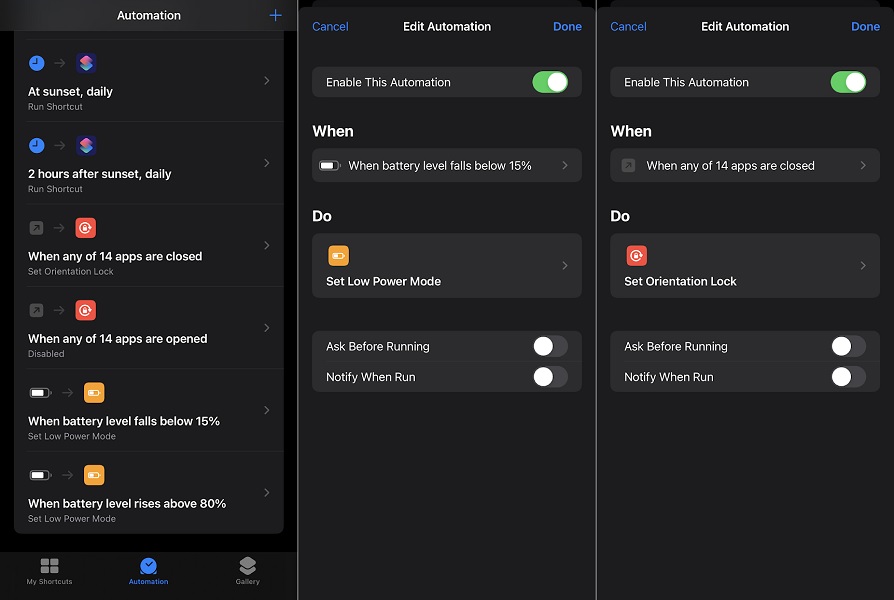
Here are some automations I've previously set up on my iPhone: |
Getting pop-up alerts each time these routines ran was annoying and would quickly lead to a cluttered notification center. With iOS 15.4, you can tap any automation in the Shortcuts app, and as long as "Ask Before Running" is disabled, you'll see an additional toggle for "Notify When Run." |
Without the nuisance of notifications, iOS automation should get a lot more interesting. How-to Geek has a few other ideas to try, such as changing your Apple Watch face based on the time of day. If you prefer an alternative camera app such as Halide or Obscura, you can even use automation to launch it from the lock screen. |
With a new iPad Air on the way, now's a fine time to buy the current model at a discount. Best Buy is selling the Air for $500 with 64 GB of storage or $650 with 256 GB of storage, both $100 of the regular price, and if you scroll down to "Buying Options," you can get open-box models for even less. |
Incidentally, Apple's Magic Keyboard for the iPad Air and 11-inch iPad Pro is also on sale for $239 in white, down from $299. |
- The 16-inch MacBook Pro is $200 off once again.
- Amazon's 4th-gen Echo speaker drops to $70 in all colors.
- Lenovo's 13-inch Chromebook tablet and keyboard hits a new low of $350.
- Lenovo also has a premium 13-inch Android tablet for $390 with the code LENOVOEMPCLEAR22 at checkout.
- Also for $390: Samsung's Galaxy Tab S7. (Sign up for education discounts first, then select no trade-in and skip add-ons. The final price appears at checkout.)
- eBay has open-box Samsung Galaxy Watch 4 smartwatches for $139 with black and gray bands.
- If you like Garmin watches, the Venu is on sale for $175.
|
Hey folks, just a heads up that there will be no regular edition of the newsletter next Tuesday, March 22 as I'll be taking a bit of a vacation. That said, I do plan to send out a brief email with something to hold you over while I'm gone, so keep an eye out for that in your inbox next week. |
In the meantime, send me your tech questions and I'll do my best to answer them. |
This has been Advisorator, written by Jared Newman and made possible by readers like you. Manage your subscription by clicking here, or reply to this email with "unsubscribe" in the subject to cancel your membership. |
Advisorator LLC, PO Box 42711, Cincinnati, OH, 45242 |
|
|
|

 Jared Newman | March 15, 2022 |