|
Plus: Alexa's new name and a last call for DOS nostalgia
Take control of email privacy |
Plus: Alexa's new name, an endlessly repairable laptop, and a last call for DOS nostalgia |
In the grand scheme of potential privacy concerns, email privacy is perhaps the most personal. |
Getting unwanted messages in your inbox can feel like a major breach of trust, and knowing senders can see a record of everything you've opened and clicked can make reading email feel downright creepy. |
That may explain why companies like Apple and DuckDuckGo have latched onto email as fertile ground for new privacy products. Both companies are developing ways to bounce unwelcome senders from your inbox and to step them from snooping on you. |
But you don't have to wait for those companies to take control of email privacy. Here are some of my favorite tools you can use right now: |
Abine Blur for all-purpose email masking |
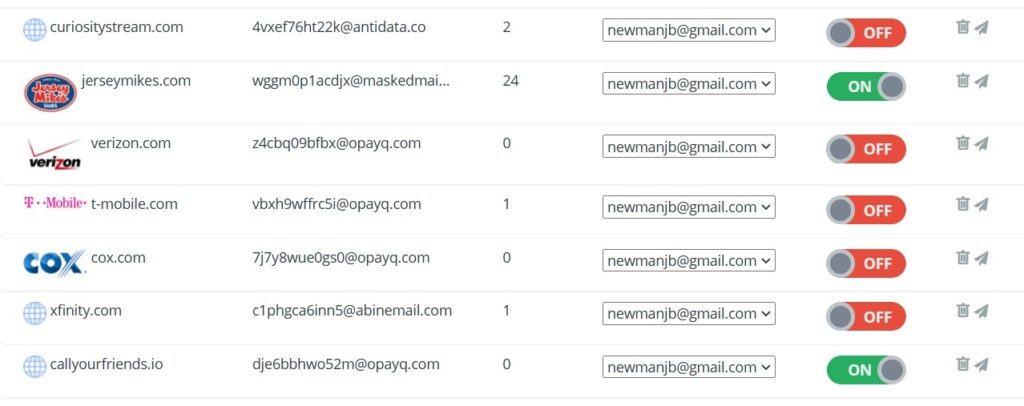
I've been singing the praises of Abine Blur ever since an Advisorator subscriber introduced me to it a year ago (thanks Gib!), and it's still my preferred way to avoid handing out my real address. |
Abine Blur generates masked email addresses that forward to your actual inbox. The sender only sees the masked email (which looks like "gx2bhfw3155w@opayq.com"), and you can disable or delete these addresses on Abine's website. Doing so prevents the sender from ever being able to contact you again. |
Masked email is perfect for retail sites that offer coupons in exchange for your email address, charitable organizations that abuse your generosity with nonstop requests for more donations, and any other site you don't fully trust to treat your inbox with respect. It can also help you get extra free trials from services that require a unique email address. |
One caveat: Abine's browser extension for Chrome or Firefox is great for generating masked addresses directly inside web sign-up forms, but it also includes a lot of superfluous features. After installing it, click on the extension, then click Settings > Settings for All Sites and disable what you don't need. (I only use it for masked email, and rely on other extensions like Bitwarden for passwords and uBlock Origin for ad blocking.) |
Anonaddy for on-the-fly email addresses |
While Abine Blur is a valuable resource, it's not perfect. Generating new email addresses is a pain on phones, where you have to use Abine's clunky mobile app, and the service is of little help when someone asks for your email address out in the real world. |
For those situations, I've started turning to Anonaddy instead. Just like Abine Blur, it can generate masked email addresses that forward to your real address, but it also lets you make up new addresses on the spot without an app or extension. |
Let's say you sign up for Anonaddy with the username "joeshmoe." If you wanted to join my newsletter with a masked email, you'd use an address like "advisorator@joeshmoe.anonaddy.com." Or, if you wanted a free trial to Starz that didn't use your regular email, you could sign up with "starz@joeshmoe.anonaddy.com." |
Crucially, you don't have to set these addresses up in advance. Instead, Anonaddy will forward mail from any address that ends with "@joeshmoe.anonaddy.com," so you can invent new masked addresses on the fly with practically no effort—even offline. |
The downside to this approach is that anyone who knows your nickname could also generate new email addresses on your behalf, and the only way to stop them would be to delete your account and set up a new one. For that reason, I'd only use Anonaddy with businesses that are unlikely to scrutinize individual addresses. |
(I've also tested a service called ManyMe that offers similar on-the-fly email masking. It's worth trying if you want to experiment, but I'm more hesitant to suggest it since the company has no clear business model right now. By contrast, Anonaddy offers subscription plans for power users who want more features or who receive more than 10 MB of masked email per month.) |
Last year, I wrote about how marketing emails, newsletters, and even some individual senders can track whether you've opened their messages. This can sometimes lead to more unwanted email and targeted advertising, and it's also just unnerving to know that someone can look over your personal reading habits. |
While I still think Trocker is the best anti-tracking browser extension for Gmail, Outlook.com, and Yahoo Mail, a few other notable options have arrived since I first covered the topic. Simplify Gmail, an extension that provides a suite of enhancements on Gmail's desktop site, blocks more than 170 known trackers, so you can use it instead of or in addition to Trocker. Simplify also open-sources its block list for other apps to use, so if you're using Apple Mail on MacOS, MailTrackerBlocker offers the same level of protection. |
Just be aware of the limitations with these blockers: Since none of them work on mobile, you won't get tracking protection while reading email on your phone. Some third-party mail apps such as Twobird and Edison have tracker blocking built in, but otherwise the only workaround is to turn off images in email by default. |
Also, none of these methods will prevent senders from tracking which links you click on. The best you can do to prevent this kind of tracking is hover or long-press on a link and look for signs of tracking in the address—it'll usually include a jumble of random characters—and avoid clicking if you don't trust the source. |
(By way of disclaimer: You might notice that Advisorator includes trackers as well. Because the newsletter platform I use supports anonymous tracking, all I can see is a total percentage of opens and link clicks for each newsletter. There's no way for me to tell who clicked on what.) |
What about DuckDuckGo and Apple? |
The appeal of both DuckDuckGo's and Apple's upcoming email privacy solutions is that they provide both masked email and anti-tracking in one place. |
Apple, for instance, will register all emails as opened if you enable Mail Privacy Protection in iOS 15 and MacOS Monterey, essentially leaving senders with useless data. It will also offer a masked email service, called Hide My Mail, that will be included with all paid iCloud storage plans. You can try both services now as part of the iOS 15 and MacOS Monterey public betas. |
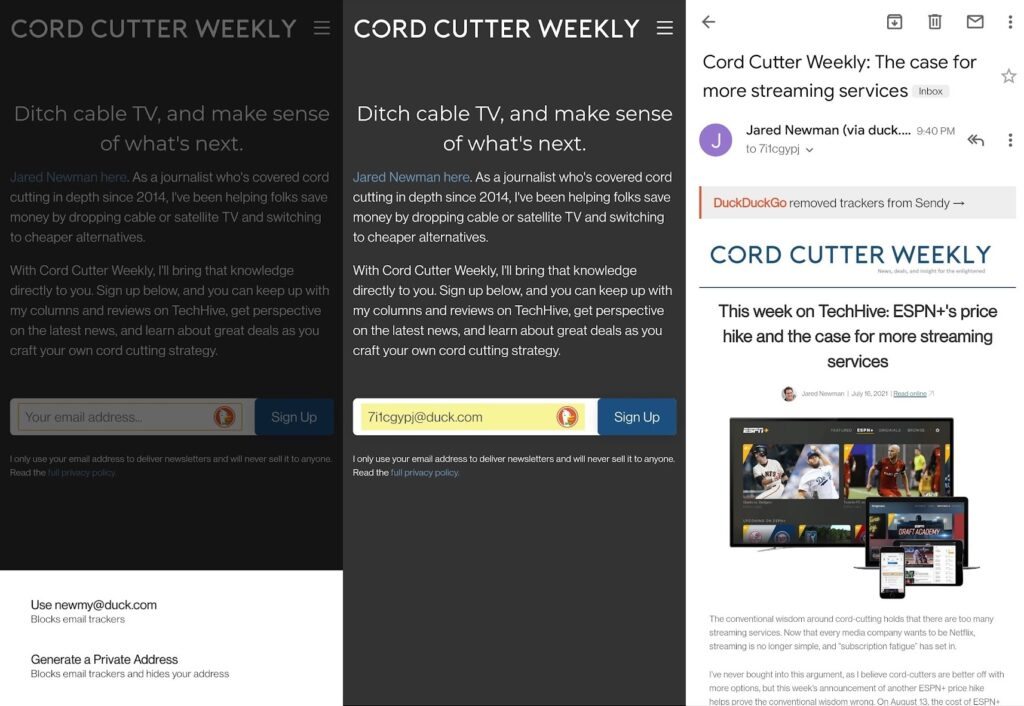
DuckDuckGo has started testing a similar combo in its mobile apps and browser extension. The company will provide users with a permanent duck.com email address, which will forward messages to your real address while stripping out trackers along the way. It'll also let you create masked duck.com emails, which you can disable to block unwanted senders. You can sign up for an invite to these features through the Settings menu in DuckDuckGo's mobile app. |
But these solutions will have their downsides. Apple's anti-tracking tool requires you to use its own Mail app, and its masked email service requires Apple hardware to manage. With DuckDuckGo, you can only create masked emails on the web through the company's browser extension, which in turn requires you to use DuckDuckGo's search engine in Chrome and Chromium-based browsers. You'll also have to use DuckDuckGo's mobile browser to fill out sign-ups forms with masked email addresses. |
All the more reason, then, to start evaluating your options now. |
The endlessly repairable laptop: The Framework laptop is one of the most interesting new notebooks in recent memory, as it's built around the idea that you can replace and potentially upgrade any component inside. While Framework was first announced back in February, it's just now started shipping and landing in the hands of reviewers. |
Early impressions have been disappointingly mixed, though. Both Gizmodo and CNet observed below-average battery life compared to other high-end laptops, and of course long-term support for all those swappable components remains a major question mark. Framework needs to build an ecosystem of aftermarket parts for the concept to be successful, and many companies have tried and failed at modular hardware in the past. I'm keeping an eye on Framework because I want technology to be less disposable, but buying in right now looks like a pretty big gamble. |
Google's iMessage alternative: The last domino has fallen in Google's efforts to establish a next-generation text messaging platform on Android, at least in the United States. Verizon now says it will make Google's Messages app the default on all the Android phones it sells starting next year, following similar pledges by AT&T and T-Mobile. The Messages app uses a standard called RCS to support advanced features like full-resolution images and large group chats, but it only works if everyone in the chat is using RCS as well. That's much more likely to happen with all three major carriers supporting it out of the box. |
Still, the big question is whether Apple will get on board with RCS as well. While iMessage exclusivity has business value for Apple, the company can't claim a high road on privacy while denying its users a simple, secure way to chat with Android device owners. With Google now pledging to support end-to-end encryption for group chats, and already supporting it for one-on-one messages, I suspect won't hold out forever. |
Wait for Wear OS 3: A couple months ago, Google and Samsung announced plans to collaborate on a unified smartwatch platform to better compete with the Apple Watch. Now, Google is saying that most existing Wear OS watches won't receive the update, called Wear OS 3, and that the handful of watches that are eligible won't get upgrade until the second half of next year. (Qualcomm's Snapdragon 4100, which launched in mid-2020, may be a prerequisite for upgrading.) |
This all sounds like a way to give Samsung first crack at showcasing the software. The company is likely to announce new Wear OS 3 watches next month, effectively giving it a window of exclusivity, though it's worth noting that current Samsung watches won't be upgradeable at all. In other words, anyone who's interested in Apple Watch alternatives should take a wait-and-see approach to this whole situation. |
Get iDOS while it lasts: The mere existence of iDOS 2 on the iPhone and iPad has always felt like a small miracle. While Apple has never allowed game console emulators on the App Store, iDOS has been able to skate by with its emulation of classic PC software and games. (It can even run Windows 3.1) |
But maybe not for much longer. Chaoji Li, the developer of iDOS, said last week that Apple has rejected his latest app update on the grounds that it can execute code not included in the app, and that he has 14 days to rectify the matter before Apple removes the app outright. Instead of breaking the app's core features, Li appears to have accepted iDOS's doomed fate (and kicked off a round of geeky outrage in the process). |
As with other App Store takedowns, anything you download remains yours to keep for as long as it stays on your device, so you want to revisit classic software via iOS—and can figure out how to acquire some—spend the $5 now before it's too late. This was one of the easier App Store purchase decisions I've made lately. |
Alexa's new name: For the first time in more than four years, Amazon has added a new wake word for Echo speakers, and for some reason that wake word is "Ziggy." (I'm guessing it's a riff on Amazon's "A to Z" slogan.) Just say "Alexa, change your wake word" to give your smart speaker a new name. You'll be able to select Ziggy alongside existing alternatives including Amazon, Echo, and Computer. |
Amazon's also adding a masculine voice option for Alexa—or Ziggy—as well. You can access that by saying "Alexa, change your voice." |
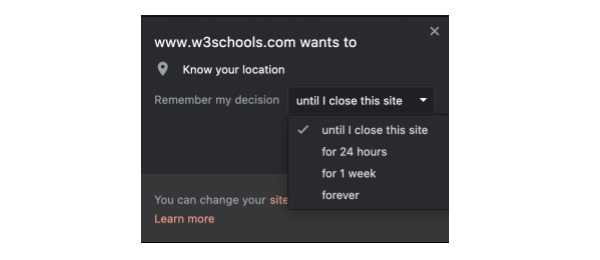
Brave's smarter browser permissions: The privacy-focused web browser Brave has come up one of those clever ideas that I suddenly want all other browsers to copy: When a website wants to access a privacy-sensitive feature, such as your location or the webcam, you can now grant permission on a one-time or limited-time basis. If you return to the site at a later date, it'll have to ask for permission again. |
I'm always wary of letting restaurant sites track my location on every visit, or giving any website ongoing access to my webcam, yet most browsers take a forever-or-never approach to these permissions. Brave's approach is clearly a nod to the temporary permission controls that Apple and Google have been building into iOS and Android, respectively, and it's high time that browsers offered similar features. Of course, you can always give Brave a try if you can't wait for other browsers to come around. |
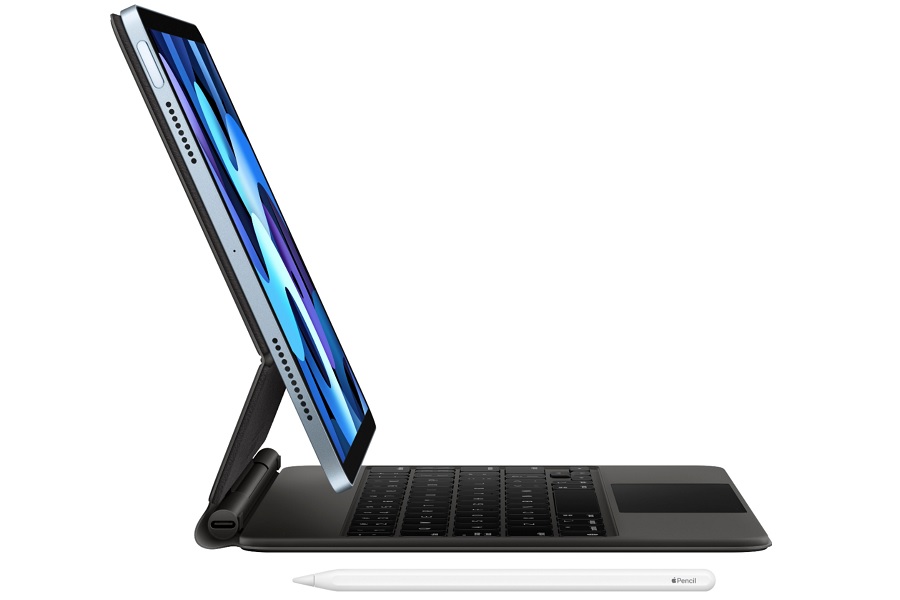
If you're looking to buy an iPad Air with accessories to match, now's a pretty good time. Best Buy is taking $100 off Apple's mid-range tablet, bringing the price to $500 with 64 GB or $650 with 256 GB. Meanwhile, Verizon is bundling the Magic Keyboard and Apple Pencil 2 for $300, with the final price appearing the your cart. (You needn't be a Verizon customer to take advantage.) |
A few other notable deals: |
- Logitech's luxurious MX Master 2S is on sale for $50 with the code MXMASTER50.
- Grab a three-pack of Google Nest Mini speakers for $65.
- Amazon's Echo Auto brings Alexa voice control to any card for $15.
|
This has been Advisorator, written by Jared Newman and made possible by readers like you. Manage your subscription by clicking here, or reply to this email with "unsubscribe" in the subject to cancel your membership. |
|

 Jared Newman | July 27, 2021 |